Loading
Form preview
  • US Legal Forms
  • Form Library
  • Tax Forms
  • Connecticut Tax Forms
  • Ct Drs Ct-1041 2018

Get Ct Drs Ct-1041 2018

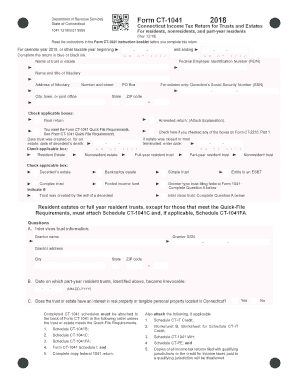
V. 12/18) Read the instructions in the Form CT-1041 instruction booklet before you complete this return. For calendar year 2018, or other taxable year beginning and ending Complete the return in blue or black ink. Name of trust or estate M M - D D - Y Y Y Y M M - D D - Y Y Y Y Federal Employer Identification Number (FEIN) Name and title of fiduciary Address of fiduciary Number.

How it works

  1. Open form

    Open form follow the instructions

  2. Easily sign form

    Easily sign the form with your finger

  3. Share form

    Send filled & signed form or save

How to fill out the CT DRS CT-1041 online

Filling out the Connecticut Income Tax Return for Trusts and Estates (Form CT-1041) online can streamline the process and ensure accuracy. This guide provides a clear, step-by-step approach to help you complete the form with confidence.

Follow the steps to successfully complete your CT-1041 online.

  1. Click ‘Get Form’ button to access the CT-1041 form and open it for editing.
  2. Enter the basic information: Fill in the name of the trust or estate, the Federal Employer Identification Number (FEIN), and the name and title of the fiduciary. In the address section, provide the complete address details, including city, state, and ZIP code.
  3. Indicate the time frame for the taxable year by filling in the start and end dates. Ensure that these dates are formatted correctly.
  4. Check the appropriate boxes for your filing type. Indicate if this is a final return or if the trust meets the Quick-File requirements.
  5. Complete the details of the decedent’s Social Security Number if applicable, or specify the date for estate closure or trust termination.
  6. Provide details for inter vivos trusts and indicate if the trust was created by the will of a decedent or if it is an Electing Small Business Trust (ESBT).
  7. Attach the relevant schedules behind the form in the specified order if required. Include additional documents only if they apply to your situation.
  8. Fill out the computation of tax section, calculating the Connecticut taxable income and applicable credits or amounts owed. Make sure each line is completed as instructed.
  9. Complete the declaration section by signing and dating your form. If using a paid preparer, they must also sign and provide their details.
  10. Review the filled form for accuracy. Save any changes, download a copy for your records, and prepare to submit the form electronically.

Complete your CT-1041 form online today to ensure timely submission and avoid penalties.

Get form

Experience a faster way to fill out and sign forms on the web. Access the most extensive library of templates available.

Related content

Trust and Estate forms
CT-1041, 2024 Connecticut Income Tax Return for Trusts and Estates -INSTRUCTIONS, 12/2024...
Learn more
Connecticut Resident Income Tax
Apr 15, 2019 — Connecticut taxpayers may obtain help filing Schedule CT-EITC by visiting...
Learn more
The Agilent Instrument & Accessories Catalog
Together with new Retention Time Locking databases, DRS extracts accurate qualitative and...
Learn more

Related links form

NY DTF MT-50 2012 NY DTF MT-53 2015 NY DTF MT-53 2012 NY DTF MT-903-I 2016

Questions & Answers

Get answers to your most pressing questions about US Legal Forms API.

Contact support

To have your 1040 form mailed to you, you can request it directly from the Connecticut Department of Revenue Services. Alternatively, many tax preparation services can provide a hard copy if you prefer that option. Consider using uslegalforms to help streamline your request and ensure you receive the correct documentation.

Your CT 1040 form is available for download from the Connecticut DRS website or through various online tax service providers. If you prefer a hard copy, you can often request it through tax preparers or at local tax offices in Connecticut. Being proactive about gathering these forms is essential for accurate tax reporting.

You can easily access your CT 1040 form on the Connecticut Department of Revenue Services website. Many online tax platforms also provide downloadable forms. Remember to ensure you are using the latest version for compliance with CT DRS CT-1041 standards.

A Connecticut fiduciary adjustment refers to the modifications made to federal taxable income for Connecticut tax purposes. This adjustment aligns the taxable income reported by the fiduciary with Connecticut tax law. Understanding this can help you navigate the intricacies of CT DRS CT-1041 filings more effectively.

CT Form 1040 is the standard income tax return form used by residents of Connecticut to report their annual income. It is essential for filing your state taxes accurately, and it is a key document for determining your tax obligations to the state. Understanding this form is crucial for anyone looking to comply with CT DRS CT-1041 requirements.

You can find your 1040 form on the CT DRS website or through various tax software platforms. Additionally, many tax preparation companies provide access to these forms. Be sure to check the latest version to ensure compliance with current tax laws.

The IL 1041 must be filed by estates or trusts that generate income exceeding $1,000 annually. The executor or trustee managing these estates has the responsibility of filing this form. Recognizing this requirement is vital for ensuring compliance with tax regulations in Illinois.

If the estate does not produce any income during the tax year, filing the CT DRS CT-1041 may not be necessary. However, it is advisable to evaluate your situation closely, as specific circumstances could still warrant filing. Consulting with a tax professional can clarify your obligations.

The CT DRS CT-1041 must be filed by estates that generate income above the $600 threshold. Either the executor or administrator of the estate is responsible for this filing. Staying informed about this requirement ensures proper management of estate taxes.

The threshold for filing the CT DRS CT-1041 is primarily based on the estate's gross income exceeding $600 for the tax year. If your estate meets this requirement, filing becomes necessary. Paying attention to this threshold helps prevent potential penalties and ensures adherence to tax laws.

Get This Form Now!

Use professional pre-built templates to fill in and sign documents online faster. Get access to thousands of forms.
If you believe that this page should be taken down, please follow our DMCA take down processhere.

Industry-leading security and compliance

US Legal Forms protects your data by complying with industry-specific security standards.
  • In businnes since 1997
    25+ years providing professional legal documents.
  • Accredited business
    Guarantees that a business meets BBB accreditation standards in the US and Canada.
  • Secured by Braintree
    Validated Level 1 PCI DSS compliant payment gateway that accepts most major credit and debit card brands from across the globe.
Get CT DRS CT-1041
  • Adoption
  • Bankruptcy
  • Contractors
  • Divorce
  • Home Sales
  • Employment
  • Identity Theft
  • Incorporation
  • Landlord Tenant
  • Living Trust
  • Name Change
  • Personal Planning
  • Small Business
  • Wills & Estates
  • Packages A-Z
  • Affidavits
  • Bankruptcy
  • Bill of Sale
  • Corporate - LLC
  • Divorce
  • Employment
  • Identity Theft
  • Internet Technology
  • Landlord Tenant
  • Living Wills
  • Name Change
  • Power of Attorney
  • Real Estate
  • Small Estates
  • Wills
  • All Forms
  • Forms A-Z
  • Form Library
  • Legal Hub
  • About Us
  • Help Portal
  • Legal Resources
  • Blog
  • Affiliates
  • Contact Us
  • Delete My Account
  • Site Map
  • Industries
  • Forms in Spanish
  • Localized Forms
  • State-specific Forms
  • Forms Kit
  • Real Estate Handbook
  • All Guides
  • Notarize
  • Incorporation services
  • For Consumers
  • For Small Business
  • For Attorneys
  • USLegal
  • FormsPass
  • pdfFiller
  • signNow
  • altaFlow
  • DocHub
  • Instapage
Form Packages
  • Adoption
  • Bankruptcy
  • Contractors
  • Divorce
  • Home Sales
  • Employment
  • Identity Theft
  • Incorporation
  • Landlord Tenant
  • Living Trust
  • Name Change
  • Personal Planning
  • Small Business
  • Wills & Estates
  • Packages A-Z
Form Categories
  • Affidavits
  • Bankruptcy
  • Bill of Sale
  • Corporate - LLC
  • Divorce
  • Employment
  • Identity Theft
  • Internet Technology
  • Landlord Tenant
  • Living Wills
  • Name Change
  • Power of Attorney
  • Real Estate
  • Small Estates
  • Wills
  • All Forms
  • Forms A-Z
  • Form Library
Customer Service
  • Legal Hub
  • About Us
  • Help Portal
  • Legal Resources
  • Blog
  • Affiliates
  • Contact Us
  • Delete My Account
  • Site Map
  • Industries
  • Forms in Spanish
  • Localized Forms
  • State-specific Forms
  • Forms Kit
Legal Guides
  • Real Estate Handbook
  • All Guides
Prepared for you
  • Notarize
  • Incorporation services
Our Customers
  • For Consumers
  • For Small Business
  • For Attorneys
Our Sites
  • USLegal
  • FormsPass
  • pdfFiller
  • signNow
  • altaFlow
  • DocHub
  • Instapage
Social Media
Call us now toll free:
+1 833 426 79 33
As seen in:
© Copyright 1999-2026 airSlate Legal Forms, Inc. 3720 Flowood Dr, Flowood, Mississippi 39232
  • Your Privacy Choices
  • Terms of Service
  • Privacy Notice
  • Content Takedown Policy
  • Bug Bounty Program
CT DRS CT-1041
This form is available in several versions.
Select the version you need from the drop-down list below.
2023 CT DRS CT-1041
Select form
  • 2023 CT DRS CT-1041
  • 2022 CT DRS CT-1041
  • 2021 CT DRS CT-1041
  • 2020 CT DRS CT-1041
  • 2019 CT DRS CT-1041
  • 2018 CT DRS CT-1041
  • 2017 CT DRS CT-1041
  • 2016 CT DRS CT-1041
  • 2015 CT DRS CT-1041
  • 2014 CT DRS CT-1041
  • 2013 CT DRS CT-1041
  • 2011 CT DRS CT-1041
Select form