Get Ct Drs Ct-945 2014
How it works
-

Open form follow the instructions
-

Easily sign the form with your finger
-

Send filled & signed form or save
How to fill out the CT DRS CT-945 online
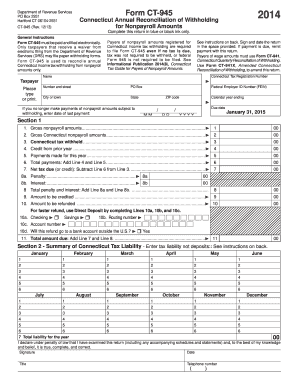
Filling out the Connecticut Annual Reconciliation of Withholding for Nonpayroll Amounts, known as Form CT-945, is a crucial task for ensuring correct tax compliance. This guide provides clear, step-by-step instructions on how to complete the form online, helping users navigate through each section efficiently.
Follow the steps to successfully complete Form CT-945 online.
- Press the ‘Get Form’ button to obtain the CT DRS CT-945 form and open it in your preferred online editor.
- Enter your Connecticut Tax Registration Number, name, address, and Federal Employer ID Number (FEIN) in the provided fields. Ensure all information is accurate and complete.
- Fill in the calendar year ending date, and if applicable, provide the date of your last payment for nonpayroll amounts.
- Proceed to Section 1, starting with Line 1. Enter the total gross nonpayroll amounts paid during the calendar year.
- On Line 2, specify the total gross Connecticut nonpayroll amounts subject to withholding.
- Input the Connecticut tax withheld on Line 3 based on the nonpayroll amounts reported.
- On Line 4, enter any credit from the prior year as indicated.
- Add your payments made for the year in Line 5.
- Calculate the total payments by adding Line 4 and Line 5, then enter this on Line 6.
- Subtract the total payments (Line 6) from the Connecticut tax withheld (Line 3) to determine the net tax due or credit on Line 7.
- Complete Lines 8a and 8b if penalties or interest apply, and compute the total on Line 8.
- Indicate the amount to be credited on Line 9 and the amount to be refunded on Line 10, indicating direct deposit preferences if desired.
- In Section 2, summarize the Connecticut tax liability for each month and enter the total on Line 7.
- Sign and date the return at the bottom, including your title and telephone number.
- After completing the form, review all entered information for accuracy, then save your changes. You can choose to download, print, or share the completed form.
Take action today and file your CT DRS CT-945 online to ensure compliance and avoid penalties.
Get form
When making payments associated with the CT DRS CT-945 form, you should write your check to the 'Connecticut Department of Revenue Services.' Including your registration number on the check is essential to ensure proper crediting to your account. Always confirm payment methods on the CT DRS website for the most current processes. Properly addressing your payment helps avoid potential delays.
Get This Form Now!
Industry-leading security and compliance
-
In businnes since 199725+ years providing professional legal documents.
-
Accredited businessGuarantees that a business meets BBB accreditation standards in the US and Canada.
-
Secured by BraintreeValidated Level 1 PCI DSS compliant payment gateway that accepts most major credit and debit card brands from across the globe.