Loading
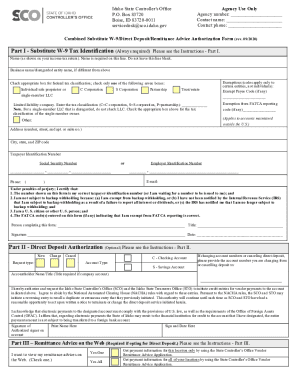
Get Id Substitute W-9
How it works
-

Open form follow the instructions
-

Easily sign the form with your finger
-

Send filled & signed form or save
How to fill out the ID Substitute W-9 online
Filling out the ID Substitute W-9 online is an essential step for individuals and entities receiving payments from the state. This guide provides a detailed walkthrough to help you complete the form accurately and efficiently.
Follow the steps to successfully complete the ID Substitute W-9 online
- Press the ‘Get Form’ button to access the form and open it in your browser.
- In Part I, provide your name as it appears on your income tax return. Ensure this line is not left blank. If you have a different business name, include it in the designated field.
- Select your federal tax classification by checking one box from the given options such as Individual/sole proprietor, C Corporation, S Corporation, etc. If you're a single-member LLC, do not check the LLC box; instead, identify the classification of the owner.
- If applicable, enter any Exempt Payee Code or Exemption from FATCA reporting code in the provided fields. These codes are relevant only for certain entities, not individuals.
- Fill in your address, including the number, street, city, state, and ZIP code.
- Enter your Taxpayer Identification Number or Social Security Number. Ensure that it is accurate as this information is critical for IRS reporting.
- Fill in your contact phone number and email, if not already provided in the previous sections.
- In the certification area, confirm the accuracy of the taxpayer identification number and that you are not subject to backup withholding. Sign your name and enter the date you are completing the form.
- For Part II, if you wish to opt for direct deposit, indicate whether this is a new request, change, or cancellation by marking the appropriate box. Select your account type and provide the necessary banking information.
- In Part III, if you want to view your remittance advice online, check the respective option and provide details as required. This part is optional but recommended if you are using direct deposit.
- Once all sections are complete, review your information for accuracy. Save the changes, and choose to download, print, or share the form as needed.
Complete your ID Substitute W-9 online today to ensure timely processing of your payments.
The W9 form is primarily designed for U.S. persons to provide their taxpayer identification information. As such, it is not used internationally. However, if you are dealing with foreign entities, other forms may apply instead. If you’re navigating such complexities, consider using the ID Substitute W-9 on platforms like US Legal Forms, which can help simplify the process according to your specific needs.
Industry-leading security and compliance
US Legal Forms protects your data by complying with industry-specific security standards.
-
In businnes since 199725+ years providing professional legal documents.
-
Accredited businessGuarantees that a business meets BBB accreditation standards in the US and Canada.
-
Secured by BraintreeValidated Level 1 PCI DSS compliant payment gateway that accepts most major credit and debit card brands from across the globe.