Loading
Get Mn Dor St3 2019-2026
How it works
-

Open form follow the instructions
-

Easily sign the form with your finger
-

Send filled & signed form or save
How to fill out the MN DoR ST3 online
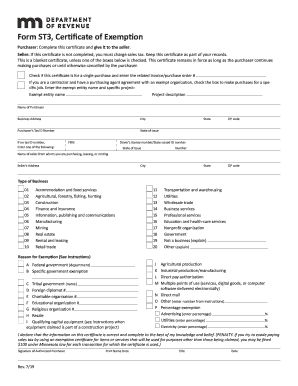
Filling out the MN DoR ST3 form online is essential for individuals and organizations looking to claim sales tax exemptions in Minnesota. This guide provides a clear, step-by-step approach to help you complete the form accurately and effectively.
Follow the steps to successfully complete your MN DoR ST3 form online.
- Press the ‘Get Form’ button to acquire the ST3 form and access it in your preferred editor.
- Begin filling out the form by entering the name of the purchaser, their business address, and city.
- Include the purchaser’s tax ID number, or if unavailable, provide the FEIN, state, ZIP code, or driver's license number along with the state of issue.
- Specify the name of the seller, their address, and city.
- Indicate the type of business of the seller by selecting from the provided options (01 to 20).
- In the 'Reason for Exemption' section, select the applicable exemption category from A to P based on your situation.
- If claiming a percentage exemption, be sure to enter the appropriate percentages in the designated fields.
- Review all entries for accuracy before finalization.
- Once completed, save your changes, and choose to download, print, or share the ST3 form as necessary.
Start filling out your MN DoR ST3 form online today to claim your sales tax exemptions.
Necessary information on a 1040EZ form included your name, address, filing status, income amounts, and any tax withheld. While this form is no longer in use, knowing what information was required can aid you in navigating the current forms. The MN DoR ST3 can assist you in understanding the comprehensive details needed on Minnesota’s tax forms.