Loading
Form preview
  • US Legal Forms
  • Form Library
  • Tax Forms
  • New York Tax Forms
  • Ny Dtf It-280 2019

Get Ny Dtf It-280 2019

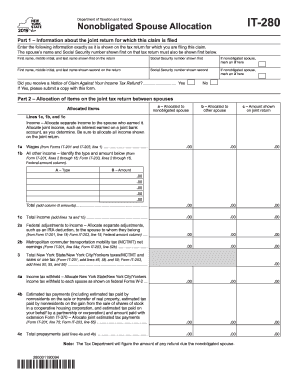
Is shown on the tax return for which you are filing this claim. The spouse s name and social security number shown first on that tax return must also be shown first below. First name, middle initial, and last name shown first on the return Social security number shown first If nonobligated spouse, mark an X here First name, middle initial, and last name shown second on the return Social security number shown second If nonobligated spouse, mark an X here Did you receive a Notice.

How it works

  1. Open form

    Open form follow the instructions

  2. Easily sign form

    Easily sign the form with your finger

  3. Share form

    Send filled & signed form or save

How to fill out the NY DTF IT-280 online

Filing the NY DTF IT-280 form online can help protect your portion of a joint tax refund from being applied to your spouse's debts. This guide provides a streamlined approach to ensure you fill out the form accurately and efficiently.

Follow the steps to complete your NY DTF IT-280 form online.

  1. Press the ‘Get Form’ button to access the NY DTF IT-280 and open it in your online editor.
  2. In Part 1, provide the information from the joint return exactly as shown. Begin with the first spouse's name and Social Security number. If applicable, indicate if you are the nonobligated spouse by marking an X.
  3. Continue with the second spouse's information by entering their name and Social Security number, marking an X if they are the nonobligated spouse.
  4. Answer the question regarding a Notice of Claim Against Your Income Tax Refund by selecting 'Yes' or 'No'. If you select 'Yes', be prepared to upload a copy.
  5. In Part 2, allocate income and adjustments between spouses. Fill out the allocated items as it pertains to each spouse. Ensure that each amount on lines 1a, 1b, and 1c corresponds to the correct spouse.
  6. Continue filling in other income items and adjustments including taxes withheld and estimated tax payments. Make sure all fields are accurately completed according to your financial records.
  7. In Part 3, sign and date the form. If applicable, the paid preparer must also complete their section.
  8. Review all entries for accuracy. Once everything is correctly filled out, you can save changes, download, print, or share the form as needed.

Start filling out the NY DTF IT-280 online today to manage your tax refund appropriately.

Get form

Experience a faster way to fill out and sign forms on the web. Access the most extensive library of templates available.

Related content

Changes to your personal income tax refund...
Jul 2, 2025 — You will then have 10 days from the date of the notification to send the...
Learn more
2008 NEW YORK STATE REFERENCE MANUAL FOR ...
by KR Bennett — Complete Form IT-399, New York State Depreciation Schedule, and attach...
Learn more
GALaxy IV Traction Elevator Controller Manual
Foreword. G.A.L. has developed this manual with usability and safety in mind. General and...
Learn more

Related links form

PA NPT 2019 NY DTF NYC-202 2019 VT DoT S-3C 2019 VT HS-122 & HI-144 2020

Questions & Answers

Get answers to your most pressing questions about US Legal Forms API.

Contact support

To fill out a withholding allowance form, begin by estimating your yearly income, exemptions, and deductions. Use this information to determine the correct number of allowances to claim, which affects the amount of tax withheld from your paycheck. The NY DTF IT-280 provides valuable context for understanding your withholding responsibilities and can be a helpful reference during this process.

Factors for equitable relief under the NY DTF IT-280 include whether you received benefits from the joint return, your level of involvement in managing finances, and whether you will suffer economic hardship. The IRS carefully assesses the overall situation to ensure a fair evaluation of your claim. Understanding these factors is vital when seeking relief based on equitable arguments.

If one spouse owes taxes while the other does not, the spouse who owes can still request innocent spouse relief under the NY DTF IT-280. This can prevent the non-owing spouse from facing collection actions for the debt of the other spouse. It's crucial to look into this option if you're caught in a financial bind due to a partner's tax issues.

Eligible taxpayers for innocent spouse relief typically include individuals who filed joint returns and were unaware of inaccuracies in their spouse's reported income or deductions. If you believe you might be qualified under the NY DTF IT-280 guidelines, it's essential to understand your situation thoroughly. Always consult with a tax professional to discuss your eligibility based on your specific circumstances.

To fill out the EZ tax form, gather your income information, such as W-2s and other IRS documents. Follow the specific instructions provided by the IRS, which guide you through reporting income, calculating your tax, and claiming any refund. For complete assistance, consider using the NY DTF IT-280 as a helpful resource while completing your return accurately.

To qualify for innocent spouse relief using the NY DTF IT-280, you must have filed a joint tax return with your spouse and must not have known or had reason to know about the understatement of tax. Additionally, you must request relief within two years of the IRS beginning collection activities against you. Understanding these requirements helps ensure you can seek the relief you deserve.

Obtaining a New York State vendor identification number is straightforward. You must register your business with the New York State Department of Taxation and Finance, providing your business details. This vendor ID is crucial for business transactions and for fulfilling tax obligations in New York, thus streamlining your operations.

To secure a New York State withholding account number, you need to fill out the registration form on the New York State Department of Taxation and Finance website. By providing essential information about your business, you can complete the process efficiently. Once registered, your withholding account number will be issued, enabling you to handle employee withholdings properly.

Registering for NY state withholding tax involves completing the appropriate registration form through the New York State Department of Taxation and Finance. You can access this form online and submit it electronically for convenience. Upon successful registration, you will be issued a withholding tax account number, allowing you to comply with state tax laws.

To get a NY withholding identification number, you should register your business with the New York State Department of Taxation and Finance. This can be done easily online, where you will need to provide relevant business information. Once submitted, you will receive your NY withholding identification number to use for tax purposes.

Get This Form Now!

Use professional pre-built templates to fill in and sign documents online faster. Get access to thousands of forms.
If you believe that this page should be taken down, please follow our DMCA take down processhere.

Industry-leading security and compliance

US Legal Forms protects your data by complying with industry-specific security standards.
  • In businnes since 1997
    25+ years providing professional legal documents.
  • Accredited business
    Guarantees that a business meets BBB accreditation standards in the US and Canada.
  • Secured by Braintree
    Validated Level 1 PCI DSS compliant payment gateway that accepts most major credit and debit card brands from across the globe.
Get NY DTF IT-280
  • Adoption
  • Bankruptcy
  • Contractors
  • Divorce
  • Home Sales
  • Employment
  • Identity Theft
  • Incorporation
  • Landlord Tenant
  • Living Trust
  • Name Change
  • Personal Planning
  • Small Business
  • Wills & Estates
  • Packages A-Z
  • Affidavits
  • Bankruptcy
  • Bill of Sale
  • Corporate - LLC
  • Divorce
  • Employment
  • Identity Theft
  • Internet Technology
  • Landlord Tenant
  • Living Wills
  • Name Change
  • Power of Attorney
  • Real Estate
  • Small Estates
  • Wills
  • All Forms
  • Forms A-Z
  • Form Library
  • Legal Hub
  • About Us
  • Help Portal
  • Legal Resources
  • Blog
  • Affiliates
  • Contact Us
  • Delete My Account
  • Site Map
  • Industries
  • Forms in Spanish
  • Localized Forms
  • State-specific Forms
  • Forms Kit
  • Real Estate Handbook
  • All Guides
  • Notarize
  • Incorporation services
  • For Consumers
  • For Small Business
  • For Attorneys
  • USLegal
  • FormsPass
  • pdfFiller
  • signNow
  • altaFlow
  • DocHub
  • Instapage
Form Packages
  • Adoption
  • Bankruptcy
  • Contractors
  • Divorce
  • Home Sales
  • Employment
  • Identity Theft
  • Incorporation
  • Landlord Tenant
  • Living Trust
  • Name Change
  • Personal Planning
  • Small Business
  • Wills & Estates
  • Packages A-Z
Form Categories
  • Affidavits
  • Bankruptcy
  • Bill of Sale
  • Corporate - LLC
  • Divorce
  • Employment
  • Identity Theft
  • Internet Technology
  • Landlord Tenant
  • Living Wills
  • Name Change
  • Power of Attorney
  • Real Estate
  • Small Estates
  • Wills
  • All Forms
  • Forms A-Z
  • Form Library
Customer Service
  • Legal Hub
  • About Us
  • Help Portal
  • Legal Resources
  • Blog
  • Affiliates
  • Contact Us
  • Delete My Account
  • Site Map
  • Industries
  • Forms in Spanish
  • Localized Forms
  • State-specific Forms
  • Forms Kit
Legal Guides
  • Real Estate Handbook
  • All Guides
Prepared for you
  • Notarize
  • Incorporation services
Our Customers
  • For Consumers
  • For Small Business
  • For Attorneys
Our Sites
  • USLegal
  • FormsPass
  • pdfFiller
  • signNow
  • altaFlow
  • DocHub
  • Instapage
Social Media
Call us now toll free:
+1 833 426 79 33
As seen in:
© Copyright 1999-2026 airSlate Legal Forms, Inc. 3720 Flowood Dr, Flowood, Mississippi 39232
  • Your Privacy Choices
  • Terms of Service
  • Privacy Notice
  • Content Takedown Policy
  • Bug Bounty Program
NY DTF IT-280
This form is available in several versions.
Select the version you need from the drop-down list below.
2021 NY DTF IT-280
Select form
  • 2021 NY DTF IT-280
  • 2020 NY DTF IT-280
  • 2019 NY DTF IT-280
  • 2018 NY DTF IT-280
  • 2017 NY DTF IT-280
  • 2015 NY DTF IT-280
  • 2014 NY DTF IT-280
  • 2013 NY DTF IT-280
  • 2002 NY DTF IT-280
Select form