Loading
Form preview
  • US Legal Forms
  • Form Library
  • Tax Forms
  • Wisconsin Tax Forms
  • Wi W-9 2019

Get Wi W-9 2019

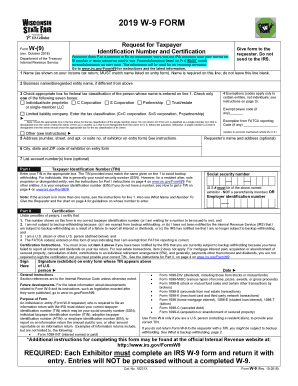
2011 WISCONSIN STATE FAIR W-9 FORM for Homebrew and Vintner Exhibitors Form W-(9) (rev. Jan. 2003) Department of the Treasury Internal Revenue Service Request for Taxpayer Identification Number and.

How it works

  1. Open form

    Open form follow the instructions

  2. Easily sign form

    Easily sign the form with your finger

  3. Share form

    Send filled & signed form or save

How to fill out the WI W-9 online

Filling out the WI W-9 form online can seem daunting, but this comprehensive guide will help you navigate each section with confidence. The WI W-9 form is essential for providing your taxpayer identification information for tax reporting purposes, particularly if you are involved with the Wisconsin State Fair or other organizations that require this documentation.

Follow the steps to complete the WI W-9 form online.

  1. Click the ‘Get Form’ button to obtain the form and open it in your online editor.
  2. Enter your name in line 1 as shown on your income tax return. It is critical that this name matches the information provided in your entry form.
  3. If applicable, fill in the business name or disregarded entity name in line 2, ensuring it differs from the name you provided in line 1.
  4. In line 3, check the appropriate box that corresponds to your federal tax classification. You may select from options like Individual/Sole Proprietor, C Corporation, or Partnership among others. Remember to check only one option.
  5. Complete line 4 if you have any applicable exemptions by entering the exempt payee code or exemption from FATCA reporting code if you qualify.
  6. Fill out your address in line 5, providing the number, street, and suite or apartment number associated with your entry form.
  7. Add your city, state, and ZIP code in line 6 accurately, as it ensures correct identification.
  8. If needed, you can provide your account number(s) in line 7, but this is optional.
  9. Now, enter your taxpayer identification number (TIN) in Part I. Depending on your situation, this could be your social security number or employer identification number.
  10. Under Part II, read and certify the statements provided. You must sign the form to validate your taxpayer identification information and acknowledge the conditions outlined.
  11. Finally, once you have completed all the required fields, save your changes. You can download, print, or share the completed form as necessary.

Take the next step towards completing your documents online efficiently.

Get form

Experience a faster way to fill out and sign forms on the web. Access the most extensive library of templates available.

Related content

Form W-9 (Rev. March 2024)
Form W-9 (Rev. 3 ... If the owner of the disregarded entity is a foreign person, the owner...
Learn more
Form W-9 (Rev. March 2024)
Form W-9 (Rev. 3 ... If the owner of the disregarded entity is a foreign person, the owner...
Learn more
W-9
An individual or entity (Form W-9 requester) who is required to file an information return...
Learn more

Related links form

Kanawha County Building Permit Confidential Information Form Oregon Philippine Visa Application Form Test Administration Seating Chart 2020

Questions & Answers

Get answers to your most pressing questions about US Legal Forms API.

Contact support

You should collect a WI W-9 from all independent contractors and certain vendors providing services to your business. If those individuals or businesses receive more than $600 in one year, a W-9 is necessary. This creates transparency in your transactions. It also facilitates proper tax documentation and reporting.

The IRS provides the WI W-9 form. As the official source, the IRS ensures that the form meets all requirements for accurate tax reporting. You can access it online for immediate use. This guarantees you use the most current form necessary for your business.

You should obtain a WI W-9 from any contractor or vendor who will invoice you for services. This includes those engaged in work that exceeds the $600 threshold during a calendar year. Having a W-9 on file protects both you and the vendor. It clarifies their tax status and prevents potential tax issues.

You need to collect a WI W-9 from individuals or entities that provide services to your business. This includes freelancers, independent contractors, and certain suppliers. Gathering this information is essential for accurate tax reporting. By doing so, you ensure compliance with IRS regulations.

Typically, you will not find WI W-9 forms at the post office. The form is an IRS document and can be downloaded directly from the IRS website. It’s a straightforward process, and you can print it right at home. This saves time and ensures you have the most current version.

Yes, you need to provide a WI W-9 if you receive payments from certain sources. The IRS mandates that businesses collect this form from contractors and freelancers. Providing a W-9 allows payers to report income accurately. Without it, you might face tax withholding or delivery issues.

The WI W-9 form is primarily used to collect taxpayer information such as name, address, and taxpayer identification number. It helps businesses report payments made to independent contractors and freelancers to the IRS. This form ensures that accurate information is provided for tax reporting, which is crucial for avoiding unnecessary complications. If you are unsure about W-9 usage, our resources can assist you in understanding its importance.

You can get a WI W-9 form by visiting the IRS website and downloading it directly. After downloading, you can print it out and fill it in as needed. Alternatively, our platform, US Legal Forms, provides a straightforward way to locate and obtain the W-9 form, ensuring you have the right document when you need it.

Generally, the post office does not carry WI W-9 forms. Since the form is an IRS document, it is best to obtain it directly from the IRS website or reliable tax resources. Many local offices may not have tax forms on hand but can guide you on how to access them online. For easy access, consider using the US Legal Forms platform, where you can find the needed documents quickly.

Any individual or business that earns income in the U.S. may need to submit a WI W-9 form. This is especially true for freelancers, contractors, and self-employed individuals when working with clients or companies. By submitting a W-9, you provide the necessary taxpayer identification information that clients need to report payments to the IRS. Our resources at US Legal Forms can help clarify your situation.

Get This Form Now!

Use professional pre-built templates to fill in and sign documents online faster. Get access to thousands of forms.
If you believe that this page should be taken down, please follow our DMCA take down processhere.

Industry-leading security and compliance

US Legal Forms protects your data by complying with industry-specific security standards.
  • In businnes since 1997
    25+ years providing professional legal documents.
  • Accredited business
    Guarantees that a business meets BBB accreditation standards in the US and Canada.
  • Secured by Braintree
    Validated Level 1 PCI DSS compliant payment gateway that accepts most major credit and debit card brands from across the globe.
Get WI W-9
  • Adoption
  • Bankruptcy
  • Contractors
  • Divorce
  • Home Sales
  • Employment
  • Identity Theft
  • Incorporation
  • Landlord Tenant
  • Living Trust
  • Name Change
  • Personal Planning
  • Small Business
  • Wills & Estates
  • Packages A-Z
  • Affidavits
  • Bankruptcy
  • Bill of Sale
  • Corporate - LLC
  • Divorce
  • Employment
  • Identity Theft
  • Internet Technology
  • Landlord Tenant
  • Living Wills
  • Name Change
  • Power of Attorney
  • Real Estate
  • Small Estates
  • Wills
  • All Forms
  • Forms A-Z
  • Form Library
  • Legal Hub
  • About Us
  • Help Portal
  • Legal Resources
  • Blog
  • Affiliates
  • Contact Us
  • Delete My Account
  • Site Map
  • Industries
  • Forms in Spanish
  • Localized Forms
  • State-specific Forms
  • Forms Kit
  • Real Estate Handbook
  • All Guides
  • Notarize
  • Incorporation services
  • For Consumers
  • For Small Business
  • For Attorneys
  • USLegal
  • FormsPass
  • pdfFiller
  • signNow
  • altaFlow
  • DocHub
  • Instapage
Form Packages
  • Adoption
  • Bankruptcy
  • Contractors
  • Divorce
  • Home Sales
  • Employment
  • Identity Theft
  • Incorporation
  • Landlord Tenant
  • Living Trust
  • Name Change
  • Personal Planning
  • Small Business
  • Wills & Estates
  • Packages A-Z
Form Categories
  • Affidavits
  • Bankruptcy
  • Bill of Sale
  • Corporate - LLC
  • Divorce
  • Employment
  • Identity Theft
  • Internet Technology
  • Landlord Tenant
  • Living Wills
  • Name Change
  • Power of Attorney
  • Real Estate
  • Small Estates
  • Wills
  • All Forms
  • Forms A-Z
  • Form Library
Customer Service
  • Legal Hub
  • About Us
  • Help Portal
  • Legal Resources
  • Blog
  • Affiliates
  • Contact Us
  • Delete My Account
  • Site Map
  • Industries
  • Forms in Spanish
  • Localized Forms
  • State-specific Forms
  • Forms Kit
Legal Guides
  • Real Estate Handbook
  • All Guides
Prepared for you
  • Notarize
  • Incorporation services
Our Customers
  • For Consumers
  • For Small Business
  • For Attorneys
Our Sites
  • USLegal
  • FormsPass
  • pdfFiller
  • signNow
  • altaFlow
  • DocHub
  • Instapage
Social Media
Call us now toll free:
+1 833 426 79 33
As seen in:
© Copyright 1999-2026 airSlate Legal Forms, Inc. 3720 Flowood Dr, Flowood, Mississippi 39232
  • Your Privacy Choices
  • Terms of Service
  • Privacy Notice
  • Content Takedown Policy
  • Bug Bounty Program
WI W-9
This form is available in several versions.
Select the version you need from the drop-down list below.
2022 WI W-9
Select form
  • 2022 WI W-9
  • 2019 WI W-9
Select form