Loading
Form preview
  • US Legal Forms
  • Form Library
  • Tax Forms
  • Executive Department Treasury IRS Forms
  • Irs 2106 2017

Get Irs 2106 2017

G vehicle expenses.) 11 12 13 14 15 16 17 18 19 20 21 2 Vehicle Expenses Enter the date the vehicle was placed in service . . . . . . . . Total miles the vehicle was driven during 2017 . . . . . . . . Business miles included on line 12 . . . . . . . . . . . . Percent of business use. Divide line 13 by line 12 . . . . . . . . Average daily roundtrip commuting distance . . . . . . . . . Commuting miles included on line 12 . . . . . . . . . . . Other miles. Add lines 13 and 16 and subtract the t.

This website is not affiliated with IRS

How it works

  1. Open form

    Open form follow the instructions

  2. Easily sign form

    Easily sign the form with your finger

  3. Share form

    Send filled & signed form or save

How to fill out the IRS 2106 online

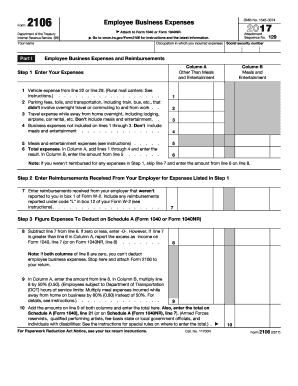
Filling out the IRS Form 2106 is crucial for individuals seeking to deduct employee business expenses on their tax returns. This guide will walk you through each section of the form, providing clear instructions to ensure a smooth and accurate submission.

Follow the steps to complete your IRS 2106 form.

  1. Click ‘Get Form’ button to obtain the IRS 2106 form and open it in the editor.
  2. Enter your name and Social Security number at the top of the form.
  3. In Part I, fill in your occupation where you incurred expenses and begin detailing your employee business expenses in Column A for other than meals and entertainment.
  4. For line 1, input your vehicle expense from the relevant prior section. For line 2, list any parking fees, tolls, and other transportation costs that did not involve overnight travel or commuting.
  5. On line 3, include your travel expenses incurred while away from home overnight, ensuring to omit any meals and entertainment.
  6. Continue to line 4 to add any additional business expenses not covered in previous lines, still excluding meals and entertainment.
  7. For line 5, enter any meals and entertainment expenses, then calculate the total for Column A on line 6 by summing lines 1 through 4.
  8. In Column B, enter the amount from line 5, representing meals and entertainment expenses.
  9. If you received reimbursements from your employer, fill those in on line 7, ensuring they were not previously reported in box 1 of your Form W-2.
  10. On line 8, subtract the amount in line 7 from line 6. If the result is zero or less, enter -0-.
  11. Enter the result from line 8 back into Column A. If applicable, multiply line 8 by 50% for Column B.
  12. Add the values from line 9 of both columns and place the total on line 10. This total will also be needed for your Schedule A.
  13. In Part II, Section A, enter vehicle information including the date the vehicle was placed in service and total miles driven during the tax year.
  14. Fill in business miles, percentage of business use, and any relevant commuting details. Answer yes or no to questions about vehicle usage during off-duty hours.
  15. If using Section B, utilize the standard mileage rate by multiplying your business miles by 53.5 cents to detail costs in the appropriate fields.
  16. Once all information is filled, review your entries for accuracy, then save your changes, download the form, print it, or share it as needed.

Start filling out your IRS 2106 form online today to ensure you can deduct your eligible business expenses!

Get form

Experience a faster way to fill out and sign forms on the web. Access the most extensive library of templates available.

Related content

About Form 2106, Employee Business Expenses
Dec 3, 2024 — Employees file this form to deduct ordinary and necessary expenses for...
Learn more
Employee Business Expenses
Department of the Treasury. Internal Revenue Service. â–· Attach to Form 1040 ... Form...
Learn more
Form 2106-EZ
You Can Use This Form Only if All of the Following Apply. • You are an employee...
Learn more

Related links form

USCIS I-765 2018 CA DE 2501F 2019 VA 21-4142 2014 DA 3349 2010

Questions & Answers

Get answers to your most pressing questions about US Legal Forms API.

Contact support

To enter Form 2106 in TurboTax, navigate to the 'Deductions & Credits' section of the software. Look for the business expenses section, where you can input the information from your IRS Form 2106. TurboTax will guide you through the necessary steps to ensure you receive your deductions.

Unreimbursed business expenses should be reported on Schedule A of IRS Form 1040 if you are itemizing deductions. After you complete IRS Form 2106, transfer the total to the appropriate line on Schedule A. This process ensures that your expenses get properly deducted from your taxable income.

To write off unreimbursed business expenses, you need to document all eligible expenses related to your business activities. Gather receipts, invoices, and other relevant records. Use IRS Form 2106 for employee business expenses to claim these deductions on your tax return.

Form 2106 is used to claim deductions for unreimbursed expenses incurred by employees during the course of their work. This includes costs for traveling, meals, and other expenses that employers do not cover. Knowing how to utilize form 2106 effectively can lead to maximized tax benefits. For guidance and resources, uslegalforms can be a handy tool in your tax preparation journey.

IRS code 2106 relates specifically to the rules and deductions for employee business expenses. This code governs the conditions under which workers may deduct costs associated with their jobs, such as travel and supplies. Familiarity with IRS code 2106 is crucial for determining eligibility for deductions. Adhering to these codes ensures compliance while potentially benefiting your tax return.

Form 2106, also referred to as the Employee Business Expenses form, is used to claim deductions for expenses incurred by employees for business purposes. This IRS form provides a way for individuals to report necessary costs that are not compensated by their employers. Comprehending the purpose of form 2106 can help employees maximize their tax returns. Utilizing uslegalforms can assist in getting the proper documentation in order.

Accessing IRS 2106 in TurboTax is straightforward. Simply navigate to the section for deductions, and TurboTax will guide you through the necessary steps to enter your unreimbursed employee expenses. The software provides prompts that simplify the input process. If you have questions, TurboTax offers excellent support to ensure you correctly file your taxes.

Form 2106 is available to employees incurring unreimbursed business expenses related to their job. To qualify, you need to have expenses that your employer has not reimbursed you for, and these costs must be necessary for your role. It's important to keep detailed records of these expenses, as they will support your claims under the IRS 2106. Understanding the qualifications can lead to significant tax savings.

Form 2106 is specifically designed for employees to report unreimbursed business expenses, while Schedule C is used by self-employed individuals to report income and expenses. IRS 2106 captures employee costs that can be deductible in your federal return. In contrast, Schedule C allows self-employed people to detail their complete business income and expense statement.

Workers who incur costs while performing duties for their employers can qualify for unreimbursed employee expenses under IRS 2106. Typically, these expenses must be necessary and directly related to your job functions. Certain professions may have more expenses eligible for deductions, such as traveling sales representatives. Always review IRS guidelines to confirm your eligibility.

Get This Form Now!

Use professional pre-built templates to fill in and sign documents online faster. Get access to thousands of forms.
If you believe that this page should be taken down, please follow our DMCA take down processhere.

Industry-leading security and compliance

US Legal Forms protects your data by complying with industry-specific security standards.
  • In businnes since 1997
    25+ years providing professional legal documents.
  • Accredited business
    Guarantees that a business meets BBB accreditation standards in the US and Canada.
  • Secured by Braintree
    Validated Level 1 PCI DSS compliant payment gateway that accepts most major credit and debit card brands from across the globe.
Get IRS 2106
Form Packages
Adoption
Bankruptcy
Contractors
Divorce
Home Sales
Employment
Identity Theft
Incorporation
Landlord Tenant
Living Trust
Name Change
Personal Planning
Small Business
Wills & Estates
Packages A-Z
Form Categories
Affidavits
Bankruptcy
Bill of Sale
Corporate - LLC
Divorce
Employment
Identity Theft
Internet Technology
Landlord Tenant
Living Wills
Name Change
Power of Attorney
Real Estate
Small Estates
Wills
All Forms
Forms A-Z
Form Library
Customer Service
Your Privacy Choices
Terms of Service
Privacy Notice
Legal Hub
Content Takedown Policy
Bug Bounty Program
About Us
Help Portal
Legal Resources
Blog
Affiliates
Contact Us
Delete My Account
Site Map
Industries
Forms in Spanish
Localized Forms
State-specific Forms
Forms Kit
Legal Guides
Real Estate Handbook
All Guides
Prepared for You
Notarize
Incorporation services
Our Customers
For Consumers
For Small Business
For Attorneys
Our Sites
US Legal Forms
USLegal
FormsPass
pdfFiller
signNow
altaFlow
DocHub
Instapage
Social Media
Call us now toll free:
+1 833 426 79 33
As seen in:
  • USA Today logo picture
  • CBC News logo picture
  • LA Times logo picture
  • The Washington Post logo picture
  • AP logo picture
  • Forbes logo picture
© Copyright 1997-2026
airSlate Legal Forms, Inc.
3720 Flowood Dr, Flowood, Mississippi 39232
Form Packages
Adoption
Bankruptcy
Contractors
Divorce
Home Sales
Employment
Identity Theft
Incorporation
Landlord Tenant
Living Trust
Name Change
Personal Planning
Small Business
Wills & Estates
Packages A-Z
Form Categories
Affidavits
Bankruptcy
Bill of Sale
Corporate - LLC
Divorce
Employment
Identity Theft
Internet Technology
Landlord Tenant
Living Wills
Name Change
Power of Attorney
Real Estate
Small Estates
Wills
All Forms
Forms A-Z
Form Library
Customer Service
Your Privacy Choices
Terms of Service
Privacy Notice
Legal Hub
Content Takedown Policy
Bug Bounty Program
About Us
Help Portal
Legal Resources
Blog
Affiliates
Contact Us
Delete My Account
Site Map
Industries
Forms in Spanish
Localized Forms
State-specific Forms
Forms Kit
Legal Guides
Real Estate Handbook
All Guides
Prepared for You
Notarize
Incorporation services
Our Customers
For Consumers
For Small Business
For Attorneys
Our Sites
US Legal Forms
USLegal
FormsPass
pdfFiller
signNow
altaFlow
DocHub
Instapage
Social Media
Call us now toll free:
+1 833 426 79 33
As seen in:
  • USA Today logo picture
  • CBC News logo picture
  • LA Times logo picture
  • The Washington Post logo picture
  • AP logo picture
  • Forbes logo picture
© Copyright 1997-2026
airSlate Legal Forms, Inc.
3720 Flowood Dr, Flowood, Mississippi 39232
IRS 2106
This form is available in several versions.
Select the version you need from the drop-down list below.
2024 IRS 2106
Select form
  • 2024 IRS 2106
  • 2022 IRS 2106
  • 2020 IRS 2106
  • 2019 IRS 2106
  • 2018 IRS 2106
  • 2017 IRS 2106
  • 2016 IRS 2106
  • 2013 IRS 2106
  • IRS 2106_DSA
Select form