Loading
Get Ok Ow-8-es 2020-2026
How it works
-

Open form follow the instructions
-

Easily sign the form with your finger
-

Send filled & signed form or save
How to fill out the OK OW-8-ES online
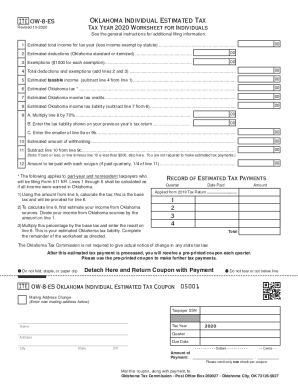
This guide provides a comprehensive overview of how to fill out the OK OW-8-ES form online. The OK OW-8-ES is essential for individuals in Oklahoma to estimate their tax liabilities and ensure timely payments throughout the tax year.
Follow the steps to complete your OK OW-8-ES form online.
- Click ‘Get Form’ button to obtain the form and open it in the editor.
- Start by entering the estimated total income for the tax year in line 1, omitting any income exempt by statute.
- Next, in line 2, enter your estimated deductions. You can choose between the Oklahoma standard deduction or itemized deductions.
- In line 3, list any exemptions. Each exemption amounts to $1,000.
- Calculate the total deductions and exemptions by adding the amounts from lines 2 and 3. Enter this result on line 4.
- Determine your estimated taxable income by subtracting line 4 from line 1. Enter the result in line 5.
- Calculate the estimated Oklahoma tax by entering the applicable amount in line 6.
- Next, list any estimated Oklahoma income tax credits in line 7.
- To find your estimated Oklahoma income tax liability, subtract line 7 from line 6 and write this amount on line 8.
- Multiply the value in line 8 by 70% and place this result in line 9A. In line 9B, enter the tax liability from your previous year’s tax return. In line 9C, enter the smaller of line 9A or 9B.
- Enter the estimated amount of withholding on line 10.
- Finally, subtract line 10 from line 9C and record this result on line 11. If line 11 is negative or zero, you do not need to make estimated tax payments.
- If required, divide the amount in line 11 by 4 to find the payment amount that should be made with each coupon. Enter this on line 12.
- After completing all sections, save your changes, and you can then download, print, or share the form as needed.
Start completing your OK OW-8-ES form online today to ensure your tax obligations are met on time.
Forms can be downloaded from our business tax forms list, requested by calling Taxpayer Assistance at (405) 521-3160 or by picking them up at one of our offices.