Loading
Form preview
  • US Legal Forms
  • Other Templates
  • Tax Forms
  • Arizona Tax Forms
  • Az Dor 5005 2015

Get Az Dor 5005 2015

E From: Through: box or the Until revoked box must be checked. If the From: Through: box is checked, the From: Through: dates must be provided. The Specific Exceptions box is optional and allows the Prime Contractor to exclude Specific projects or time periods from the Blanket Certificate If the Specific Exceptions is checked, details describing the excluded project(s) or the excluded time periods must be provided. The SI.

How it works

  1. Open form

    Open form follow the instructions

  2. Easily sign form

    Easily sign the form with your finger

  3. Share form

    Send filled & signed form or save

How to fill out the AZ DoR 5005 online

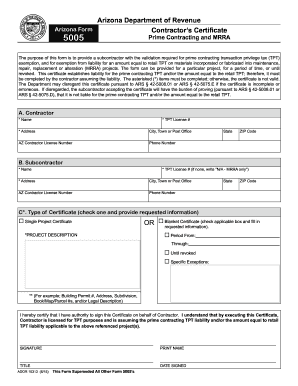
The AZ DoR 5005 form, known as the Contractor's Certificate, is essential for validating transaction privilege tax exemptions for subcontractors. This guide provides clear instructions to help users navigate the online filling process effectively.

Follow the steps to complete the AZ DoR 5005 online.

  1. Click ‘Get Form’ button to obtain the form and open it in the editor.
  2. In the Contractor section, enter the required information: the contractor's name, TPT license number, address (including city, state, and ZIP code), contractor license number, and phone number. All fields marked with an asterisk (*) are mandatory.
  3. In the Subcontractor section, provide the subcontractor’s name and TPT license number (if none, write 'N/A - MRRA only'). Fill in the subcontractor's address details, including city, state, ZIP code, contractor license number, and phone number. Again, fields marked with an asterisk (*) must be completed.
  4. Choose the Type of Certificate by selecting either the 'Single Project Certificate' or 'Blanket Certificate' option. It is necessary to check one of these options to proceed.
  5. If you selected 'Single Project Certificate,' complete the 'PROJECT DESCRIPTION' section with sufficient details to clearly identify the location of the project. If you selected the 'Blanket Certificate,' check either the 'From: Through:' option and provide the appropriate dates, or select 'Until revoked.'
  6. If applicable, you may fill in the 'Specific Exceptions' section to exclude specific projects or time periods from the blanket certificate.
  7. In the Signature section, provide the signature, print the name, title, and date signed. It is essential that all fields in this section are completed to ensure the certificate is valid.
  8. Once all required fields are filled out, you can save your changes, download the document, print it, or share it as needed.

Complete the AZ DoR 5005 online to ensure your compliance with transaction privilege tax requirements.

Get form

Experience a faster way to fill out and sign forms on the web. Access the most extensive library of templates available.

Related content

Contractor's Certificate | Arizona Department of...
Dec 16, 2024 — The purpose of this form is to provide a subcontractor with the...
Learn more
State of Arizona June 30, 2023 Single Audit
Dec 17, 2024 — Our report includes a reference to other auditors who audited the...
Learn more
Tektronix 067-1180-99 Settling Time Fixture...
It contains a solid state relay to provide a step function to the unit under test. When...
Learn more

Related links form

FL DoR DR-5 2016 FL DoR DR-5 2010 FL DoR DR-5 2003 FL DoR DR-504CS 2000

Questions & Answers

Get answers to your most pressing questions about US Legal Forms API.

Contact support

Yes, Arizona offers a sales tax exemption certificate that businesses can use under certain conditions. This certificate allows eligible purchasers to buy goods without paying sales tax upfront. Understanding how to utilize this certificate, along with the AZ DoR 5005, is essential for maximizing your tax savings and ensuring proper compliance.

The primary difference between AZ 5000 and 5005 lies in their specific purposes. AZ 5000 deals with total sales reporting, while AZ 5005 is about requesting TPT exemptions. Understanding these forms helps streamline your tax responsibilities and keeps you in compliance with Arizona regulations.

Arizona Form 5000 is utilized to report the total amount of Taxable Transactions Subject to TPT. Businesses must accurately fill this form to meet their reporting requirements and avoid penalties. It's important to differentiate this from the AZ DoR 5005, which focuses on exemptions, ensuring you handle your tax obligations correctly.

Arizona Form 5005 is designed specifically for requesting a Transaction Privilege Tax exemption. This form helps businesses confirm their eligibility for various exemptions, reducing their upfront tax costs. Using AZ DoR 5005 ensures you comply with state regulations while taking advantage of available benefits.

AZ form 5000 is generally used for reporting your business's total sales, while AZ form 5005 specifically pertains to TPT exemptions. The two forms serve different purposes and it's critical to use the correct one based on your business activities. Accurate completion of AZ DoR 5005 can help you avoid unnecessary tax liabilities, making it vital for compliance.

Arizona's Transaction Privilege Tax (TPT) is not the same as sales tax. While sales tax is collected on sales of goods, TPT applies to the privilege of doing business in the state. This means TPT is assessed on a range of transactions, not just sales. Understanding this distinction is important for businesses operating in Arizona, particularly when completing forms like the AZ DoR 5005.

In Arizona, individuals who are elderly, disabled, or low-income may qualify for a property tax credit. The eligibility criteria can vary, so reviewing the specifics related to the AZ DoR 5005 form is essential. This program aims to provide financial relief to those who need it most. If you think you qualify, submit your application timely to take advantage of this benefit.

To obtain a property tax exemption in Arizona, you will need to complete the AZ DoR 5005 form and submit it to your local assessor's office. Ensure you provide all necessary supporting documents to enhance your application. Different exemptions might have specific conditions, so reviewing those criteria beforehand is advisable. This proactive approach can lead to a smoother approval process.

Filing an amended sales tax return in Arizona requires you to complete the appropriate amendment form, which can usually be found on the AZ DoR website. Be sure to include all corrected information and any necessary documentation. Submitting your amendment promptly can help you avoid penalties. If you need help, consider using services like UsLegalForms to guide you through the process.

To apply for a property tax exemption in Arizona, residents must complete the AZ DoR 5005 form and submit it to their local tax office. Make sure to gather all necessary documentation to support your eligibility. The process may vary slightly by county, so checking specific guidelines can help. Once submitted, you can expect to see a reduction in your property tax assessment if approved.

Get This Form Now!

Use professional pre-built templates to fill in and sign documents online faster. Get access to thousands of forms.
If you believe that this page should be taken down, please follow our DMCA take down processhere.
Get AZ DoR 5005
  • Adoption
  • Bankruptcy
  • Contractors
  • Divorce
  • Home Sales
  • Employment
  • Identity Theft
  • Incorporation
  • Landlord Tenant
  • Living Trust
  • Name Change
  • Personal Planning
  • Small Business
  • Wills & Estates
  • Packages A-Z
  • Affidavits
  • Bankruptcy
  • Bill of Sale
  • Corporate - LLC
  • Divorce
  • Employment
  • Identity Theft
  • Internet Technology
  • Landlord Tenant
  • Living Wills
  • Name Change
  • Power of Attorney
  • Real Estate
  • Small Estates
  • Wills
  • All Forms
  • Forms A-Z
  • Other Templates
  • Legal Hub
  • About Us
  • Help Portal
  • Legal Resources
  • Blog
  • Affiliates
  • Contact Us
  • Delete My Account
  • Site Map
  • Industries
  • Forms in Spanish
  • Localized Forms
  • State-specific Forms
  • Forms Kit
  • Real Estate Handbook
  • All Guides
  • Notarize
  • Incorporation services
  • For Consumers
  • For Small Business
  • For Attorneys
  • USLegal
  • FormsPass
  • pdfFiller
  • signNow
  • altaFlow
  • DocHub
  • Instapage
Form Packages
  • Adoption
  • Bankruptcy
  • Contractors
  • Divorce
  • Home Sales
  • Employment
  • Identity Theft
  • Incorporation
  • Landlord Tenant
  • Living Trust
  • Name Change
  • Personal Planning
  • Small Business
  • Wills & Estates
  • Packages A-Z
Form Categories
  • Affidavits
  • Bankruptcy
  • Bill of Sale
  • Corporate - LLC
  • Divorce
  • Employment
  • Identity Theft
  • Internet Technology
  • Landlord Tenant
  • Living Wills
  • Name Change
  • Power of Attorney
  • Real Estate
  • Small Estates
  • Wills
  • All Forms
  • Forms A-Z
  • Other Templates
Customer Service
  • Legal Hub
  • About Us
  • Help Portal
  • Legal Resources
  • Blog
  • Affiliates
  • Contact Us
  • Delete My Account
  • Site Map
  • Industries
  • Forms in Spanish
  • Localized Forms
  • State-specific Forms
  • Forms Kit
Legal Guides
  • Real Estate Handbook
  • All Guides
Prepared for you
  • Notarize
  • Incorporation services
Our Customers
  • For Consumers
  • For Small Business
  • For Attorneys
Our Sites
  • USLegal
  • FormsPass
  • pdfFiller
  • signNow
  • altaFlow
  • DocHub
  • Instapage
Social Media
Call us now toll free:
+1 833 426 79 33
As seen in:
© Copyright 1999-2026 airSlate Legal Forms, Inc. 17 Station Street, Suite 303, Brookline, MA 02445
  • Your Privacy Choices
  • Terms of Service
  • Privacy Notice
  • Content Takedown Policy
  • Bug Bounty Program
AZ DoR 5005
This form is available in several versions.
Select the version you need from the drop-down list below.
2020 AZ DoR 5005
Select form
  • 2020 AZ DoR 5005
  • 2015 AZ DoR 5005
  • 2002 AZ DoR 5005
Select form