Get Fl Dr-600a 2011
How it works
-

Open form follow the instructions
-

Easily sign the form with your finger
-

Send filled & signed form or save
How to fill out the FL DR-600A online
The FL DR-600A form is essential for enrolling in the e-Services program offered by the Florida Department of Revenue. This guide will provide you with clear and supportive instructions on how to fill out this form online, ensuring a smooth submission process.
Follow the steps to complete the FL DR-600A online effectively.
- Click ‘Get Form’ button to obtain the form and open it in the editor.
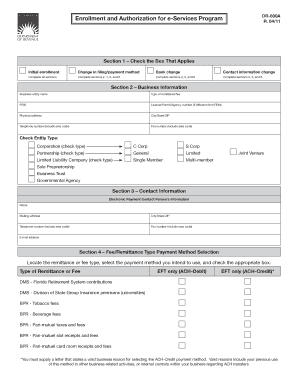
- In Section 1, check the box that applies to your situation: Initial enrollment, Change in filing/payment method, or Contact information change. Depending on your choice, complete the corresponding sections as indicated.
- In Section 2, enter your business information. Provide the business entity name, type of remittance/fee, FEIN, and any applicable License/Permit/Agency number. Fill in your physical address, city/state/ZIP code, and telephone and fax numbers.
- Also in Section 2, check the appropriate box to indicate your entity type, such as Corporation, Partnership, Limited Liability Company, or Sole Proprietorship.
- In Section 3, provide the electronic payment contact person's information including their name, mailing address, city/state/ZIP code, telephone number, fax number, and email address.
- In Section 4, locate the type of remittance or fee you are submitting and select your intended payment method by checking the appropriate box. Remember to include a letter if you are selecting the ACH-Credit payment method.
- If using ACH-Debit, complete Section 5 by providing your bank's name, ABA Routing/Transit number, account number, and account type (business or personal checking/savings). Note that international ACH transactions cannot be processed.
- In Section 6, review the Enrollee Authorization and Agreement. Ensure that you certify your authority to sign on behalf of the business entity. Sign and print your name, title, and contact number. If required, provide a second signature.
- After completing all sections, review the form for accuracy. Save your changes, and download or print the document as needed. You can then share or submit it as per the instructions provided.
Complete the FL DR-600A online to take advantage of the e-Services program.
Get form
Typically, acquiring a sales tax certificate in Florida takes approximately 24 to 48 hours if you complete your application online. If you submit a paper application, the time frame might extend to several weeks. To ensure speedier processing, it's imperative to fill out the application comprehensively. Frequently, using the FL DR-600A can smooth the path to obtaining your certificate without unnecessary delays.
Get This Form Now!
Industry-leading security and compliance
-
In businnes since 199725+ years providing professional legal documents.
-
Accredited businessGuarantees that a business meets BBB accreditation standards in the US and Canada.
-
Secured by BraintreeValidated Level 1 PCI DSS compliant payment gateway that accepts most major credit and debit card brands from across the globe.