Loading
Get Ky 740-np-r 2019
How it works
-

Open form follow the instructions
-

Easily sign the form with your finger
-

Send filled & signed form or save
How to fill out the KY 740-NP-R online
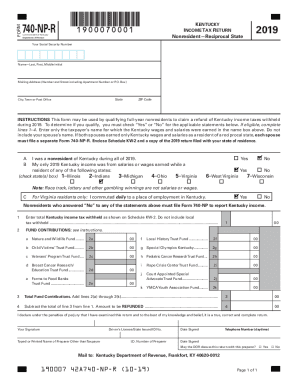
The KY 740-NP-R form is an essential document for nonresidents of Kentucky who wish to claim a refund of state income taxes withheld. This guide provides detailed steps to help you navigate the online form-filling process efficiently.
Follow the steps to complete the KY 740-NP-R form online.
- Click the ‘Get Form’ button to access the KY 740-NP-R form online and open it in the editor.
- Begin filling out the form by entering your Social Security number in the designated field.
- In the name section, include your last name followed by your first name and middle initial.
- Provide your mailing address, including street address, apartment number (if applicable), and P.O. Box if used.
- Fill in the city, town, or post office field, along with the corresponding ZIP code.
- Review the statements to determine if you qualify as a nonresident for the tax refund. Check 'Yes' or 'No' as applicable.
- If qualified, complete lines 1 through 4 as per the instructions regarding Kentucky income withheld and fund contributions.
- Sign and date the form, providing the necessary information for any preparers if applicable.
- Once all fields are completed, save your changes and choose the option to download, print, or share the form as needed.
Complete your KY 740-NP-R form online today for a smoother filing experience.
Get form
Experience a faster way to fill out and sign forms on the web. Access the most extensive library of templates available.
Pay OnlinePay your taxes online using the Kentucky Department of Revenue's Electronic Payment Application. At this time, DOR accepts payments by credit card or electronic check. If you have questions, call the Department of Revenue at (502) 564-4581.
Get This Form Now!
Use professional pre-built templates to fill in and sign documents online faster. Get access to thousands of forms.