Loading
Get Nc B-c-710 2019-2026
How it works
-

Open form follow the instructions
-

Easily sign the form with your finger
-

Send filled & signed form or save
How to fill out the NC B-C-710 online
Completing the NC B-C-710 form for malt beverage wholesalers and importers can be straightforward with the right guidance. This document serves as an informative resource to help users accurately fill out this form online.
Follow the steps to successfully fill out the NC B-C-710 form.
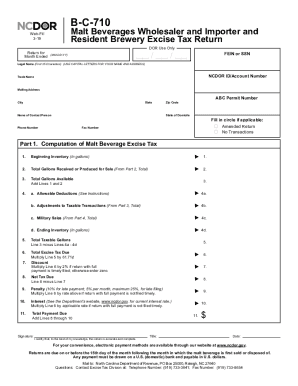
- Click ‘Get Form’ button to obtain the form and open it in the editor.
- Begin by entering your federal employer identification number (FEIN) or social security number (SSN) in the designated field. Ensure accuracy as this information is crucial for your tax return.
- Enter your legal name in uppercase letters, ensuring to fit within the first 35 characters available. Following this, input your North Carolina Department of Revenue (NCDOR) ID or account number if applicable.
- Include your trade name if you operate under a different name than your legal name. Next, provide your complete mailing address, including city, state, and zip code.
- Fill in the contact information, including the name of your contact person, phone number, and fax number if available. Indicate your state of domicile.
- If applicable, check the box for 'Amended Return' or 'No Transactions' as it pertains to your submission.
- Proceed to Part 1 for computation of malt beverage excise tax. Enter your beginning inventory in gallons, and then record the total gallons received or produced for sale from Part 2.
- Calculate the total gallons available by adding Lines 1 and 2 together.
- Input any allowable deductions in Line 4a, adjustments to taxable transactions in Line 4b, military sales in Line 4c, and your ending inventory in Line 4d.
- Subtract the total deductions (Lines 4a to 4d) from your total gallons available to determine your total taxable gallons for Line 5.
- Multiply the total taxable gallons by the rate of 61.71¢ to calculate the total excise tax due. If you are filing this return with full payment timely, apply a 2% discount on Line 7.
- Calculate the net tax due on Line 8 by subtracting the discount from the total excise tax due.
- If filing late, calculate any penalties and interest, ensuring to add these amounts on Lines 9 and 10 accordingly.
- Finally, sum the amounts from Lines 8 to 10 to find the total payment due, then review all information for accuracy.
- Provide your signature and the title, then date the form before submission.
- Once all information is completed, save your changes, then download, print, or share the form as needed.
Complete your NC B-C-710 form online today for a streamlined filing experience.
Related links form
Industry-leading security and compliance
US Legal Forms protects your data by complying with industry-specific security standards.
-
In businnes since 199725+ years providing professional legal documents.
-
Accredited businessGuarantees that a business meets BBB accreditation standards in the US and Canada.
-
Secured by BraintreeValidated Level 1 PCI DSS compliant payment gateway that accepts most major credit and debit card brands from across the globe.