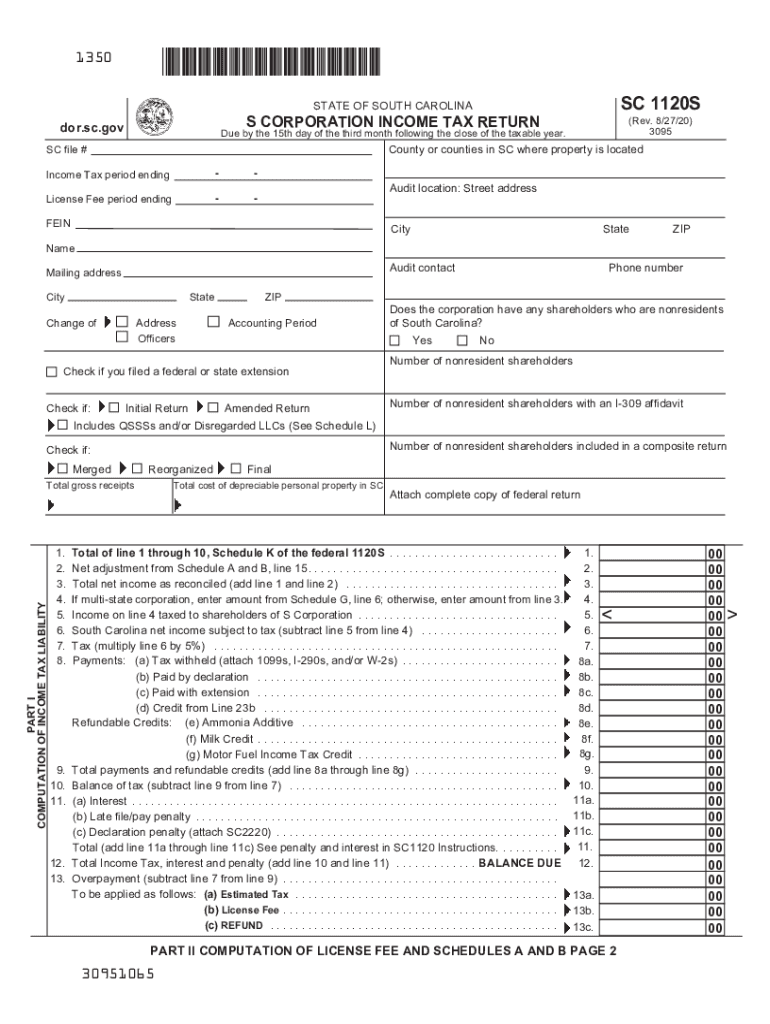
1350SC 1120SSTATE OF SOUTH CAROLINAS CORPORATION INCOME TAX RETURNdor.sc.gov(Rev. 8/27/20) 3095Due by the 15th day of the third month following the close of the taxable year.County or counties in.

Open form follow the instructions

Easily sign the form with your finger

Send filled & signed form or save
How to fill out the SC DoR SC1120S online
Filling out the SC DoR SC1120S form online can be straightforward with the right guidance. This form is essential for S corporations in South Carolina to report their income tax and license fee. Follow the comprehensive steps provided to ensure accurate completion.
Follow the steps to fill out the SC DoR SC1120S form online effectively.
- Click ‘Get Form’ button to obtain the SC1120S form and open it in the editor.
- Begin by entering your income tax period ending dates in the designated fields. Make sure to fill in the correct county or counties where your property is located.
- Provide your SC file number and FEIN in the respective fields. This information is crucial for identifying your corporation within the state tax system.
- Complete the mailing address section, ensuring accuracy in your city, state, and ZIP code. If there has been a change in address, check the appropriate box.
- Specify the type of return you are submitting by checking if it is the initial return, amended return, or if your corporation has merged or reorganized. Indicate if you have any nonresident shareholders.
- Move to Part I to compute your income tax liability. Enter total gross receipts and the necessary deductions, following the form’s guidance for each line.
- Calculate tax due by multiplying your taxable income by 5%. Ensure to account for any payments previously made.
- Proceed to Part II to compute the license fee. Multiply total capital and paid-in surplus by the specified rate and add any applicable fees.
- Complete all necessary Schedules as directed in the form, paying attention to the requirements for nonresident shareholders and any multi-state allocation.
- After completing the form, review all entries for accuracy. You can then save changes, download, or print the form according to your needs.
Complete your SC DoR SC1120S form online today for a smooth filing experience.
Experience a faster way to fill out and sign forms on the web. Access the most extensive library of templates available.
Related content
V824 Ara is a synchronized binary similar in age to the prototype young single K dwarf AB...
Use professional pre-built templates to fill in and sign documents online faster. Get access to thousands of forms.
If you believe that this page should be taken down, please follow our DMCA take down process here.
This form is available in several versions. Select the version you need from the drop-down list below.