Rity number or FEIN on your check. HOW TO ESTIMATE YOUR TAX. A schedule for computing your estimated tax and the tax rate schedules are listed in the Tax Booklet. Please note for 2019 the maximum tax rate was reduced from 6% to 5.75%. PENALTIES. Failure to comply with the provisions of this law relative to underpayment of installments may result in the assessment of additional charges as a penalty. Willful failure to pay estimated tax will constitute a misdemeanor. STANDARD DEDUCTION. Single and.

Open form follow the instructions

Easily sign the form with your finger

Send filled & signed form or save
How to fill out the GA DoR 500 ES online
Filling out the GA DoR 500 ES form online can be a straightforward process when guided appropriately. This document serves as a comprehensive guide to walk you through each section of the form, ensuring that you complete it accurately and efficiently.
Follow the steps to fill out the GA DoR 500 ES correctly.
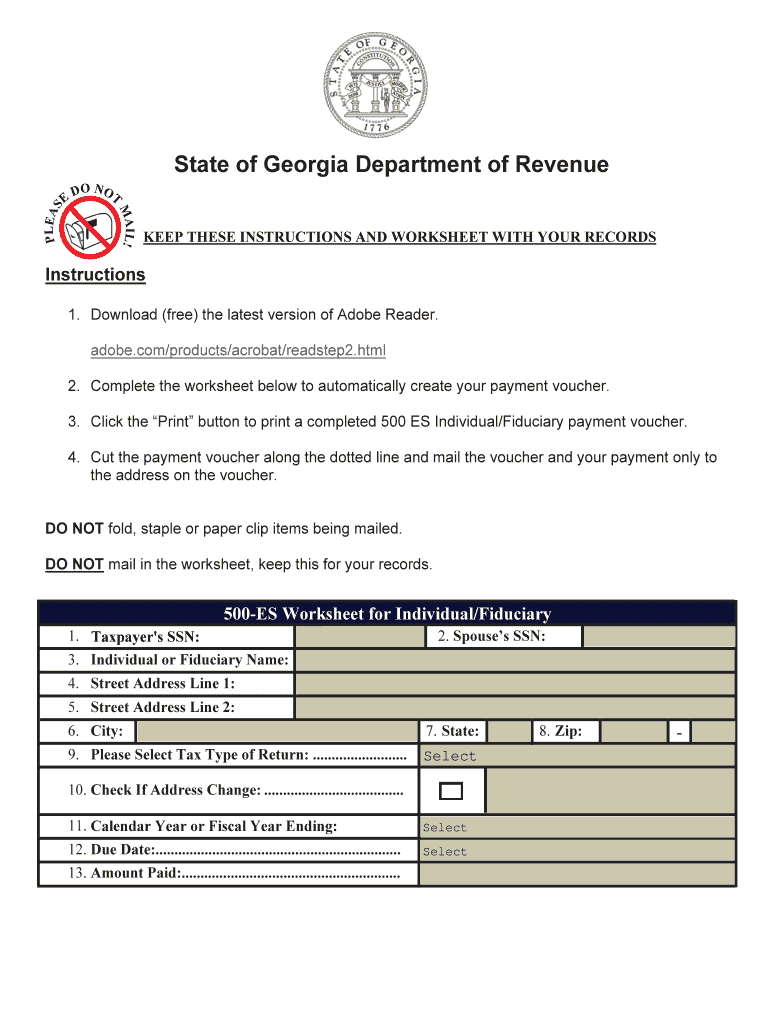
- Press the ‘Get Form’ button to access the GA DoR 500 ES form and open it in your editing tool.
- Enter the taxpayer's social security number (SSN) in the first field.
- If applicable, input the spouse’s SSN in the second field.
- Provide the full name for either the individual or fiduciary in the third field.
- Complete the street address line 1, and if necessary, input additional address details in street address line 2.
- Fill in the city name in the designated field.
- Select the state from the dropdown menu.
- Enter the zip code in the specified format.
- Choose the tax type of return from the provided selection options.
- If there is a change in the address, check the box to indicate this.
- Input either the calendar year or fiscal year ending date in the appropriate field.
- Select the due date for this payment using the dropdown options.
- Fill in the amount you are paying based on your estimated tax calculations.
- Once all sections are completed, you can save the changes made to the form. Download it for your records, print it as necessary, or share the completed document as required.
Ensure accurate and timely filing by completing your documents online today.
Experience a faster way to fill out and sign forms on the web. Access the most extensive library of templates available.
Related content
Please make checks and money orders payable to the Georgia Department of Revenue. 2025...
by A Terapêuticos · 2004 — CONTEÚDO: Estas drogas exercem suas ações principalmente...
- Parede Dupla, os painéis em chapa de aço são isolados internamente com poliuretano...
Get answers to your most pressing questions about US Legal Forms API.
Where do I mail my Georgia form 500 Nol?
Your Georgia form 500 NOL should be mailed to the Georgia Department of Revenue at the address mentioned on the form itself. Confirm that all required documentation accompanies your submission to avoid delays. Using uslegalforms can also help you make sure you complete the form correctly and meet the guidelines for the GA DoR 500 ES.
Where do I mail my GA federal tax return?
You need to mail your GA federal tax return to the appropriate IRS address designated for your location. The address will depend on whether you are including a payment or not, and you can find this information on the IRS website or your tax form. For help with the question of making proper mail submissions, uslegalforms offers guidance that helps ensure you comply with both GA DoR 500 ES and federal requirements.
Does Georgia allow a net operating loss carryforward?
Yes, Georgia does allow a net operating loss carryforward. You can carry forward the net operating losses to offset future taxable income, which can be beneficial for tax planning. To understand the specifics of how this impacts your taxes, including the GA DoR 500 ES, you might want to explore resources on uslegalforms, which clarify the rules for carryforwards.
Where to mail GA 500 nol?
You should send your GA 500 net operating loss (NOL) form to the Georgia Department of Revenue at the specified address on the form. It is crucial to verify that you address it correctly to ensure prompt processing of your NOL request. Using uslegalforms can guide you through this mailing process to ensure compliance with the GA DoR 500 ES requirements.
How to fill out a withholding allowance form?
To fill out a withholding allowance form, start by gathering your personal information, including your Social Security number and residency details. Then, calculate the number of allowances you qualify for based on your income and family situation. Utilizing uslegalforms can streamline this process by providing templates and examples specifically for the GA DoR 500 ES.
Where do I mail my GA 500?
You should mail your GA 500 form to the Georgia Department of Revenue. Specifically, use the address indicated on the form instructions based on whether you are submitting a payment. Always ensure that you allow enough time for delivery, especially during tax season, to avoid any late fees related to the GA DoR 500 ES.
How to fill out Georgia G4 form?
To fill out the Georgia G4 form, begin by entering your personal information, including your name, address, and Social Security number. Next, provide details about your filing status and the number of withholding allowances you are claiming. For assistance, consider using uslegalforms, which offers step-by-step guides and resources that can help you navigate the GA DoR 500 ES accurately.
Where do I file GA form 500?
You need to file GA form 500 with the Georgia Department of Revenue, either electronically or via mail. Be sure to follow the filing deadlines to avoid penalties. You can also find detailed guidance on filing methods and requirements on the official Georgia Department of Revenue website. For a smoother experience, USLegalForms offers resources to help in completing and submitting your forms correctly.
What is Georgia form 500 Nol?
Georgia form 500 NOL is used to report net operating losses for businesses in the state. This form allows you to carry forward losses to offset future taxable income, which can offer significant tax savings. It's crucial to fill out the form accurately to avoid potential complications. Consider accessing the USLegalForms platform for step-by-step instructions and assistance.
Can I get tax forms at my local post office?
While local post offices often carry basic tax forms, they may not always have the specific forms you require, such as the GA DoR 500 ES. To ensure you have the most current and required forms, visit the Georgia Department of Revenue's website or use platforms like USLegalForms that provide these documents electronically. This approach can save you time and ensure accuracy.
Use professional pre-built templates to fill in and sign documents online faster. Get access to thousands of forms.
If you believe that this page should be taken down, please follow our DMCA take down process here.
This form is available in several versions. Select the version you need from the drop-down list below.