Loading
Get Nc Dor Gen-58 2019-2026
How it works
-

Open form follow the instructions
-

Easily sign the form with your finger
-

Send filled & signed form or save
How to fill out the NC DoR GEN-58 online
The NC DoR GEN-58 form, also known as the Power of Attorney and Declaration of Representative, allows taxpayers to appoint representatives to act on their behalf for tax matters. This guide provides clear, step-by-step instructions to help users complete the form efficiently and accurately.
Follow the steps to fill out the NC DoR GEN-58 online successfully.
- Click ‘Get Form’ button to obtain the form and open it in the editor for editing.
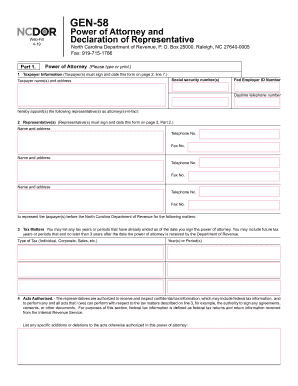
- In Part 1, provide the taxpayer information. This includes the taxpayer name(s), address, and social security number(s). Ensure that the information is accurate, as it will be used to identify the taxpayer.
- Next, list the representative(s) you wish to appoint. Include their name(s), address(es), and contact information, such as telephone number(s) and fax number(s), if available.
- In the tax matters section, specify the types of tax (e.g., individual, corporate, sales) and the corresponding year(s) or period(s) covered by the power of attorney.
- Detail the acts authorized for the representatives. This grants them the ability to perform specific actions related to the tax matters described. If there are any specific additions or deletions, include those as well.
- If applicable, check the box that authorizes your representative to create an e-Business Center account with the Department of Revenue to conduct online services on your behalf.
- Indicate if you wish to retain any prior power(s) of attorney by checking the designated box, and attach a copy of any power of attorney you want to remain in effect.
- Your signature is required on page 2, line 7. If applicable, ensure both spouses sign if the tax matter concerns a joint return. If signed by a representative, confirm that they have the authority to execute the form.
- In Part 2, the representative must complete their declaration. They should select their designation, provide jurisdiction or enrollment card number, and sign and date the form.
- Once completed, save your changes. You will have the option to download, print, or share the form as needed.
Complete your forms online today and ensure you are fully prepared for your tax matters.
An employee who is a resident of N. C. is subject to N. C. withholding on all of his wages, whether he works in N. C. or in another state. EXCEPTION: N. C. withholding is not required if the other state in which the employee works requires the employer to withhold income for that state.