Loading
Get Ky 1906 - Boone County 2021-2026
How it works
-

Open form follow the instructions
-

Easily sign the form with your finger
-

Send filled & signed form or save
How to fill out the KY 1906 - Boone County online
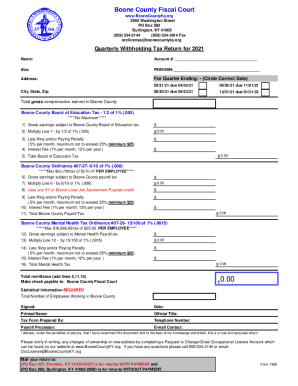
Filling out the KY 1906 - Boone County form is an essential task for businesses operating within Boone County, ensuring compliance with local tax regulations. This guide provides clear step-by-step instructions to assist users in completing the form accurately online.
Follow the steps to complete your KY 1906 - Boone County form online.
- Click ‘Get Form’ button to access the form and open it in the online editor.
- Enter your name in the designated field at the top of the form.
- Fill in your account number in the provided space to identify your tax account.
- Indicate your business name by filling in the 'dba' (doing business as) section.
- Input your Federal Employer Identification Number (FEIN) or Social Security Number (SSN) in the specified area.
- Circle the correct date for the quarter ending. Choose from March 31, June 30, September 30, or December 31 of the applicable year.
- Enter your business address, including city, state, and zip code.
- Detail the total gross compensation earned in Boone County within the relevant section of the form.
- Calculate the Boone County Board of Education tax by completing the relevant calculations based on your gross earnings and following the instructions provided for each line.
- Account for any penalties and interest fees applicable to late filing or payment, as outlined in the relevant fields.
- Complete similar sections for the Boone County payroll tax and mental health tax, ensuring to utilize the appropriate percentages for calculations.
- Finalize your total remittance calculation by adding the totals from the respective tax sections.
- Review the statistical information section and fill in the total number of employees working in Boone County.
- Sign and date the form, print your name, and include your official title.
- Provide the contact information for the tax form preparer, including phone number and email address.
- Once all fields are filled, save changes, and choose an appropriate option to download, print, or share the completed form.
Complete your tax forms online today for a streamlined and efficient filing process.
With the BIR, you need to pay your Annual Registration Fee in the amount of P500. As the name implies, you will have to pay this amount every year. The Annual Registration Fee is due on January 31 and failure to pay this amount will incur a compromise penalty of P1,000.
Industry-leading security and compliance
US Legal Forms protects your data by complying with industry-specific security standards.
-
In businnes since 199725+ years providing professional legal documents.
-
Accredited businessGuarantees that a business meets BBB accreditation standards in the US and Canada.
-
Secured by BraintreeValidated Level 1 PCI DSS compliant payment gateway that accepts most major credit and debit card brands from across the globe.