Loading
Get Ak Dor 6300 2022-2026
How it works
-

Open form follow the instructions
-

Easily sign the form with your finger
-

Send filled & signed form or save
How to fill out the AK DoR 6300 online
The AK DoR 6300 form is essential for reporting various Alaska incentive credits. This guide will help you navigate the online filling process, ensuring you provide all necessary information accurately.
Follow the steps to complete the AK DoR 6300 form efficiently.
- Click ‘Get Form’ button to access the form and open it in your preferred editor.
- Enter the employer identification number (EIN) and the name as shown on your return at the top of the form.
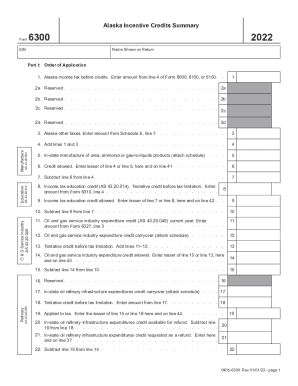
- In Part I, for line 1, enter the total Alaska income tax before credits, which should be taken from line 4 of Form 6000, 6100, or 6150.
- Proceed to line 3 and input the amount from Schedule E, line 7, for Alaska other taxes.
- For line 5, input the amount related to in-state manufacture of urea, ammonia or gas-to-liquids products and attach any necessary schedule.
- On line 6, enter the lesser between line 4 and line 5, as this represents the credit allowed.
- Continue to line 8 and input the tentative credit from Form 6310, line 4, regarding the income tax education credit.
- For line 9, again enter the lesser between line 7 and line 8, identifying the income tax education credit that is allowed.
- Complete line 10 by subtracting line 9 from line 7 to determine the remaining amount.
- Once all relevant sections are filled out, review your entries for accuracy. You can save changes, download, print, or share the form as needed.
Start filling out the AK DoR 6300 form online today.