Loading
Form preview
  • US Legal Forms
  • Form Library
  • Tax Forms
  • Massachusetts Tax Forms
  • Ma Dor M-706 2016

Get Ma Dor M-706 2016

. . . . 15 Fill in if the decedent made any transfer under Internal Revenue Code sections 2035, 2036, 2037 or 2038 in which an asset has been excluded from the gross estate . . . . . . . . . . . . . . . . . . . . . . . . . . . . . . . . . . . . . . . . . . . . . . . . . . . . . . . . . . . . . . . . . . . . . . . . . . . . . . . . . . . . . . . . . . . . . . . . . . . . 16 Fill in if during the decedent s lifetime any gifts were made in excess of the annual exclusion. . . . . . . . . . . .

How it works

  1. Open form

    Open form follow the instructions

  2. Easily sign form

    Easily sign the form with your finger

  3. Share form

    Send filled & signed form or save

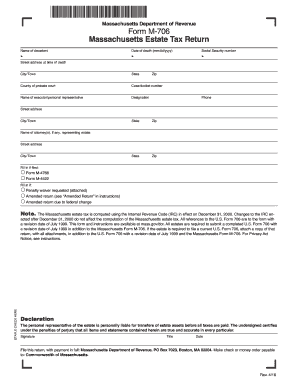
How to fill out the MA DoR M-706 online

The MA DoR M-706 is the Massachusetts estate tax return form, which is crucial for ensuring proper tax handling for estates. This guide provides clear, step-by-step instructions for filling out the form online, making the process easier for users at all experience levels.

Follow the steps to fill out the MA DoR M-706 online with confidence.

  1. Press the ‘Get Form’ button to access the MA DoR M-706 and open it in your preferred editing tool.
  2. Enter the name of the decedent in the designated field.
  3. Fill in the date of death using the format mm/dd/yyyy.
  4. Provide the decedent's Social Security number.
  5. Input the street address where the decedent lived at the time of death.
  6. Complete the city or town, state, and zip code fields.
  7. Specify the county of probate court.
  8. Enter the case or docket number associated with the probate court.
  9. Fill in the name of the executor or personal representative responsible for the estate.
  10. Indicate the designation and phone number of the executor or personal representative.
  11. Complete the street address, city or town, state, and zip code of the executor or personal representative.
  12. If applicable, fill in the name and information of the attorney(s) representing the estate.
  13. Indicate if any relevant forms (M-4768 or M-4422) were previously filed.
  14. Overall, declare if a penalty waiver is being requested, or if this is an amended return.
  15. Staple the check indicating payment near the bottom of the form.
  16. Provide a declaration, ensuring all information declared is accurate and true by signing, dating, and entering the title of the signer.
  17. File the completed return, along with full payment, to the Massachusetts Department of Revenue's address.
  18. Finally, ensure to save your changes, download the completed form, or print it for submission.

Begin filling out your MA DoR M-706 online today for efficient estate management.

Get form

Experience a faster way to fill out and sign forms on the web. Access the most extensive library of templates available.

Related content

DOR Estate Tax Forms and Instructions
May 14, 2025 — The Department now issues, Certificate Releasing Massachusetts Estate...
Learn more
Appendix Revenue Impact of Increasing the Estate...
To compute the maximum federal credit for state estate taxes, the July 1999 revision of...
Learn more
Manual do usuário
Conecte essa TV LED Smart Philips à Internet e descubra um novo mundo de televisão...
Learn more

Related links form

KY AOC-RU-005 2013 Aoc Ru 009 Kentucky 2013 KY AOC-SJ-10 2015 KY AOC-SJ-20 2015

Questions & Answers

Get answers to your most pressing questions about US Legal Forms API.

Contact support

Choosing the right withholding percentage depends on multiple factors, such as your income level, filing status, and deductions. The MA DoR M-706 is an essential resource that can help you calculate an appropriate percentage, ensuring that you neither overpay nor underpay. Selecting the correct withholding percentage allows you to manage your finances effectively throughout the year, or you can seek help from tax professionals to make the best decision.

You must file Form 706 if you are the executor of an estate that meets the Massachusetts estate tax requirements. This typically includes estates valued over $1 million. The MA DoR M-706 provides vital information on filing deadlines and documentation needed for compliance. Proper filing ensures that your responsibilities as an executor are fulfilled and helps avoid delays in distributing the estate.

MA withholding is the process of deducting state income tax from your earnings to meet Massachusetts tax obligations. This ensures that you are paying taxes gradually throughout the year, rather than facing a lump sum payment during tax season. The MA DoR M-706 can assist you in determining how much to withhold based on your specific income and tax situation. Proper withholding helps ensure compliance and avoids underpayment penalties.

The Massachusetts estate tax law has seen recent updates that can affect your estate planning. Currently, estates valued at over $1 million are subject to the Massachusetts estate tax. It is vital to consult the MA DoR M-706 for the latest details on how this may impact your estate. Planning ahead can help you minimize taxation on your inheritance and ensure a smoother transition for your beneficiaries.

When determining how much to withhold for Massachusetts taxes, consider your income, filing status, and any deductions you plan to claim. Generally, the Massachusetts Department of Revenue recommends using the MA DoR M-706 form for guidance. This form can help you calculate the appropriate withholding to avoid owing taxes at the end of the year. Always consult the latest guidelines or a tax professional for personalized advice.

Currently, the maximum amount you can inherit without paying estate taxes in Massachusetts is $1 million. It’s important to note that this figure applies to the entire estate value and not just your inheritance portion. Familiarizing yourself with the MA DoR M-706 can aid in properly estimating potential tax implications.

Calculating the Massachusetts estate tax requires you to assess the total value of the estate, including real property, bank accounts, and investments. Once you have that figure, refer to the MA DoR M-706 guidelines to determine the appropriate tax bracket and apply the rates accordingly. It’s essential to include any deductions allowed under Massachusetts law, such as debts and funeral expenses, to arrive at the taxable estate value.

Yes, you can file your MA state taxes online with ease using the MA DoR M-706. Online filing is a popular choice, as it reduces the time and effort needed for traditional paper filing. Numerous services, including USLegalForms, offer user-friendly online platforms to help you navigate this process successfully. Prepare your information to take full advantage of this convenient option.

To file taxes in Massachusetts, you will need several forms, primarily the MA DoR M-706 for estate taxes. Additionally, depending on your income sources, you may require Form 1 or 1-NR/PY. Familiarizing yourself with these forms can expedite the filing process. Utilize resources from USLegalForms to ensure you have everything necessary for a successful submission.

Yes, you can indeed file your taxes electronically on your own using the MA DoR M-706. Many users appreciate the ease of e-filing, which allows for immediate processing. However, if you feel uncertain about the intricacies of tax forms, consider leveraging platforms like USLegalForms for guidance. Always ensure you have all your documents at hand to facilitate smooth electronic filing.

Get This Form Now!

Use professional pre-built templates to fill in and sign documents online faster. Get access to thousands of forms.
If you believe that this page should be taken down, please follow our DMCA take down processhere.
Get MA DoR M-706
  • Adoption
  • Bankruptcy
  • Contractors
  • Divorce
  • Home Sales
  • Employment
  • Identity Theft
  • Incorporation
  • Landlord Tenant
  • Living Trust
  • Name Change
  • Personal Planning
  • Small Business
  • Wills & Estates
  • Packages A-Z
  • Affidavits
  • Bankruptcy
  • Bill of Sale
  • Corporate - LLC
  • Divorce
  • Employment
  • Identity Theft
  • Internet Technology
  • Landlord Tenant
  • Living Wills
  • Name Change
  • Power of Attorney
  • Real Estate
  • Small Estates
  • Wills
  • All Forms
  • Forms A-Z
  • Form Library
  • Legal Hub
  • About Us
  • Help Portal
  • Legal Resources
  • Blog
  • Affiliates
  • Contact Us
  • Delete My Account
  • Site Map
  • Industries
  • Forms in Spanish
  • Localized Forms
  • State-specific Forms
  • Forms Kit
  • Real Estate Handbook
  • All Guides
  • Notarize
  • Incorporation services
  • For Consumers
  • For Small Business
  • For Attorneys
  • USLegal
  • FormsPass
  • pdfFiller
  • signNow
  • altaFlow
  • DocHub
  • Instapage
Form Packages
  • Adoption
  • Bankruptcy
  • Contractors
  • Divorce
  • Home Sales
  • Employment
  • Identity Theft
  • Incorporation
  • Landlord Tenant
  • Living Trust
  • Name Change
  • Personal Planning
  • Small Business
  • Wills & Estates
  • Packages A-Z
Form Categories
  • Affidavits
  • Bankruptcy
  • Bill of Sale
  • Corporate - LLC
  • Divorce
  • Employment
  • Identity Theft
  • Internet Technology
  • Landlord Tenant
  • Living Wills
  • Name Change
  • Power of Attorney
  • Real Estate
  • Small Estates
  • Wills
  • All Forms
  • Forms A-Z
  • Form Library
Customer Service
  • Legal Hub
  • About Us
  • Help Portal
  • Legal Resources
  • Blog
  • Affiliates
  • Contact Us
  • Delete My Account
  • Site Map
  • Industries
  • Forms in Spanish
  • Localized Forms
  • State-specific Forms
  • Forms Kit
Legal Guides
  • Real Estate Handbook
  • All Guides
Prepared for you
  • Notarize
  • Incorporation services
Our Customers
  • For Consumers
  • For Small Business
  • For Attorneys
Our Sites
  • USLegal
  • FormsPass
  • pdfFiller
  • signNow
  • altaFlow
  • DocHub
  • Instapage
Social Media
Call us now toll free:
+1 833 426 79 33
As seen in:
© Copyright 1999-2026 airSlate Legal Forms, Inc. 3720 Flowood Dr, Flowood, Mississippi 39232
  • Your Privacy Choices
  • Terms of Service
  • Privacy Notice
  • Content Takedown Policy
  • Bug Bounty Program
MA DoR M-706
This form is available in several versions.
Select the version you need from the drop-down list below.
2018 MA DoR M-706
Select form
  • 2018 MA DoR M-706
  • 2016 MA DoR M-706
  • 2011 MA DoR M-706
  • 2004 MA DoR M-706
  • 2002 MA DoR M-706
Select form