Get Mi Dot 3676 2017
How it works
-

Open form follow the instructions
-

Easily sign the form with your finger
-

Send filled & signed form or save
How to fill out the MI DoT 3676 online
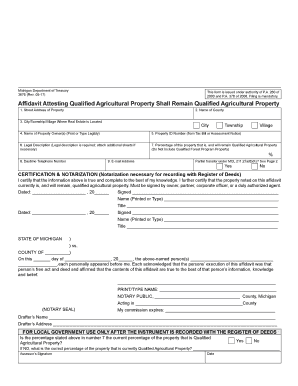
The MI DoT 3676 form is essential for declaring that certain properties will continue to qualify as agricultural properties after a transfer. This guide provides a straightforward, step-by-step approach to help users fill out the form accurately and efficiently online.
Follow the steps to complete the MI DoT 3676 form online.
- Click ‘Get Form’ button to access the form and open it in your preferred document editor.
- Begin filling out the form by entering the street address of the property in the provided field at the top of the form. Ensure you type this information clearly and accurately.
- Next, select the name of the county where the property is located from the given options. This is crucial for proper documentation.
- Indicate the city, township, or village where the real estate is situated. Choose the appropriate designation to ensure accurate processing.
- In the next field, print or type the name of the property owner(s) legibly. Include all relevant owners to ensure no one is omitted.
- Enter the Property ID Number. This number can be found on the tax bill or assessment notice associated with the property.
- Provide a legal description of the property. If more space is needed, you may attach additional sheets to ensure completeness.
- Specify the percentage of the property that is, and will remain, qualified agricultural property. Make sure this figure does not include any property related to the Qualified Forest Program.
- Fill in the daytime telephone number where the property owner can be reached. This is helpful for any required follow-up regarding the form.
- Input an email address for correspondence related to the affidavit and any potential inquiries.
- Indicate whether there is a partial transfer under MCL 211.27a(6)(K) by selecting ‘Yes’ or ‘No’. Refer to page 2 of the form as necessary for additional context.
- Proceed to the certification and notarization section. Here, users must sign and date the affidavit, certifying the truth of the information provided. If there are multiple owners, all must sign.
- Ensure a notary public is present to notarize the document after signing, which is necessary for recording the affidavit with the register of deeds.
- After completing all sections, review the form for any errors or omissions. Once satisfied, you can save any changes made, download a copy, print it for your records, or share the completed form as required.
Complete your MI DoT 3676 form online today to ensure your property maintains its qualified status.
Get form
To obtain a tax clearance in Michigan, you must complete a specific request form available through the Michigan Department of Treasury. Provide all necessary identification and details regarding your tax status to facilitate the process. After submission, you will receive confirmation from the Treasury once your clearance is processed. Resources from USLegalForms can guide you through requirements related to MI DoT 3676.
Get This Form Now!
Industry-leading security and compliance
-
In businnes since 199725+ years providing professional legal documents.
-
Accredited businessGuarantees that a business meets BBB accreditation standards in the US and Canada.
-
Secured by BraintreeValidated Level 1 PCI DSS compliant payment gateway that accepts most major credit and debit card brands from across the globe.