Loading
Form preview
  • US Legal Forms
  • Form Library
  • Tax Forms
  • Michigan Tax Forms
  • Mi Dot 4763 2016

Get Mi Dot 4763 2016-2026

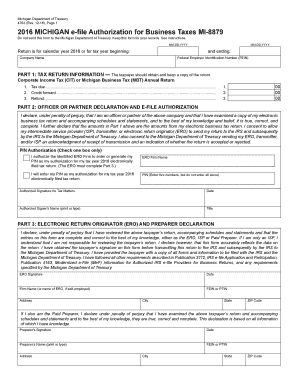
Ents described in Publication 3112, IRS e-file Application and Participation, Publication 4163, Modernized e-File (MeF) Information for Authorized IRS e-file Providers for Business Returns, and any requirements specified by the Michigan Department of Treasury. ERO Signature Date Firm Name (or name of ERO, if self-employed) FEIN or PTIN Address City State ZIP Code If I also am the Paid Preparer, I declare under penalty of perjury that I have examined the above taxpayer s return and acco.

How it works

  1. Open form

    Open form follow the instructions

  2. Easily sign form

    Easily sign the form with your finger

  3. Share form

    Send filled & signed form or save

How to fill out the MI DoT 4763 online

Filling out the MI DoT 4763 can seem complex, but with clear guidance, you can complete it accurately and efficiently. This guide aims to walk you through each section of the form, ensuring a smooth online submission process.

Follow the steps to successfully complete the MI DoT 4763.

  1. Press the ‘Get Form’ button to access the MI DoT 4763 form and open it for editing.
  2. Enter the tax return information in Part 1, including the tax type (Corporate Income Tax or Michigan Business Tax) and the amounts for tax due, credit forward, and refund. Make sure to input numbers clearly in the designated fields, using zeros if applicable.
  3. In Part 2, the officer or partner must declare their position within the company and verify that the electronic tax return is accurate. They should check the appropriate box to authorize either an ERO Firm to generate their Personal Identification Number (PIN) or enter their own PIN.
  4. Complete the authorized signature, date, name, and title fields. This step is crucial as it signifies the consent for the ERO to transmit the return. Ensure that all information is entered correctly.
  5. In Part 3, if applicable, the ERO or paid preparer should declare their review of the tax return. They must include their signature, the date, and the firm name, along with FEIN or PTIN.
  6. Verify that all parts of the form are filled out accurately and completely before finalizing. Users should retain a copy of the completed MI DoT 4763 for their records and ensure not to send it to the Michigan Department of Treasury unless specifically requested.
  7. Once all fields are completed and verified, users can save changes, download, print, or share the completed form as needed.

Take the next step in your document management by completing your MI DoT 4763 online today.

Get form

Experience a faster way to fill out and sign forms on the web. Access the most extensive library of templates available.
Get form

Related content

4890, 2024 Corporate Income Tax Forms and...
... MI-8879 (also called the Michigan e-file Authorization for Business Taxes MI-8879...
Learn more
The Astrophysical Journal, 268:476-494, 1983 May...
The point at the lower right is 2184, which is one. © American Astronomical Society •...
Learn more
MWH-Full-Product-Catalog.pdf
DOT 3, DOT 4 approved. Less expansion provides more stopping power. Gives immediate brake...
Learn more

Related links form

TBI Backgrounds BI-0200 2012 TN Attorney General and Reporter's Nonprofit Corporations Request For Information Packet 2010 TN BLE Affidavit of Practice in Foreign Jurisdiction 2018 TN BLE Amendment to Application 2016

Questions & Answers

Get answers to your most pressing questions about US Legal Forms API.

Contact support

The common abbreviation for Michigan Department of Transportation is MDOT. This abbreviation is widely used in various documents and discussions regarding transportation policies and projects. If you are dealing with related paperwork or processes, such as those involving the MI DoT 4763, recognizing this abbreviation can simplify your communications.

MDOT refers to the Michigan Department of Transportation, an agency responsible for maintaining and improving the state's transportation systems. This includes overseeing the construction and maintenance of highways, bridges, and railroads. Familiarizing yourself with MDOT, especially in the context of MI DoT 4763, can significantly enhance your understanding of state transportation operations.

The 'M' on Michigan roads indicates that it is a state trunk line highway. These highways serve as major routes for transport and travel across the state. Knowing about these roads, particularly those identified with the MI DoT 4763, helps drivers plan their trips and understand route options better.

MDOT stands for the Michigan Department of Transportation. This agency plays a crucial role in managing Michigan's transportation infrastructure, including roads and highways. Understanding MDOT and its role can help you navigate state transportation resources more efficiently, especially when dealing with MI DoT 4763 matters.

To contact the Michigan Department of Transportation, you can visit their official website. There, you will find contact information including phone numbers and email addresses. Engaging with the MI DoT 4763 through their website can provide you with timely updates and assistance on various services.

Yes, you can file ADT 1 before ADT 3. The ADT 1 form is typically submitted to document a change of ownership, while ADT 3 concerns other vehicle transactions. Filing ADT 1 first ensures that you establish clear ownership before completing subsequent forms.

The person who purchased the vehicle is usually responsible for filing the ADT-1 form. This ensures that the vehicle's registration reflects accurate ownership information. If you need assistance or clarification, platforms like US Legal Forms can provide resources to help you understand your obligations.

Filing Michigan Form 5081 involves a straightforward process. Begin by accessing the form on the MI DoT's official website, then fill it out with the required details about the vehicle. Once completed, submit the form through the designated channels, ensuring you keep records of your submission for future reference.

The frequency of filing the ADT 1 form typically depends on the specific needs regarding vehicle transactions. Generally, you need to file this form each time there is a change in ownership or status of the vehicle. Staying aware of when to file will ensure you meet MI DoT regulations and avoid potential penalties.

Filing the ADT 1 form online is simple and convenient. Visit the MI DoT portal and navigate to the online services section for filing forms. Follow the prompts to fill in the required information, and submit your application. Keep a copy of your confirmation for your records.

Get This Form Now!

Use professional pre-built templates to fill in and sign documents online faster. Get access to thousands of forms.
Get form
If you believe that this page should be taken down, please follow our DMCA take down processhere.

Industry-leading security and compliance

US Legal Forms protects your data by complying with industry-specific security standards.
  • In businnes since 1997
    25+ years providing professional legal documents.
  • Accredited business
    Guarantees that a business meets BBB accreditation standards in the US and Canada.
  • Secured by Braintree
    Validated Level 1 PCI DSS compliant payment gateway that accepts most major credit and debit card brands from across the globe.
Get MI DoT 4763
Get form
Form Packages
Adoption
Bankruptcy
Contractors
Divorce
Home Sales
Employment
Identity Theft
Incorporation
Landlord Tenant
Living Trust
Name Change
Personal Planning
Small Business
Wills & Estates
Packages A-Z
Form Categories
Affidavits
Bankruptcy
Bill of Sale
Corporate - LLC
Divorce
Employment
Identity Theft
Internet Technology
Landlord Tenant
Living Wills
Name Change
Power of Attorney
Real Estate
Small Estates
Wills
All Forms
Forms A-Z
Form Library
Customer Service
Your Privacy Choices
Terms of Service
Privacy Notice
Legal Hub
Content Takedown Policy
Bug Bounty Program
About Us
Help Portal
Legal Resources
Blog
Affiliates
Contact Us
Delete My Account
Site Map
Industries
Forms in Spanish
Localized Forms
State-specific Forms
Forms Kit
Legal Guides
Real Estate Handbook
All Guides
Prepared for You
Notarize
Incorporation services
Our Customers
For Consumers
For Small Business
For Attorneys
Our Sites
US Legal Forms
USLegal
FormsPass
pdfFiller
signNow
altaFlow
DocHub
Instapage
Social Media
Call us now toll free:
+1 833 426 79 33
As seen in:
  • USA Today logo picture
  • CBC News logo picture
  • LA Times logo picture
  • The Washington Post logo picture
  • AP logo picture
  • Forbes logo picture
© Copyright 1997-2026
airSlate Legal Forms, Inc.
3720 Flowood Dr, Flowood, Mississippi 39232
Form Packages
Adoption
Bankruptcy
Contractors
Divorce
Home Sales
Employment
Identity Theft
Incorporation
Landlord Tenant
Living Trust
Name Change
Personal Planning
Small Business
Wills & Estates
Packages A-Z
Form Categories
Affidavits
Bankruptcy
Bill of Sale
Corporate - LLC
Divorce
Employment
Identity Theft
Internet Technology
Landlord Tenant
Living Wills
Name Change
Power of Attorney
Real Estate
Small Estates
Wills
All Forms
Forms A-Z
Form Library
Customer Service
Your Privacy Choices
Terms of Service
Privacy Notice
Legal Hub
Content Takedown Policy
Bug Bounty Program
About Us
Help Portal
Legal Resources
Blog
Affiliates
Contact Us
Delete My Account
Site Map
Industries
Forms in Spanish
Localized Forms
State-specific Forms
Forms Kit
Legal Guides
Real Estate Handbook
All Guides
Prepared for You
Notarize
Incorporation services
Our Customers
For Consumers
For Small Business
For Attorneys
Our Sites
US Legal Forms
USLegal
FormsPass
pdfFiller
signNow
altaFlow
DocHub
Instapage
Social Media
Call us now toll free:
+1 833 426 79 33
As seen in:
  • USA Today logo picture
  • CBC News logo picture
  • LA Times logo picture
  • The Washington Post logo picture
  • AP logo picture
  • Forbes logo picture
© Copyright 1997-2026
airSlate Legal Forms, Inc.
3720 Flowood Dr, Flowood, Mississippi 39232