Get Mi Dot 518 2013
How it works
-

Open form follow the instructions
-

Easily sign the form with your finger
-

Send filled & signed form or save
How to fill out the MI DoT 518 online
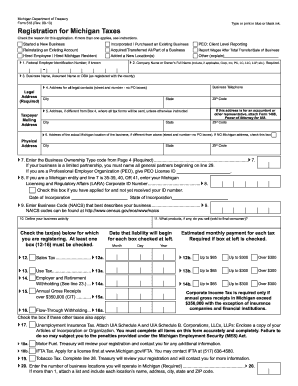
The MI DoT 518 is a crucial form for registering your business for Michigan taxes. This guide provides a comprehensive overview of how to accurately complete the form online, catering to users with varying levels of experience in legal or tax matters.
Follow the steps to fill out the MI DoT 518 online.
- Click the ‘Get Form’ button to obtain the form and open it in the editor.
- Indicate the reason for this application by checking the appropriate box. Multiple reasons can be checked if applicable.
- Enter your Federal Employer Identification Number (FEIN) issued by the IRS in Line 1. If you do not have one, you must obtain it before proceeding.
- Fill in your company name on Line 2, including any required designators such as LLC or Inc.
- Provide the legal address where your business records are kept in Line 4, and a mailing address (if different) in Line 5.
- If applicable, complete Line 6 with the physical address of the business location in Michigan.
- Select the appropriate business ownership type code in Line 7 as specified in the instructions.
- On Line 9, enter the North American Industrial Classification System (NAICS) code that reflects your business operations.
- Describe the specific business activity you will be conducting in Line 10.
- In Line 11, specify the products you will sell to final consumers.
- Check all relevant tax types you're registering for in Lines 12 to 16 and indicate the estimated monthly payments.
- Complete Line 17 for Unemployment Insurance Tax, attaching UIA Schedules A and B where necessary.
- Fill in any additional applicable tax type boxes in Lines 18 to 19.
- Enter the number of locations your business operates in Michigan in Line 20 and the month you close your tax books in Line 21.
- If your business is seasonal, specify the months you operate in Lines 22a and 22b.
- Provide the necessary information for each owner, partner, or corporate officer in Lines 29 to 32, ensuring all names and titles are completed accurately.
- Review your completed form for any missing information and then save your changes.
- Once satisfied, you can download, print, or share your completed MI DoT 518 form as required.
Complete your MI DoT 518 form online today to ensure your business is properly registered for Michigan taxes.
Get form
The Michigan Department of Treasury sends various communications, including tax documents, notices, and compliance updates. These communications are essential for ensuring you stay informed about your tax obligations, especially concerning the MI DoT 518 process. Often, these communications may require your attention, so it’s wise to review them promptly. To easily manage your documents, consider using platforms like uslegalforms for accurate forms and filing guidance.
Get This Form Now!
Industry-leading security and compliance
-
In businnes since 199725+ years providing professional legal documents.
-
Accredited businessGuarantees that a business meets BBB accreditation standards in the US and Canada.
-
Secured by BraintreeValidated Level 1 PCI DSS compliant payment gateway that accepts most major credit and debit card brands from across the globe.