Loading
Form preview
  • US Legal Forms
  • Form Library
  • Tax Forms
  • Michigan Tax Forms
  • Mi Dot Mi-1041 2014

Get Mi Dot Mi-1041 2014

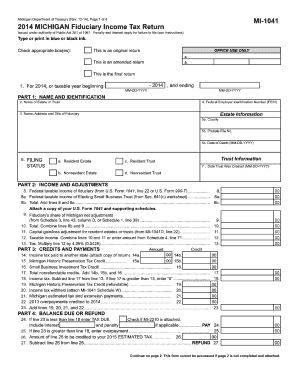
8. 8a. 8b. 00 00 00 9. 10. 11. 12. 13. 00 00 00 00 00 00 00 00 17. 18. 00 00 00 00 00 00 23. 00 Include interest and penalty if applicable................... PAY 24. 25. If line 23 is greater than line 18, enter overpayment................................................................... 25. 26. Amount of line 25 to be credited to your 2015 ESTIMATED TAX................. 26. 00 27. Subtrac.

How it works

  1. Open form

    Open form follow the instructions

  2. Easily sign form

    Easily sign the form with your finger

  3. Share form

    Send filled & signed form or save

How to fill out the MI DoT MI-1041 online

Filing the MI DoT MI-1041 form online is essential for estates and trusts in Michigan to report fiduciary income tax. This guide provides clear instructions to assist you in completing the form accurately and efficiently.

Follow the steps to fill out the MI-1041 online.

  1. Click the ‘Get Form’ button to obtain the MI DoT MI-1041 and open it in the editor.
  2. Begin with Part 1, which requires you to provide the name of the estate or trust, your Federal Employer Identification Number (FEIN), and the details of the fiduciary, including their name, address, and title. Make sure to fill in the appropriate tax year and check if the return is original, amended, or final.
  3. In Part 2, enter the federal taxable income of the fiduciary. This should include any necessary supporting documentation like U.S. Form 1041. Likewise, include any adjustments specific to Michigan income and calculate your taxable income accordingly.
  4. For Part 3, outline any credits and payments. This includes income tax paid to other states and any applicable Michigan Historic Preservation Tax Credits. Total these amounts and subtract total nonrefundable credits from the income tax calculated previously.
  5. In Part 4, determine whether there is a balance due or an overpayment. Ensure that you calculate accurately; if a balance is due, you will also need to check if MI-2210 is attached, which pertains to any penalties related to underpayment.
  6. Complete any necessary schedules such as Schedule 1 for net Michigan adjustments, Schedule 2 for beneficiaries, and as instructed. Attach any required schedules and the amended U.S. Form 1041 if applicable.
  7. Finally, review your completed form for accuracy. Save your changes, download a copy for your records, and then proceed to print or share the form as needed.

Complete your MI DoT MI-1041 form online to ensure compliance and to facilitate the management of your estate or trust.

Get form

Experience a faster way to fill out and sign forms on the web. Access the most extensive library of templates available.

Related content

Form 1041, Refusal of PASRR Mental Illness...
Form 1041 is prepared after an interdisciplinary team (IDT) meeting when a person who is...
Learn more
hazardous-material-code-table.pdf
1041 Propylene Dichloride (FL, P). 3409 Propylene Glycol (I). 1043 Propylene Glycol...
Learn more
Manual do Proprietário de Bicicleta ...
A PARTE I deste manual é a 9ª edição do manual genérico. Parte ii. Contém...
Learn more

Related links form

TX HCAD 11.13 2019 TX Home Equity Security Document TX Instruction for Completing the Texas Civil Case Information Sheet 2013 TX Instructions for Preparation of Inventory and Appraisement

Questions & Answers

Get answers to your most pressing questions about US Legal Forms API.

Contact support

The 1041 tax form is used primarily to report income earned by estates and trusts, outlining how the income is taxed and attributed to beneficiaries. When completing the MI DoT MI-1041, fiduciaries provide information on the financial activities of the estate, ensuring accurate tax payments and compliance with regulations. This form plays a crucial role in the tax process for estates.

As a beneficiary, you typically do not file a MI DoT MI-1041 tax return unless you receive income directly from the estate or trust. Instead, you may report any distributed income on your personal tax return. However, it is essential to understand your tax obligations based on the distributions you receive from the estate.

The IRS 1041 form is used to report income, deductions, gains, losses, and other important financial information for estates and trusts. When completing the MI DoT MI-1041, these details help determine the tax obligations of the estate or trust. Properly filing this form ensures that you remain compliant with federal tax laws.

Taxable income for Form 1041 typically includes all income earned by the estate, including interest, dividends, and capital gains. Additionally, any refunds or other payments that can be classified as income may also fall under this category. Understanding what qualifies will help you successfully navigate the MI DoT MI-1041 requirements.

Refunds for state-local tax returns can be taxable if those taxes were previously deducted, affecting the overall tax consequence for the estate. When filing the MI DoT MI-1041, it is vital to determine if the estate benefited from any deductions in the past. This evaluation will guide your tax reporting obligations.

Filling out Form 1041 involves detailing income, deductions, and tax credits for the estate or trust. You will need to gather relevant financial documents to accurately represent income and expenses on the form. Using the MI DoT MI-1041 will provide clarification on the requirements and help ensure correct submission.

Yes, state tax refunds can be taxable income to an estate if the estate had previously claimed a deduction for those state taxes. The MI DoT MI-1041 guidelines help determine when an estate must report such refunds as income. Therefore, it's crucial to analyze past tax filings to make an informed decision.

State tax refunds can be taxable on Form 1041, depending on whether the estate received a tax benefit from the deduction in the prior year. If the estate previously deducted the state taxes, the refund might be taxable income when reporting on the MI DoT MI-1041. Therefore, it is essential to evaluate your estate's tax history to determine the proper treatment.

You can send IRS payments electronically, and many people find this method efficient and secure. Electronic payment options allow you to complete your transactions from the comfort of your home, making it easier to manage your financial obligations. Always verify the payment methods accepted by the IRS on their official site. Consider using resources like USLegalForms to guide you through this process.

Yes, you can make MI DoT MI-1041 payments online through various platforms. Online payment options provide convenience and ensure that your payment is processed quickly. Be sure to check the official MI DoT site or trusted platforms for secure transactions. Using services like USLegalForms can help simplify the payment process.

Get This Form Now!

Use professional pre-built templates to fill in and sign documents online faster. Get access to thousands of forms.
If you believe that this page should be taken down, please follow our DMCA take down processhere.

Industry-leading security and compliance

US Legal Forms protects your data by complying with industry-specific security standards.
  • In businnes since 1997
    25+ years providing professional legal documents.
  • Accredited business
    Guarantees that a business meets BBB accreditation standards in the US and Canada.
  • Secured by Braintree
    Validated Level 1 PCI DSS compliant payment gateway that accepts most major credit and debit card brands from across the globe.
Get MI DoT MI-1041
  • Adoption
  • Bankruptcy
  • Contractors
  • Divorce
  • Home Sales
  • Employment
  • Identity Theft
  • Incorporation
  • Landlord Tenant
  • Living Trust
  • Name Change
  • Personal Planning
  • Small Business
  • Wills & Estates
  • Packages A-Z
  • Affidavits
  • Bankruptcy
  • Bill of Sale
  • Corporate - LLC
  • Divorce
  • Employment
  • Identity Theft
  • Internet Technology
  • Landlord Tenant
  • Living Wills
  • Name Change
  • Power of Attorney
  • Real Estate
  • Small Estates
  • Wills
  • All Forms
  • Forms A-Z
  • Form Library
  • Legal Hub
  • About Us
  • Help Portal
  • Legal Resources
  • Blog
  • Affiliates
  • Contact Us
  • Delete My Account
  • Site Map
  • Industries
  • Forms in Spanish
  • Localized Forms
  • State-specific Forms
  • Forms Kit
  • Real Estate Handbook
  • All Guides
  • Notarize
  • Incorporation services
  • For Consumers
  • For Small Business
  • For Attorneys
  • USLegal
  • FormsPass
  • pdfFiller
  • signNow
  • altaFlow
  • DocHub
  • Instapage
Form Packages
  • Adoption
  • Bankruptcy
  • Contractors
  • Divorce
  • Home Sales
  • Employment
  • Identity Theft
  • Incorporation
  • Landlord Tenant
  • Living Trust
  • Name Change
  • Personal Planning
  • Small Business
  • Wills & Estates
  • Packages A-Z
Form Categories
  • Affidavits
  • Bankruptcy
  • Bill of Sale
  • Corporate - LLC
  • Divorce
  • Employment
  • Identity Theft
  • Internet Technology
  • Landlord Tenant
  • Living Wills
  • Name Change
  • Power of Attorney
  • Real Estate
  • Small Estates
  • Wills
  • All Forms
  • Forms A-Z
  • Form Library
Customer Service
  • Legal Hub
  • About Us
  • Help Portal
  • Legal Resources
  • Blog
  • Affiliates
  • Contact Us
  • Delete My Account
  • Site Map
  • Industries
  • Forms in Spanish
  • Localized Forms
  • State-specific Forms
  • Forms Kit
Legal Guides
  • Real Estate Handbook
  • All Guides
Prepared for you
  • Notarize
  • Incorporation services
Our Customers
  • For Consumers
  • For Small Business
  • For Attorneys
Our Sites
  • USLegal
  • FormsPass
  • pdfFiller
  • signNow
  • altaFlow
  • DocHub
  • Instapage
Social Media
Call us now toll free:
+1 833 426 79 33
As seen in:
© Copyright 1999-2026 airSlate Legal Forms, Inc. 3720 Flowood Dr, Flowood, Mississippi 39232
  • Your Privacy Choices
  • Terms of Service
  • Privacy Notice
  • Content Takedown Policy
  • Bug Bounty Program
MI DoT MI-1041
This form is available in several versions.
Select the version you need from the drop-down list below.
2020 MI DoT MI-1041
Select form
  • 2020 MI DoT MI-1041
  • 2019 MI DoT MI-1041
  • 2017 MI DoT MI-1041
  • 2016 MI DoT MI-1041
  • 2015 MI DoT MI-1041
  • 2014 MI DoT MI-1041
  • 1998 MI DoT MI-1041
Select form