Loading
Get Ne Form 10 2017
How it works
-

Open form follow the instructions
-

Easily sign the form with your finger
-

Send filled & signed form or save
How to fill out the NE Form 10 online
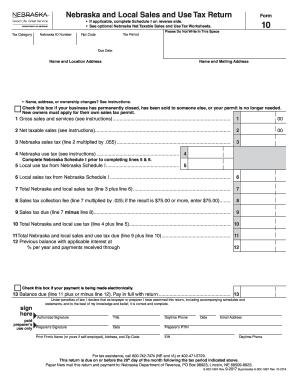
Filling out the NE Form 10 online is essential for businesses that make taxable sales in Nebraska. This guide provides a comprehensive overview and step-by-step instructions to help you complete the form accurately and efficiently.
Follow the steps to successfully complete the NE Form 10 online.
- Press the ‘Get Form’ button to obtain the NE Form 10 and open it in your editing environment.
- Enter your Nebraska ID number in the designated field at the top of the form, ensuring it is accurate to avoid processing issues.
- Fill in the tax period for which you are reporting. This information is essential for the timely processing of your return.
- Complete the 'Name and Location Address' and 'Name and Mailing Address' sections. Ensure to indicate any changes accurately and check the box if your business is closed or sold.
- Report your gross sales and services in line 1. This should include all sales, whether taxable or exempt, rounded to the nearest dollar.
- Calculate the net taxable sales and enter this amount on line 2. Refer to the Nebraska Net Taxable Sales Worksheets for guidance on allowable deductions.
- Complete the Nebraska sales tax calculation on line 3, multiplying the net taxable sales by the appropriate sales tax rate.
- Fill in the Nebraska use tax on line 4, detailing any applicable amounts according to the instructions provided.
- Use Nebraska Schedule I to enter local use tax on line 5 and local sales tax on line 6. Ensure these figures are accurate.
- Calculate the total Nebraska and local sales tax on line 7 by combining the amounts from line 3 and line 6.
- Compute the sales tax collection fee on line 8, applying the specified percentage to line 7, and apply the minimum limit if necessary.
- Determine the sales tax due on line 9 by subtracting the collection fee from the total sales tax.
- Calculate total Nebraska use tax on line 10 by combining the figures from lines 4 and 5.
- Sum lines 9 and 10 to find the total Nebraska and local sales and use tax due on line 11.
- If applicable, enter any previous balance information on line 12, including interest and payments received.
- Indicate the balance due on line 13. Ensure all checks for electronic payments are accurately completed.
- Provide signatures in the designated area, certifying the accuracy of the information submitted.
- Upon completing all sections, save your changes, download the form, print it, or share it as required.
Complete your NE Form 10 online today to ensure timely and accurate reporting.
Get form
Experience a faster way to fill out and sign forms on the web. Access the most extensive library of templates available.
Related links form
You record tax-exempt sales by maintaining clear and accurate records for all exempt transactions. This includes collecting completed NE Form 10 from your customers and storing these documents for your records. Proper documentation ensures transparency and simplifies your tax reporting processes during audits.
Get This Form Now!
Use professional pre-built templates to fill in and sign documents online faster. Get access to thousands of forms.
Industry-leading security and compliance
US Legal Forms protects your data by complying with industry-specific security standards.
-
In businnes since 199725+ years providing professional legal documents.
-
Accredited businessGuarantees that a business meets BBB accreditation standards in the US and Canada.
-
Secured by BraintreeValidated Level 1 PCI DSS compliant payment gateway that accepts most major credit and debit card brands from across the globe.