Loading
Form preview
  • US Legal Forms
  • Form Library
  • Tax Forms
  • New York Tax Forms
  • Ny Dtf Dtf-17 2004

Get Ny Dtf Dtf-17 2004

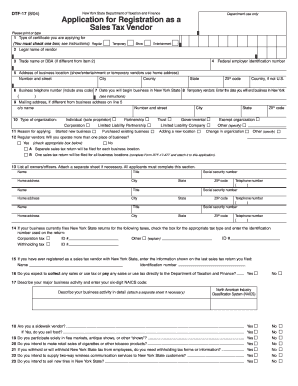
For (You must check one box; see instructions): Regular 2 Legal name of vendor Temporary Show Entertainment 3 Trade name or DBA (if different from item 2) 4 Federal employer identification number 5 Address of business location (show/entertainment or temporary vendors use home address) Number and street City County State ZIP code Country, if not U.S. 6 Business telephone number (include area code) 7 Date you will begin business in New York State 8 Temporary vendors: Enter the date you.

How it works

  1. Open form

    Open form follow the instructions

  2. Easily sign form

    Easily sign the form with your finger

  3. Share form

    Send filled & signed form or save

How to fill out the NY DTF DTF-17 online

The NY DTF DTF-17 form is essential for individuals and organizations seeking to register as sales tax vendors in New York State. This guide provides a detailed overview of each section of the form, ensuring a smooth filing process for all users, regardless of their experience with such documents.

Follow the steps to complete the NY DTF DTF-17 form online.

  1. Click the ‘Get Form’ button to obtain the form and open it in the editor.
  2. Select the type of certificate you are applying for by checking the appropriate box, either 'Regular' or 'Temporary'. This will determine the nature of your registration.
  3. Enter your legal name as the vendor in the designated field, ensuring accuracy to avoid any discrepancies in your application.
  4. If you operate under a trade name or 'Doing Business As' (DBA) name different from your legal name, enter that name in the specified field.
  5. Provide your federal employer identification number (EIN), which is essential for tax identification.
  6. Fill in your business location address. If you are a show or entertainment vendor, use your home address.
  7. Enter your business telephone number, including the area code, to facilitate easy communication.
  8. Indicate the date when you will begin your business activities in New York State.
  9. Temporary vendors should specify the date they will end their business in New York State.
  10. If your mailing address differs from your business address, provide the appropriate mailing information here.
  11. Select the type of organization you represent: Individual, Partnership, Corporation, Limited Liability Partnership, Trust, Governmental, Limited Liability Company, Exempt Organization, or Other.
  12. State your reason for applying, such as starting a new business or purchasing an existing one.
  13. Indicate whether you will operate more than one place of business and check the corresponding box for your choice.
  14. List all owners or officers of the business, ensuring to include their names, home addresses, and social security numbers.
  15. If applicable, check the box next to the type of tax you currently file in New York State, and provide the identification number used.
  16. If you have previously registered as a sales tax vendor, provide the required information from your last filed sales tax return.
  17. Declare whether you expect to collect or pay any sales or use tax to the Department of Taxation and Finance.
  18. Describe your major business activities and include your six-digit NAICS code; attach additional information if needed.
  19. Answer questions regarding your involvement as a sidewalk vendor or participation in flea markets.
  20. Respond to queries about any outstanding state tax notifications, tax liabilities, or legal issues related to tax law.
  21. Certify that the information you have provided is true and correct, sign the form, and provide your title and date.
  22. Finally, after completing the form, you can save your changes, download a copy, print, or share as necessary.

Begin your registration process today by filling out the NY DTF DTF-17 form online.

Get form

Experience a faster way to fill out and sign forms on the web. Access the most extensive library of templates available.

Related content

Instructions for Form DTF-17
Form DTF-17 is an application to register for a sales tax certificate, allowing you to...
Learn more
29: Collecting Sales Tax - Cornell Small Farms
Feb 2, 2021 — Becoming a Sales Tax Vendor – Form DTF-17-I – Certificate of...
Learn more
Form CT-600-I:2011
Line 28 – Green building credit — Enter the amount of green building credit deducted...
Learn more

Related links form

Mv210 Oregon Dmv Refund Request Robber Baron Or Captain Of Industry Worksheet Khula Application

Questions & Answers

Get answers to your most pressing questions about US Legal Forms API.

Contact support

Filling out the ST-120 form PDF requires entering your business information along with the items being purchased. This form serves as a resale certificate and helps you avoid paying sales tax. When completing the NY DTF DTF-17, attention to detail is essential to maintain compliance with New York tax regulations. USLegalForms provides templates that simplify this process for you.

Filling out a NY resale certificate involves providing your business name, address, and the buyer's information. You also need to indicate the type of goods you are purchasing for resale. Completing the NY DTF DTF-17 accurately will enable you to make tax-exempt purchases legitimately. For guidance, refer to resources offered by USLegalForms to ensure accuracy.

Verifying a New York resale certificate is crucial to ensure its validity. You can do this by checking the certificate's details against the issuing authority's records. If you're unsure of the process, consider utilizing USLegalForms, which can assist you in navigating the verification seamlessly. Remember, using the correct NY DTF DTF-17 form helps you maintain compliance.

You can obtain a copy of your NY certificate of authority through the New York State Department of Taxation and Finance website. They provide an option to request a duplicate online, or you can apply by mail. Maintaining your NY DTF DTF-17 in good order ensures you can access all necessary documentation whenever required.

To cancel your NYS estimated tax payment, you must contact the New York State Department of Taxation and Finance directly. They can guide you through the cancellation process, ensuring you take the right steps. If you have filled out your NY DTF DTF-17 form in error, prompt action can help rectify the situation.

NYS DTF tax payment refers to payments made to the New York State Department of Taxation and Finance regarding your state taxes. This includes various types of taxes like income tax and sales tax. Being proactive in your NY DTF DTF-17 submissions helps ensure your payments are accurate and timely.

Receiving mail from the NYS Department of Taxation and Finance typically indicates they need to communicate important tax information. This could pertain to your tax returns, adjustments, or outstanding taxes. It's essential to review this mail carefully, especially if it relates to your NY DTF DTF-17 submissions.

You can obtain your NYC tax form by visiting the New York City Department of Finance website. They provide downloadable forms that you can complete at your own pace. Alternatively, you can use platforms like USLegalForms to find and fill out the NY DTF DTF-17 form and other related documents conveniently.

DTF stands for the Department of Taxation and Finance in New York. This department manages the state's tax collections and ensures compliance with tax laws. For individuals needing assistance with forms like the NY DTF DTF-17, the department provides resources and guidance to simplify the tax filing process.

To obtain a certificate of authority in New York, you need to complete an application through the New York Department of Taxation and Finance. This involves providing necessary business information and possibly submitting supporting documents. Using platforms like uslegalforms can help you navigate the application process smoothly and ensure compliance with regulations.

Get This Form Now!

Use professional pre-built templates to fill in and sign documents online faster. Get access to thousands of forms.
If you believe that this page should be taken down, please follow our DMCA take down processhere.

Industry-leading security and compliance

US Legal Forms protects your data by complying with industry-specific security standards.
  • In businnes since 1997
    25+ years providing professional legal documents.
  • Accredited business
    Guarantees that a business meets BBB accreditation standards in the US and Canada.
  • Secured by Braintree
    Validated Level 1 PCI DSS compliant payment gateway that accepts most major credit and debit card brands from across the globe.
Get NY DTF DTF-17
  • Adoption
  • Bankruptcy
  • Contractors
  • Divorce
  • Home Sales
  • Employment
  • Identity Theft
  • Incorporation
  • Landlord Tenant
  • Living Trust
  • Name Change
  • Personal Planning
  • Small Business
  • Wills & Estates
  • Packages A-Z
  • Affidavits
  • Bankruptcy
  • Bill of Sale
  • Corporate - LLC
  • Divorce
  • Employment
  • Identity Theft
  • Internet Technology
  • Landlord Tenant
  • Living Wills
  • Name Change
  • Power of Attorney
  • Real Estate
  • Small Estates
  • Wills
  • All Forms
  • Forms A-Z
  • Form Library
  • Legal Hub
  • About Us
  • Help Portal
  • Legal Resources
  • Blog
  • Affiliates
  • Contact Us
  • Delete My Account
  • Site Map
  • Industries
  • Forms in Spanish
  • Localized Forms
  • State-specific Forms
  • Forms Kit
  • Real Estate Handbook
  • All Guides
  • Notarize
  • Incorporation services
  • For Consumers
  • For Small Business
  • For Attorneys
  • USLegal
  • FormsPass
  • pdfFiller
  • signNow
  • altaFlow
  • DocHub
  • Instapage
Form Packages
  • Adoption
  • Bankruptcy
  • Contractors
  • Divorce
  • Home Sales
  • Employment
  • Identity Theft
  • Incorporation
  • Landlord Tenant
  • Living Trust
  • Name Change
  • Personal Planning
  • Small Business
  • Wills & Estates
  • Packages A-Z
Form Categories
  • Affidavits
  • Bankruptcy
  • Bill of Sale
  • Corporate - LLC
  • Divorce
  • Employment
  • Identity Theft
  • Internet Technology
  • Landlord Tenant
  • Living Wills
  • Name Change
  • Power of Attorney
  • Real Estate
  • Small Estates
  • Wills
  • All Forms
  • Forms A-Z
  • Form Library
Customer Service
  • Legal Hub
  • About Us
  • Help Portal
  • Legal Resources
  • Blog
  • Affiliates
  • Contact Us
  • Delete My Account
  • Site Map
  • Industries
  • Forms in Spanish
  • Localized Forms
  • State-specific Forms
  • Forms Kit
Legal Guides
  • Real Estate Handbook
  • All Guides
Prepared for you
  • Notarize
  • Incorporation services
Our Customers
  • For Consumers
  • For Small Business
  • For Attorneys
Our Sites
  • USLegal
  • FormsPass
  • pdfFiller
  • signNow
  • altaFlow
  • DocHub
  • Instapage
Social Media
Call us now toll free:
+1 833 426 79 33
As seen in:
© Copyright 1999-2026 airSlate Legal Forms, Inc. 3720 Flowood Dr, Flowood, Mississippi 39232
  • Your Privacy Choices
  • Terms of Service
  • Privacy Notice
  • Content Takedown Policy
  • Bug Bounty Program
NY DTF DTF-17
This form is available in several versions.
Select the version you need from the drop-down list below.
2010 NY DTF DTF-17
Select form
  • 2010 NY DTF DTF-17
  • 2007 NY DTF DTF-17
  • 2006 NY DTF DTF-17
  • 2004 NY DTF DTF-17
Select form