Loading
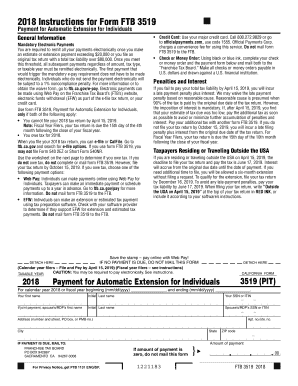
Get Ca Ftb 3519 2018
How it works
-

Open form follow the instructions
-

Easily sign the form with your finger
-

Send filled & signed form or save
How to fill out the CA FTB 3519 online
Filling out the CA FTB 3519 form successfully requires an understanding of its components and the steps necessary for completion. This guide provides clear instructions tailored for users of all experience levels, helping you navigate the process of submitting your payment for an automatic tax extension online.
Follow the steps to complete the CA FTB 3519 online
- Click ‘Get Form’ button to access the form and open it in the online editor.
- Review the general information and ensure that you meet the requirements for filing Form FTB 3519. You should only use this form if you cannot file your 2018 tax return by April 15, 2019, and if you owe tax for 2018.
- Enter your personal information in the designated fields, including your first name, last name, and Social Security Number (SSN) or Individual Taxpayer Identification Number (ITIN). If filing jointly, also include your partner's information.
- Provide your address, including street number, apartment number, city, state, and ZIP code. Ensure all information is accurate for any correspondence from the Franchise Tax Board.
- Determine the amount of payment due. Refer to the tax payment worksheet included in the form to calculate your expected tax obligations, deductions, and credits.
- If you owe tax, choose your payment method: Web Pay, electronic funds withdrawal, or check/money order. If using a check or money order, write it to the ‘Franchise Tax Board’ and include your SSN or ITIN.
- If the amount of payment is zero, do not mail the form. If you owe tax, submit the completed form according to the chosen payment method, ensuring adherence to deadlines and e-payment mandates.
- Upon completing the form, save changes, and consider downloading, printing, or sharing the form for your records.
Complete your documents and submit online for a seamless experience.
Get form
Experience a faster way to fill out and sign forms on the web. Access the most extensive library of templates available.
The grace period for an e-file rejection in California typically lasts for 5 days. During this time, you can correct the errors and resubmit your return without penalties. It's advisable to address any rejections quickly to maintain compliance with state tax regulations, including those applied to forms like the CA FTB 3519.
Get This Form Now!
Use professional pre-built templates to fill in and sign documents online faster. Get access to thousands of forms.
Industry-leading security and compliance
US Legal Forms protects your data by complying with industry-specific security standards.
-
In businnes since 199725+ years providing professional legal documents.
-
Accredited businessGuarantees that a business meets BBB accreditation standards in the US and Canada.
-
Secured by BraintreeValidated Level 1 PCI DSS compliant payment gateway that accepts most major credit and debit card brands from across the globe.