Loading
Get Nc Nc-3 2018-2026
How it works
-

Open form follow the instructions
-

Easily sign the form with your finger
-

Send filled & signed form or save
How to fill out the NC NC-3 online
Filling out the NC NC-3 form online is a crucial step for businesses in North Carolina to report annual withholding reconciliation accurately. This guide provides clear and concise instructions to help users complete the form effectively and ensure compliance with state regulations.
Follow the steps to fill out the NC NC-3 online seamlessly.
- Press the ‘Get Form’ button to access the NC NC-3 document and open it in your editing environment.
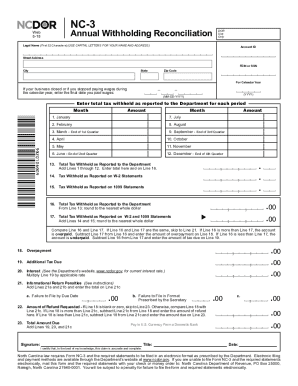
- Enter your legal name accurately using capital letters, ensuring it is within the first 32 character limit.
- Input your Account ID, FEIN (Federal Employer Identification Number) or SSN (Social Security Number), street address, city, state, and zip code as requested in the designated fields.
- Specify the calendar year for which you are reporting the withholding reconciliation.
- If applicable, enter the final date wages were paid during the calendar year, using the format MM-DD-YYYY.
- In the sections labeled for each month from January to December, enter the total tax withheld that corresponds to each month.
- Calculate the total tax withheld as reported to the Department by adding the amounts entered from Lines 1 to 12, and enter this value on Line 13.
- Fill in the tax withheld as reported on W-2 statements on Line 14 and on 1099 statements on Line 15.
- Total the tax withheld reported on W-2 and 1099 statements on Line 17 by adding Lines 14 and 15.
- Compare Line 16 (total tax withheld as reported) and Line 17; if they are the same, proceed to Line 21. If Line 16 is greater, complete Line 18 for overpayment; if less, complete Line 19 for additional tax due.
- Calculate any interest due on Line 20 related to additional tax due.
- Enter any penalties owed for late filing on Line 21, summarizing Sections 21a and 21b.
- If Line 18 indicates an overpayment, compare it with Line 21c to determine the amount of refund on Line 22, otherwise calculate the total amount due on Line 23.
- Finally, ensure your form is signed and dated, affirming that the information provided is accurate.
- Once all sections are correctly filled, users can save their changes, download, print, or share the form as needed.
Begin your online form completion today to ensure timely and accurate submission of the NC NC-3!
For NC state taxes, the withholding rate changes based on income brackets, so knowing your specific situation is essential. Generally, you might need to refer to the NC-3 form and understand the current rates. Consulting tools available on uslegalforms that cater to NC NC-3 can help you accurately calculate the appropriate withholding percentage.
Industry-leading security and compliance
US Legal Forms protects your data by complying with industry-specific security standards.
-
In businnes since 199725+ years providing professional legal documents.
-
Accredited businessGuarantees that a business meets BBB accreditation standards in the US and Canada.
-
Secured by BraintreeValidated Level 1 PCI DSS compliant payment gateway that accepts most major credit and debit card brands from across the globe.