Get Pa Rev-956 2009
How it works
-

Open form follow the instructions
-

Easily sign the form with your finger
-

Send filled & signed form or save
How to fill out the PA REV-956 online
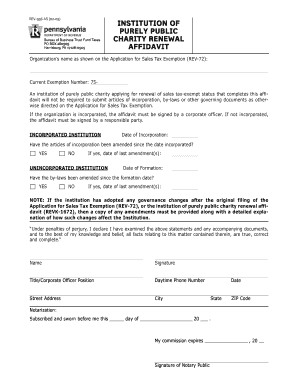
Completing the PA REV-956 affidavit is an essential step for institutions of purely public charity seeking to renew their sales tax-exempt status. This guide provides clear, step-by-step instructions to help you fill out the form accurately and efficiently.
Follow the steps to complete the PA REV-956 affidavit online.
- Press the ‘Get Form’ button to access the PA REV-956 affidavit. This allows you to open the form in your preferred online editor.
- Fill in the organization’s name as shown on the Application for Sales Tax Exemption (REV-72). Ensure this information is accurate to avoid processing delays.
- Enter the current exemption number. This is crucial for identifying your organization's tax-exempt status.
- If your organization is incorporated, provide the date of incorporation. If not, enter the date of formation for unincorporated institutions.
- Indicate whether the articles of incorporation have been amended since the date of incorporation. If 'Yes', specify the date of the last amendment.
- For unincorporated institutions, confirm if the by-laws have been amended since the formation date. If 'Yes', include the date of the last amendment.
- If any governance changes have occurred since the original filing, include a copy of the amendments and a detailed explanation of how these changes affect the institution.
- Complete the declaration by providing the name, signature, title or corporate officer position, daytime phone number, street address, city, state, ZIP code, and date.
- Arrange for notarization by a notary public. This includes signing and dating the notary section, which is required for the affidavit to be valid.
- After verifying all information, save your changes, and choose to download, print, or share the completed form as necessary.
Begin filling out your PA REV-956 affidavit online today for a streamlined process and ensure your organization's compliance.
Get form
To write a check to the PA Department of Revenue, use a blank check and include the appropriate payee's name: Pennsylvania Department of Revenue. Clearly state the amount in both numbers and words, and note the purpose of the payment in the memo line, such as 'tax payment' or 'PA REV-956 form payment'. Ensure that your check has your correct address and contact information for processing.