Loading
Form preview
  • US Legal Forms
  • Form Library
  • Tax Forms
  • South Carolina Tax Forms
  • Sc Dor Sc1040 2016

Get Sc Dor Sc1040 2016

. . . . . . . . . . . . . . . . . . . . . . . . . . . . . . . . . . . . . . . . . . Dollars 00 e Other additions to income. Attach an explanation (See instructions) . . . . . . . . . . . . e 00 Add lines a through e and enter the total here. These are your total additions . . . . . . . . . . . . . . . . . . . . . . . . . . 2 Add lines 1 and 2 and enter the total here . . . . . . . . . . . . . . . . . . . . . . . . . . . . . . . . . . . . . . . . . . . . . . . . . . . . . . . . . . 3 SUBTRA.

How it works

  1. Open form

    Open form follow the instructions

  2. Easily sign form

    Easily sign the form with your finger

  3. Share form

    Send filled & signed form or save

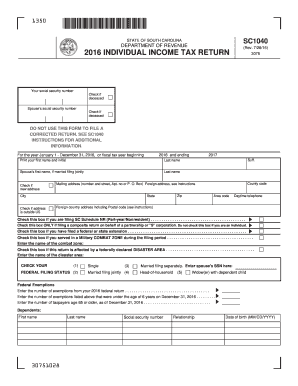
How to fill out the SC DoR SC1040 online

Filling out your SC DoR SC1040 form online can streamline your tax filing process. This guide provides a step-by-step approach to ensure that you complete your individual income tax return accurately and efficiently.

Follow the steps to correctly complete the SC DoR SC1040 form online.

  1. Press the ‘Get Form’ button to access the SC DoR SC1040 and open it in an editor.
  2. Enter your social security number in the designated field. If applicable, check the box indicating if you are deceased.
  3. Fill in your spouse's social security number, if you are filing jointly, and indicate if they are deceased.
  4. Provide your full name, including the first name and initial, followed by your last name. If filing jointly, do the same for your spouse.
  5. Specify your mailing address clearly, including city, state, and zip code. Check the box if you have a new address or if your address is outside the United States.
  6. Indicate your filing status by checking one of the provided options: single, married filing jointly, married filing separately, head of household, or widow(er) with dependent child.
  7. Report the number of federal exemptions as shown on your federal return. Additionally, provide counts for dependents and exemptions under specific age criteria as required.
  8. Detail your income information by entering your federal taxable income. Use additional schedules if necessary for non-resident or other specific situations.
  9. Complete the respective addition and subtraction fields based on your federal taxable income, ensuring all figures are accurate.
  10. Transfer your calculated tax amount and any applicable credits, ensuring to check each corresponding box for specific situations like military service or disaster areas.
  11. Confirm all payment and refund options. Decide how to receive any refund, either through direct deposit or paper check, and provide the necessary banking details if applicable.
  12. Finally, review your form for accuracy, sign where indicated, and prepare to submit your form electronically or print it for mailing.

Complete your SC DoR SC1040 online for a seamless filing experience.

Get form

Experience a faster way to fill out and sign forms on the web. Access the most extensive library of templates available.

Related content

SC1040 - Find A Form - South Carolina
Need forms assistance? Trouble opening a form? Right click on the form link, save the file...
Learn more
ELIGIBLE FOR TUITION TAX CREDIT
Enter on SC1040, line 21 ... For more information on the Tuition Tax Credit, see SC...
Learn more

Related links form

NJ Certified Application Counselor Designated Organization (CDO) Application 2019 MO LLC-4 2017 VA Cattle Assessment Refund Form 2019 VA OCRP-100 2013

Questions & Answers

Get answers to your most pressing questions about US Legal Forms API.

Contact support

You can file the SC1040 form online through various tax preparation software or by mailing it directly to the South Carolina Department of Revenue. If you prefer online filing, platforms like uslegalforms offer tools to guide you through the process. Ensure that you follow the instructions provided for your SC DoR SC1040 submission, especially concerning deadlines.

The purpose of form 8453 is to authenticate and verify the information submitted with your electronic tax return. This declaration confirms that you, as the taxpayer, have provided accurate and honest details on your SC1040 filing. It is a critical component to maintain compliance and transparency with the South Carolina Department of Revenue.

If you do not mail form 8453 when it is required, the South Carolina Department of Revenue may not process your electronic tax return. This omission can lead to delays in refund processing or even complications with your tax acceptance status. To avoid such issues with your SC DoR SC1040 filing, ensure that you submit this form as needed.

TurboTax may request that you mail form 8453 because it needs to verify certain information that's not fully supported in the electronic filing process. This is common when filing with forms that require a signature or additional documentation. By mailing this form along with your SC DoR SC1040, you can complete your filing process more reliably.

The SC1040 form is the official document required for individuals to declare their income to the South Carolina Department of Revenue. This form captures relevant financial information that helps determine your tax liability. You must complete this form accurately to avoid issues with your SC DoR SC1040 submission. Utilizing resources like uslegalforms can help ensure you fill it out correctly.

Yes, you can file your South Carolina taxes online using various tax software options, including those available on platforms like uslegalforms. Filing electronically simplifies the process, speeds up your refunds, and ensures that your SC DoR SC1040 is submitted correctly. Be sure to gather all necessary information before starting the online filing process.

Generally, South Carolina residents who earn a certain income threshold must file a state tax return. This includes individuals, couples, and businesses that earn income above the designated limits. Filing a return is crucial for compliance and allows you to claim any eligible deductions or credits. For guidance on how to fulfill this obligation, the SC DoR SC1040 provides the necessary framework.

The PT-100 is a form used by various businesses in South Carolina to report anticipated tax obligations throughout the year. It plays a critical role in ensuring that businesses comply with state tax laws. By filing the PT-100 correctly, you can avoid penalties and ensure smoother operations. This process is often detailed in conjunction with your SC DoR SC1040 filings.

Certain groups are exempt from SC sales tax, including non-profit organizations and specific government entities. Additionally, some purchases for educational purposes may also qualify for sales tax exemption. Understanding these exemptions can lead to significant savings. To learn more about navigating these exemptions effectively, consider exploring resources that relate to the SC DoR SC1040.

Typically, any business or entity that expects to owe taxes of $100 or more must file the SC PT 100. This requirement applies to partnerships, corporations, and other entities hired to conduct business in South Carolina. Meeting this requirement ensures that you adhere to state tax laws. You'll find more clarity around this process when reviewing the instructions on the SC DoR SC1040.

Get This Form Now!

Use professional pre-built templates to fill in and sign documents online faster. Get access to thousands of forms.
If you believe that this page should be taken down, please follow our DMCA take down processhere.

Industry-leading security and compliance

US Legal Forms protects your data by complying with industry-specific security standards.
  • In businnes since 1997
    25+ years providing professional legal documents.
  • Accredited business
    Guarantees that a business meets BBB accreditation standards in the US and Canada.
  • Secured by Braintree
    Validated Level 1 PCI DSS compliant payment gateway that accepts most major credit and debit card brands from across the globe.
Get SC DoR SC1040
  • Adoption
  • Bankruptcy
  • Contractors
  • Divorce
  • Home Sales
  • Employment
  • Identity Theft
  • Incorporation
  • Landlord Tenant
  • Living Trust
  • Name Change
  • Personal Planning
  • Small Business
  • Wills & Estates
  • Packages A-Z
  • Affidavits
  • Bankruptcy
  • Bill of Sale
  • Corporate - LLC
  • Divorce
  • Employment
  • Identity Theft
  • Internet Technology
  • Landlord Tenant
  • Living Wills
  • Name Change
  • Power of Attorney
  • Real Estate
  • Small Estates
  • Wills
  • All Forms
  • Forms A-Z
  • Form Library
  • Legal Hub
  • About Us
  • Help Portal
  • Legal Resources
  • Blog
  • Affiliates
  • Contact Us
  • Delete My Account
  • Site Map
  • Industries
  • Forms in Spanish
  • Localized Forms
  • State-specific Forms
  • Forms Kit
  • Real Estate Handbook
  • All Guides
  • Notarize
  • Incorporation services
  • For Consumers
  • For Small Business
  • For Attorneys
  • USLegal
  • FormsPass
  • pdfFiller
  • signNow
  • altaFlow
  • DocHub
  • Instapage
Form Packages
  • Adoption
  • Bankruptcy
  • Contractors
  • Divorce
  • Home Sales
  • Employment
  • Identity Theft
  • Incorporation
  • Landlord Tenant
  • Living Trust
  • Name Change
  • Personal Planning
  • Small Business
  • Wills & Estates
  • Packages A-Z
Form Categories
  • Affidavits
  • Bankruptcy
  • Bill of Sale
  • Corporate - LLC
  • Divorce
  • Employment
  • Identity Theft
  • Internet Technology
  • Landlord Tenant
  • Living Wills
  • Name Change
  • Power of Attorney
  • Real Estate
  • Small Estates
  • Wills
  • All Forms
  • Forms A-Z
  • Form Library
Customer Service
  • Legal Hub
  • About Us
  • Help Portal
  • Legal Resources
  • Blog
  • Affiliates
  • Contact Us
  • Delete My Account
  • Site Map
  • Industries
  • Forms in Spanish
  • Localized Forms
  • State-specific Forms
  • Forms Kit
Legal Guides
  • Real Estate Handbook
  • All Guides
Prepared for you
  • Notarize
  • Incorporation services
Our Customers
  • For Consumers
  • For Small Business
  • For Attorneys
Our Sites
  • USLegal
  • FormsPass
  • pdfFiller
  • signNow
  • altaFlow
  • DocHub
  • Instapage
Social Media
Call us now toll free:
+1 833 426 79 33
As seen in:
© Copyright 1999-2026 airSlate Legal Forms, Inc. 3720 Flowood Dr, Flowood, Mississippi 39232
  • Your Privacy Choices
  • Terms of Service
  • Privacy Notice
  • Content Takedown Policy
  • Bug Bounty Program
SC DoR SC1040
This form is available in several versions.
Select the version you need from the drop-down list below.
2022 SC DoR SC1040
Select form
  • 2022 SC DoR SC1040
  • 2021 SC DoR SC1040
  • 2020 SC DoR SC1040
  • 2019 SC DoR SC1040
  • 2018 SC DoR SC1040
  • 2017 SC DoR SC1040
  • 2016 SC DoR SC1040
  • 2015 SC DoR SC1040
  • 2014 SC DoR SC1040
  • 2013 SC DoR SC1040
  • 2012 SC DoR SC1040
  • 2011 SC DoR SC1040
  • 2010 SC DoR SC1040
  • 2008 SC DoR SC1040
  • 2005 SC DoR SC1040
  • 2004 SC DoR SC1040
  • 2002 SC DoR SC1040
Select form