Loading
Form preview
  • US Legal Forms
  • Form Library
  • Tax Forms
  • South Carolina Tax Forms
  • Sc Dor Sc1040 2002

Get Sc Dor Sc1040 2002

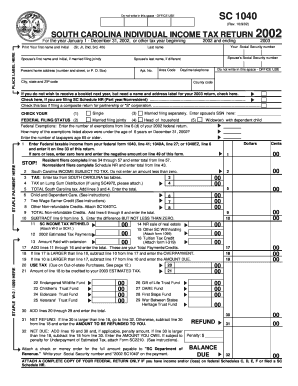
ERE Print Your first name and Initial (Sr, Jr, 2nd, 3rd, 4th) 2002 and ending Spouse's Social Security number Spouse's last name, if different Apt. No. Present home address (number and street, or P. O. Box) 2003 Your Social Security number Last name Spouse's first name and Initial, if married filing jointly 2002 Area Code Do not write in this space - OFFICE USE Daytime telephone City, state and ZIP code County code If you do not wish to receive a booklet next year, but need a n.

How it works

  1. Open form

    Open form follow the instructions

  2. Easily sign form

    Easily sign the form with your finger

  3. Share form

    Send filled & signed form or save

How to fill out the SC DoR SC1040 online

The SC DoR SC1040 is the South Carolina individual income tax return form required for reporting your annual income. This guide will assist you in accurately completing this form online by providing clear instructions for each section and field.

Follow the steps to successfully complete the SC DoR SC1040 online.

  1. Click ‘Get Form’ button to access the SC DoR SC1040 form and open it in your preferred editing tool.
  2. Begin filling out the personal information section. Enter your first name, middle initial, and last name. If applicable, include any suffixes such as Sr., Jr., or III. Next, provide your Social Security number.
  3. If you are married and filing jointly, enter your spouse's first name, middle initial, last name, and Social Security number.
  4. Fill in your current home address, including the apartment number, city, state, and ZIP code.
  5. Select your federal filing status by checking one of the provided options: single, married filing separately, married filing jointly, head of household, or widow(er) with dependent child.
  6. Report your federal taxable income by entering the amount from your federal Form 1040, line 41; Form 1040A, line 27; or Form 1040EZ, line 6.
  7. Complete the income subject to tax section and follow any necessary calculations for credits, payments, and any owed amounts or refunds.
  8. Sign and date the form. If filing jointly, ensure that both partners provide their signatures. If someone else prepared your form, they should also provide their information.
  9. After verifying all entered information, save your changes, and download a copy of the completed form to your device. You may also print and share the form as needed.

Prepare your SC DoR SC1040 form online today for a hassle-free filing experience.

Get form

Experience a faster way to fill out and sign forms on the web. Access the most extensive library of templates available.

Related content

SC1040 - Find A Form - South Carolina
Need forms assistance? Trouble opening a form? Right click on the form link, save the file...
Learn more
ELIGIBLE FOR TUITION TAX CREDIT
Enter on SC1040, line 21 ... For more information on the Tuition Tax Credit, see SC...
Learn more

Related links form

PA PDE 338 A 2019 NJ Understanding Licensing Regulations Forms Packet 2019 TX CSC-001C 2021 NJ E-cigarette/Vaping And Lung Injury Investigation Case Report Form 2019

Questions & Answers

Get answers to your most pressing questions about US Legal Forms API.

Contact support

Indeed, you can file your taxes electronically by yourself using various tax software or services authorized by the SC DoR. These tools simplify the process of preparing and submitting your SC1040. However, if you feel unsure, consider using uslegalforms for assistance and to ensure accuracy in your filing. This way, you can file with confidence.

You can file your SC1040 form through the South Carolina Department of Revenue's website or authorized e-filing services. If you prefer mailing, send your completed SC1040 to the address specified on the form. Using platforms like uslegalforms makes this process seamless, as they guide you on how to file correctly. Always ensure you choose the correct method for your situation.

The deadline to file your taxes in South Carolina is typically April 15th each year, aligning with federal tax deadlines. If this day falls on a weekend or holiday, the due date may shift. It’s critical to submit your SC1040 by this deadline to avoid late fees or interest. Always check with the SC DoR for any updates or changes.

Failing to file your taxes in South Carolina can lead to penalties and interest on any owed amount. The SC Department of Revenue (SC DoR) actively seeks individuals who neglect their tax obligations. Ultimately, not filing can result in tax liens and other legal consequences. It's important to address your SC1040 filing promptly to avoid repercussions.

The SC1040 form is the standard individual income tax return used by residents of South Carolina. This form captures your income, deductions, and credits for accurate tax reporting. Completing the SC1040 correctly is vital for ensuring compliance with state tax laws. To simplify the process, consider using resources like uslegalforms, which can guide you through the necessary steps, making it easier to file your taxes accurately.

To obtain a SC withholding number, you need to register your business with the South Carolina Department of Revenue. You can do this online through their official portal, ensuring you have all necessary business details on hand. Once registered, you'll receive your withholding number, enabling you to fulfill your tax obligations easily. This number is particularly relevant when preparing your SC DoR SC1040.

If you fail to mail form 8453 after filing your return electronically, the IRS may not process your electronic submission as intended. This may lead to delays in receiving your refund or any potential audits. To avoid complications with your tax returns, including the SC DoR SC1040, make sure to send form 8453 as required. It's a small but important step in the tax filing process.

The purpose of form 8453 is to authenticate e-filed federal tax returns. It serves as a signature document, verifying that the information you submitted is correct and allows for a detailed review by the IRS. By filling out this form correctly, you can help facilitate a smooth processing experience and avoid potential issues with your SC DoR SC1040 or other forms. It's important to follow the instructions carefully.

TurboTax may ask you to mail form 8453 if you submitted your tax return electronically but need to send additional documentation. This includes signatures or supporting forms that are required to complete your submission. Mailing form 8453 ensures that your tax return is fully processed by the IRS. It is a crucial step when dealing with tax forms like SC DoR SC1040 to prevent any delays.

Getting a SC tax exemption certificate involves filling out the appropriate application forms provided by the South Carolina Department of Revenue. You will typically need to provide information about your business and the nature of the exemption. Once submitted, the Department will review your request and issue the certificate if approved. This certificate can be vital when filing your taxes, especially if you're preparing the SC DoR SC1040.

Get This Form Now!

Use professional pre-built templates to fill in and sign documents online faster. Get access to thousands of forms.
If you believe that this page should be taken down, please follow our DMCA take down processhere.

Industry-leading security and compliance

US Legal Forms protects your data by complying with industry-specific security standards.
  • In businnes since 1997
    25+ years providing professional legal documents.
  • Accredited business
    Guarantees that a business meets BBB accreditation standards in the US and Canada.
  • Secured by Braintree
    Validated Level 1 PCI DSS compliant payment gateway that accepts most major credit and debit card brands from across the globe.
Get SC DoR SC1040
  • Adoption
  • Bankruptcy
  • Contractors
  • Divorce
  • Home Sales
  • Employment
  • Identity Theft
  • Incorporation
  • Landlord Tenant
  • Living Trust
  • Name Change
  • Personal Planning
  • Small Business
  • Wills & Estates
  • Packages A-Z
  • Affidavits
  • Bankruptcy
  • Bill of Sale
  • Corporate - LLC
  • Divorce
  • Employment
  • Identity Theft
  • Internet Technology
  • Landlord Tenant
  • Living Wills
  • Name Change
  • Power of Attorney
  • Real Estate
  • Small Estates
  • Wills
  • All Forms
  • Forms A-Z
  • Form Library
  • Legal Hub
  • About Us
  • Help Portal
  • Legal Resources
  • Blog
  • Affiliates
  • Contact Us
  • Delete My Account
  • Site Map
  • Industries
  • Forms in Spanish
  • Localized Forms
  • State-specific Forms
  • Forms Kit
  • Real Estate Handbook
  • All Guides
  • Notarize
  • Incorporation services
  • For Consumers
  • For Small Business
  • For Attorneys
  • USLegal
  • FormsPass
  • pdfFiller
  • signNow
  • altaFlow
  • DocHub
  • Instapage
Form Packages
  • Adoption
  • Bankruptcy
  • Contractors
  • Divorce
  • Home Sales
  • Employment
  • Identity Theft
  • Incorporation
  • Landlord Tenant
  • Living Trust
  • Name Change
  • Personal Planning
  • Small Business
  • Wills & Estates
  • Packages A-Z
Form Categories
  • Affidavits
  • Bankruptcy
  • Bill of Sale
  • Corporate - LLC
  • Divorce
  • Employment
  • Identity Theft
  • Internet Technology
  • Landlord Tenant
  • Living Wills
  • Name Change
  • Power of Attorney
  • Real Estate
  • Small Estates
  • Wills
  • All Forms
  • Forms A-Z
  • Form Library
Customer Service
  • Legal Hub
  • About Us
  • Help Portal
  • Legal Resources
  • Blog
  • Affiliates
  • Contact Us
  • Delete My Account
  • Site Map
  • Industries
  • Forms in Spanish
  • Localized Forms
  • State-specific Forms
  • Forms Kit
Legal Guides
  • Real Estate Handbook
  • All Guides
Prepared for you
  • Notarize
  • Incorporation services
Our Customers
  • For Consumers
  • For Small Business
  • For Attorneys
Our Sites
  • USLegal
  • FormsPass
  • pdfFiller
  • signNow
  • altaFlow
  • DocHub
  • Instapage
Social Media
Call us now toll free:
+1 833 426 79 33
As seen in:
© Copyright 1999-2026 airSlate Legal Forms, Inc. 3720 Flowood Dr, Flowood, Mississippi 39232
  • Your Privacy Choices
  • Terms of Service
  • Privacy Notice
  • Content Takedown Policy
  • Bug Bounty Program
SC DoR SC1040
This form is available in several versions.
Select the version you need from the drop-down list below.
2022 SC DoR SC1040
Select form
  • 2022 SC DoR SC1040
  • 2021 SC DoR SC1040
  • 2020 SC DoR SC1040
  • 2019 SC DoR SC1040
  • 2018 SC DoR SC1040
  • 2017 SC DoR SC1040
  • 2016 SC DoR SC1040
  • 2015 SC DoR SC1040
  • 2014 SC DoR SC1040
  • 2013 SC DoR SC1040
  • 2012 SC DoR SC1040
  • 2011 SC DoR SC1040
  • 2010 SC DoR SC1040
  • 2008 SC DoR SC1040
  • 2005 SC DoR SC1040
  • 2004 SC DoR SC1040
  • 2002 SC DoR SC1040
Select form