Loading
Form preview
  • US Legal Forms
  • Other Templates
  • Tax Forms
  • South Carolina Tax Forms
  • Sc Dor Sc1120 2014

Get Sc Dor Sc1120 2014

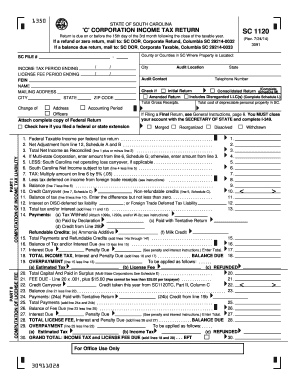
Turn, mail to: SC DOR, Corporate Refund, Columbia SC 29214-0032 If a balance due return, mail to: SC DOR, Corporate Taxable, Columbia SC 29214-0033 SC FILE # / / / 3091 County or Counties in SC Where Property is Located: - INCOME TAX PERIOD ENDING LICENSE FEE PERIOD ENDING FEIN NAME MAILING ADDRESS CITY STATE (Rev. 7/24/14) / City Audit Location Audit Contact State Telephone Number (Complete Check if Initial Return Consolidated Return Schedule M) Includes Disregarded LLC(s) (Compl.

How it works

  1. Open form

    Open form follow the instructions

  2. Easily sign form

    Easily sign the form with your finger

  3. Share form

    Send filled & signed form or save

How to fill out the SC DoR SC1120 online

The SC DoR SC1120 is the income tax return form for corporations in South Carolina. This guide will provide you with a step-by-step approach to completing the form online, ensuring that users of all backgrounds can understand the requirements and submit their return accurately.

Follow the steps to successfully complete the SC DoR SC1120 online

  1. Click ‘Get Form’ button to obtain the form and open it in the editor.
  2. Begin filling out the header section by entering your SC file number, the county where your property is located, and the income tax period ending. Ensure all information is accurate and up-to-date.
  3. Input your Federal Employer Identification Number (FEIN), corporation name, and complete mailing address, including city, state, and ZIP code.
  4. Indicate if this is an initial return, a consolidated return, or an amended return by checking the appropriate boxes. Provide details about disregarded LLCs if applicable.
  5. Move to Part I, where you will compute your income tax liability. Begin by entering the federal taxable income, followed by any necessary adjustments as indicated on the form.
  6. Complete your tax calculations based on the variables provided, ensuring to include any South Carolina net operating loss carryovers if applicable.
  7. Proceed to Part II to compute your license fee, detailing your total capital and paid-in surplus if you’re a multi-state corporation.
  8. Continue with the various schedules as instructed, ensuring you attach the complete copy of your federal return.
  9. Review all entries for accuracy and completeness, particularly signature areas for the principal officer and any preparers.
  10. After confirming all information is correct, you can save your changes, download a copy of the completed form, print it out, or share it as necessary.

Complete your SC DoR SC1120 online today to meet your tax obligations.

Get form

Experience a faster way to fill out and sign forms on the web. Access the most extensive library of templates available.

Related content

SC1120
SC1120 is a South Carolina C Corporation Income Tax Return, due by the 15th day of the...
Learn more
SOUTH CAROLINA TAX INCENTIVES FOR ECONOMIC ...
Jan 9, 2022 — This publication cites many South Carolina code sections, regulations...
Learn more

Related links form

IN Child Care And Development Fund Provider Information Page 2014 OH DNR 5616 2020 ND Form SFN 59122 2018 CT PC-211 2017

Questions & Answers

Get answers to your most pressing questions about US Legal Forms API.

Contact support

You can indeed file 1120-S electronically, which helps streamline the process and ensures quicker processing times. Use an online tax service that supports this capability, such as USLegalForms. It provides valuable tools to ensure you meet all necessary requirements for your SC DoR SC1120 filing.

Yes, Form 1120S can be filed electronically, making it easier to submit your returns on time. Many online tax platforms support the electronic filing of this form, including USLegalForms, which offers resources to simplify the process. Always check for the latest updates to filing guidelines.

No, currently, Form 1120-H cannot be filed electronically. Taxpayers must submit this form via traditional mail. However, you can use USLegalForms to access the latest information and ensure you’re following all guidelines for your tax filings.

You should mail SC1120 to the South Carolina Department of Revenue at the address specified in the form instructions. Make sure to include any required attachments and documentation to avoid delays. If you choose to file electronically, USLegalForms can guide you through the appropriate steps.

Yes, you can file S-corp forms online, including SC DoR SC1120, through various tax software platforms. Ensure that the platform you choose supports electronic filing for S-corp returns. USLegalForms is an excellent resource to help you navigate the filing process efficiently.

Certain tax returns cannot be efiled, including 1040X (Amended returns), 944 (Employer’s Annual Federal Tax Return), and SC DoR SC1120 if there are specific circumstances involved. It is important to check with tax guidelines to know which forms require paper filing. For best results, consider using the USLegalForms platform, which provides detailed instructions and support for various tax filings.

To determine the mailing address the IRS has on file for you, you can check your last tax return, as it typically shows the address reported. Alternatively, you can contact the IRS directly to confirm your address. It's crucial to keep your information updated to avoid issues with correspondence or refunds. For comprehensive support, consider using US Legal Forms to help you through these inquiries.

Your South Carolina tax return should be mailed to the SC Department of Revenue, using the address provided for tax returns on the form instructions. This ensures that your return is processed by the right department without delays. Verify the address for any updates or changes each tax season. For additional help on mailing and forms, US Legal Forms is here to assist you.

You should mail your SC1120S to the South Carolina Department of Revenue, typically at the address specified for business tax returns. This will ensure that your tax return reaches the right department without delays. Please verify the mailing address in the SC1120S instructions to avoid any issues. Utilizing US Legal Forms can simplify this process for you.

To mail your federal form 1120, you must send it to the appropriate IRS address listed in the form instructions. The address varies depending on whether you include a payment. Ensure you review the guidelines on the form, as providing the correct mailing address is essential for timely processing. For further assistance, consider using US Legal Forms, which can help guide you through this process.

Get This Form Now!

Use professional pre-built templates to fill in and sign documents online faster. Get access to thousands of forms.
If you believe that this page should be taken down, please follow our DMCA take down processhere.
Get SC DoR SC1120
  • Adoption
  • Bankruptcy
  • Contractors
  • Divorce
  • Home Sales
  • Employment
  • Identity Theft
  • Incorporation
  • Landlord Tenant
  • Living Trust
  • Name Change
  • Personal Planning
  • Small Business
  • Wills & Estates
  • Packages A-Z
  • Affidavits
  • Bankruptcy
  • Bill of Sale
  • Corporate - LLC
  • Divorce
  • Employment
  • Identity Theft
  • Internet Technology
  • Landlord Tenant
  • Living Wills
  • Name Change
  • Power of Attorney
  • Real Estate
  • Small Estates
  • Wills
  • All Forms
  • Forms A-Z
  • Other Templates
  • Legal Hub
  • About Us
  • Help Portal
  • Legal Resources
  • Blog
  • Affiliates
  • Contact Us
  • Delete My Account
  • Site Map
  • Industries
  • Forms in Spanish
  • Localized Forms
  • State-specific Forms
  • Forms Kit
  • Real Estate Handbook
  • All Guides
  • Notarize
  • Incorporation services
  • For Consumers
  • For Small Business
  • For Attorneys
  • USLegal
  • FormsPass
  • pdfFiller
  • signNow
  • altaFlow
  • DocHub
  • Instapage
Form Packages
  • Adoption
  • Bankruptcy
  • Contractors
  • Divorce
  • Home Sales
  • Employment
  • Identity Theft
  • Incorporation
  • Landlord Tenant
  • Living Trust
  • Name Change
  • Personal Planning
  • Small Business
  • Wills & Estates
  • Packages A-Z
Form Categories
  • Affidavits
  • Bankruptcy
  • Bill of Sale
  • Corporate - LLC
  • Divorce
  • Employment
  • Identity Theft
  • Internet Technology
  • Landlord Tenant
  • Living Wills
  • Name Change
  • Power of Attorney
  • Real Estate
  • Small Estates
  • Wills
  • All Forms
  • Forms A-Z
  • Other Templates
Customer Service
  • Legal Hub
  • About Us
  • Help Portal
  • Legal Resources
  • Blog
  • Affiliates
  • Contact Us
  • Delete My Account
  • Site Map
  • Industries
  • Forms in Spanish
  • Localized Forms
  • State-specific Forms
  • Forms Kit
Legal Guides
  • Real Estate Handbook
  • All Guides
Prepared for you
  • Notarize
  • Incorporation services
Our Customers
  • For Consumers
  • For Small Business
  • For Attorneys
Our Sites
  • USLegal
  • FormsPass
  • pdfFiller
  • signNow
  • altaFlow
  • DocHub
  • Instapage
Social Media
Call us now toll free:
+1 833 426 79 33
As seen in:
© Copyright 1999-2026 airSlate Legal Forms, Inc. 17 Station Street, Suite 303, Brookline, MA 02445
  • Your Privacy Choices
  • Terms of Service
  • Privacy Notice
  • Content Takedown Policy
  • Bug Bounty Program
SC DoR SC1120
This form is available in several versions.
Select the version you need from the drop-down list below.
2020 SC DoR SC1120
Select form
  • 2020 SC DoR SC1120
  • 2019 SC DoR SC1120
  • 2018 SC DoR SC1120
  • 2017 SC DoR SC1120
  • 2016 SC DoR SC1120
  • 2015 SC DoR SC1120
  • 2014 SC DoR SC1120
  • 2013 SC DoR SC1120
  • 2012 SC DoR SC1120
  • 2010 SC DoR SC1120
  • 2008 SC DoR SC1120
  • 2006 SC DoR SC1120
  • 1998 SC DoR SC1120
Select form