Loading
Form preview
  • US Legal Forms
  • Other Templates
  • Tax Forms
  • South Carolina Tax Forms
  • Sc Dor Sc1120s 2016

Get Sc Dor Sc1120s 2016

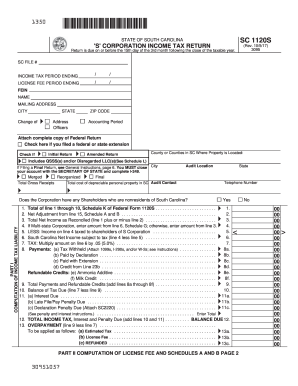
00 00 00 00 00 Page 2 PART II COMPUTATION OF LICENSE FEE SC1120S 14. 15. 16. 17. 18. Total Capital And Paid in Surplus (Multi-State Corporations See Schedule E) . . . . . . . . . . . . . . . . . FEE DUE - Line 14 x .001, plus $15.00 (Fee cannot be less than $25.00) . . . . . . . . . . . . . . . . . . . LESS: Credits taken this year against license fee from SC1120TC, Part II, Column C (attach SC1120-TC) Balance (line 15 less line 16) . . . . . . . . . . . . . . . . . . . . . . . . . . . .

How it works

  1. Open form

    Open form follow the instructions

  2. Easily sign form

    Easily sign the form with your finger

  3. Share form

    Send filled & signed form or save

How to fill out the SC DoR SC1120S online

Filling out the SC DoR SC1120S form is essential for South Carolina corporations filing their income tax returns. This guide provides step-by-step instructions to assist users in completing the form accurately and efficiently online.

Follow the steps to fill out the SC DoR SC1120S form online.

  1. Click the ‘Get Form’ button to obtain the SC DoR SC1120S form and access it in the online editor.
  2. Enter your SC file number and the income tax period ending in the designated fields. Ensure the dates are accurate as they dictate the filing timeframe.
  3. Fill in the licensing fee period. Enter your Federal Employer Identification Number (FEIN), your corporation's name, mailing address, city, state, and ZIP code.
  4. Indicate any changes in address, the filing status as an initial or amended return, and provide information regarding property locations in South Carolina.
  5. Complete Part I: Computation of Income Tax Liability, starting with questions regarding nonresident shareholders. Ensure you correctly enter the total net income as reconciled and apply the appropriate tax rate.
  6. Proceed to Part II: Computation of License Fee. Follow instructions to calculate the total capital and paid-in surplus, entering the fee due.
  7. If applicable, complete the Schedules A and B for additions and deductions from federal taxable income. Ensure correctness before continuing.
  8. Once all sections and schedules are completed, review the entire form for accuracy. Sign where indicated, providing your title, printed name, date, and telephone number.
  9. After reviewing, save your changes and select the option to download or print the form for your records and submission.

Complete your SC DoR SC1120S form online today for a smooth filing process.

Get form

Experience a faster way to fill out and sign forms on the web. Access the most extensive library of templates available.

Related content

SC 1120S
It's quick and easy! Use our free online tax portal, MyDORWAY, at dor.sc.gov/pay. Select...
Learn more
TABLE OF CONTENTS POLICY DOCUMENT SUMMARY 1
Sep 3, 2008 — The income tax withheld must be paid to the SC Department of Revenue when...
Learn more

Related links form

NY Application And Claim For An Apportionment 2017 NY NYSED Data Incident Reporting Form 2019 NY Application And Claim For An Apportionment 2020 MD Application For Operator Examination 2017

Questions & Answers

Get answers to your most pressing questions about US Legal Forms API.

Contact support

Mail your federal form 1120 to the IRS address listed in the instructions for Form 1120. The address depends on whether you are including a payment. Always verify that you are using the correct address to ensure your form is processed without delay.

You can file Form 1120 electronically via the IRS website or by mailing a paper form to the designated address for your location. If you are including the SC DoR SC1120S, make sure to submit both forms as required. Filing on time is crucial to avoid late fees and to maintain good standing.

Mail your SC estimated tax payments to the South Carolina Department of Revenue. Make sure to include the payment voucher with your SC DoR SC1120S if applicable. This ensures that your payment is correctly applied and helps avoid penalties.

You should mail your South Carolina tax return to the address indicated on the form or the SC DoR website. If filing the SC1120S, follow the specific address for business tax returns. Correctly addressing your mail helps ensure that your tax return is processed quickly.

To send tax documents, first, gather all required forms and securely place them in an envelope. Consider using certified mail or a similar service to track your items, especially for sensitive documents like the SC DoR SC1120S. Always double-check the mailing address to ensure your documents arrive safely.

To mail your SC1120S, you should send it to the South Carolina Department of Revenue. Ensure that you use the correct address provided in the SC DoR SC1120S instructions. It is important to check for the specific address as it may vary based on whether you are enclosing a payment or not.

When answering 'Are you exempt from withholding?', consider if you meet the criteria laid out by the IRS. If you had no tax liability last year and expect none this year, you may answer yes. However, it's crucial to ensure that your situation aligns with this exemption to avoid complications later. The SC DoR SC1120S can clarify the exemptions for you.

The number you put for withholding allowance should reflect your personal financial situation, including dependents and tax deductions. Calculate your allowances carefully to avoid over- or under-withholding. Utilizing the SC DoR SC1120S can provide you with helpful information on how to choose the right number.

Filling out your withholding form requires providing your personal details, including your name, address, and Social Security number, along with your chosen number of allowances. It's crucial to accurately complete each section to avoid any discrepancies with your taxes owed or refund amount. Resources like the SC DoR SC1120S can simplify this process for you.

You should consider claiming yourself as an exemption on the W-4 form if you meet specific criteria, such as being the sole earner in your household. This allowance can help manage your withholding to align with your financial situation. Always refer to the SC DoR SC1120S for up-to-date guidelines on exemptions.

Get This Form Now!

Use professional pre-built templates to fill in and sign documents online faster. Get access to thousands of forms.
If you believe that this page should be taken down, please follow our DMCA take down processhere.
Get SC DoR SC1120S
  • Adoption
  • Bankruptcy
  • Contractors
  • Divorce
  • Home Sales
  • Employment
  • Identity Theft
  • Incorporation
  • Landlord Tenant
  • Living Trust
  • Name Change
  • Personal Planning
  • Small Business
  • Wills & Estates
  • Packages A-Z
  • Affidavits
  • Bankruptcy
  • Bill of Sale
  • Corporate - LLC
  • Divorce
  • Employment
  • Identity Theft
  • Internet Technology
  • Landlord Tenant
  • Living Wills
  • Name Change
  • Power of Attorney
  • Real Estate
  • Small Estates
  • Wills
  • All Forms
  • Forms A-Z
  • Other Templates
  • Legal Hub
  • About Us
  • Help Portal
  • Legal Resources
  • Blog
  • Affiliates
  • Contact Us
  • Delete My Account
  • Site Map
  • Industries
  • Forms in Spanish
  • Localized Forms
  • State-specific Forms
  • Forms Kit
  • Real Estate Handbook
  • All Guides
  • Notarize
  • Incorporation services
  • For Consumers
  • For Small Business
  • For Attorneys
  • USLegal
  • FormsPass
  • pdfFiller
  • signNow
  • altaFlow
  • DocHub
  • Instapage
Form Packages
  • Adoption
  • Bankruptcy
  • Contractors
  • Divorce
  • Home Sales
  • Employment
  • Identity Theft
  • Incorporation
  • Landlord Tenant
  • Living Trust
  • Name Change
  • Personal Planning
  • Small Business
  • Wills & Estates
  • Packages A-Z
Form Categories
  • Affidavits
  • Bankruptcy
  • Bill of Sale
  • Corporate - LLC
  • Divorce
  • Employment
  • Identity Theft
  • Internet Technology
  • Landlord Tenant
  • Living Wills
  • Name Change
  • Power of Attorney
  • Real Estate
  • Small Estates
  • Wills
  • All Forms
  • Forms A-Z
  • Other Templates
Customer Service
  • Legal Hub
  • About Us
  • Help Portal
  • Legal Resources
  • Blog
  • Affiliates
  • Contact Us
  • Delete My Account
  • Site Map
  • Industries
  • Forms in Spanish
  • Localized Forms
  • State-specific Forms
  • Forms Kit
Legal Guides
  • Real Estate Handbook
  • All Guides
Prepared for you
  • Notarize
  • Incorporation services
Our Customers
  • For Consumers
  • For Small Business
  • For Attorneys
Our Sites
  • USLegal
  • FormsPass
  • pdfFiller
  • signNow
  • altaFlow
  • DocHub
  • Instapage
Social Media
Call us now toll free:
+1 833 426 79 33
As seen in:
© Copyright 1999-2026 airSlate Legal Forms, Inc. 17 Station Street, Suite 303, Brookline, MA 02445
  • Your Privacy Choices
  • Terms of Service
  • Privacy Notice
  • Content Takedown Policy
  • Bug Bounty Program
SC DoR SC1120S
This form is available in several versions.
Select the version you need from the drop-down list below.
2022 SC DoR SC1120S
Select form
  • 2022 SC DoR SC1120S
  • 2020 SC DoR SC1120S
  • 2019 SC DoR SC1120S
  • 2018 SC DoR SC1120S
  • 2017 SC DoR SC1120S
  • 2016 SC DoR SC1120S
  • 2015 SC DoR SC1120S
  • 2014 SC DoR SC1120S
  • 2010 SC DoR SC1120S
  • 2007 SC DoR SC1120S
  • Sc 1120s Fillable
Select form