Loading
Form preview
  • US Legal Forms
  • Other Templates
  • Tax Forms
  • South Carolina Tax Forms
  • Sc Dor Wh-1605 2002

Get Sc Dor Wh-1605 2002

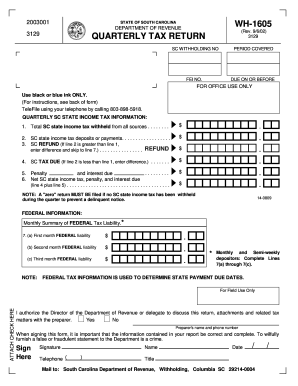
A. Enter the FEDERAL tax liability for the first month of the quarter b. Enter the FEDERAL tax liability for the second month of the quarter c. Enter the FEDERAL tax liability for the third month of the quarter NOTE: FEDERAL TAX INFORMATION IS USED TO DETERMINE STATE PAYMENT DUE DATES. SPECIAL INSTRUCTIONS FOR AMENDED RETURNS: You CANNOT file a WH-1605A (amended return) by TeleFile. Amended returns are only used to correct previously filed returns. An overpayment resulting from an amended retur.

How it works

  1. Open form

    Open form follow the instructions

  2. Easily sign form

    Easily sign the form with your finger

  3. Share form

    Send filled & signed form or save

How to fill out the SC DoR WH-1605 online

Filling out the SC DoR WH-1605 is an essential task for ensuring compliance with South Carolina state tax regulations. This guide will walk you through each section of the form to help you complete it accurately and efficiently.

Follow the steps to complete the form successfully.

  1. Press the ‘Get Form’ button to access the WH-1605 form, which you will fill out online.
  2. In the first section, enter your SC withholding number and the federal employer identification number (FEI No.), ensuring that the information is accurate. Specify the period covered for the quarter.
  3. Complete the quarterly SC state income tax information. Start with line 1 by entering the total amount of SC state income tax withheld from all sources.
  4. On line 2, input the total SC state income tax deposits or payments made during the quarter.
  5. If line 2 exceeds line 1, enter the difference on line 3 as your SC refund amount. If line 1 exceeds line 2, skip to line 4.
  6. If applicable, calculate any SC tax due by entering the difference from line 1 minus line 2 on line 4.
  7. Consider any penalties and interest due on line 5. Then, calculate the net amount due, combining line 4 and line 5, and enter it on line 6.
  8. For federal information, complete lines 7(a) through 7(c) with your monthly federal tax liabilities for the first, second, and third months as needed.
  9. Confirm your entries are correct, sign where indicated, and provide your telephone number. This information is crucial for processing your return.
  10. Finally, ensure all numbers are clearly written without any slashes or commas, use black or blue ink, and follow the instructions regarding attachments. You can then save, download, print, or share your completed form.

Complete your SC DoR WH-1605 online efficiently by following these steps.

Get form

Experience a faster way to fill out and sign forms on the web. Access the most extensive library of templates available.

Related content

Withholding Tax Returns - SC Department of Revenue
You must file WH-1605 even if you withheld no SC Income Tax during the quarter. Do not...
Learn more
Withholding - SC Department of Revenue
WH-1605 is filed for the first three quarters. WH-1606 is filed for the fourth quarter...
Learn more
IBM Monochrome Display and Printer Adapter
The Digital-Output register (DOR) is an output-only register used to control drive motors...
Learn more

Related links form

UT TC-40LI 2020 RI Form RI-2210 2020 PA DoR PA-40 F - Schedule F 2020 PA DoR REV-459B 2020

Questions & Answers

Get answers to your most pressing questions about US Legal Forms API.

Contact support

The SC DoR WH-1605 is a withholding allowance form used by South Carolina taxpayers to determine the appropriate amount of state income tax to withhold from their paycheck. Completing this form accurately helps ensure that you neither underpay nor overpay your taxes throughout the year. This form also plays a critical role in aligning your withholding strategy with your overall tax planning. You can access this form through various resources, including uslegalforms.

On the W4 form, you will indicate 0 or 1 allowances in the space provided in Step 5. Claiming 0 means the highest amount of taxes will be withheld, while claiming 1 offers a lower withholding rate. Make sure to evaluate your financial situation carefully to choose wisely. The SC DoR WH-1605 can guide you on how allowances work in relation to your W4 form.

To fill out a withholding exemption form, start with the SC DoR WH-1605, noting your eligibility for exemptions. You will need to specify your reasons for claiming exemption, such as being a low-income earner or having no tax liability in the previous year. Accurately providing your information can save you from over-withholding. Always review your completed form for accuracy before submitting.

Claiming 1 allowance usually results in higher withholding, while claiming 0 means the maximum tax will be withheld from your paychecks. It’s essential to consider your overall tax situation when making this decision. If you foresee owing taxes at the end of the year, claiming 0 may be beneficial. Refer to the SC DoR WH-1605 form for further insights into allowances.

For withholding allowance, you should assess your income, filing status, and the number of dependents. This information will directly affect how much tax is withheld from your paycheck. It’s important to reflect on your financial situation, as claiming the right number of allowances can help you manage your tax liability effectively. Utilize resources, like the SC DoR WH-1605 guidelines, to make informed decisions.

Filling out a withholding allowance form, like the SC DoR WH-1605, involves providing your personal details and determining the number of allowances to claim. Start by identifying your filing status and your dependents. Next, you will review your anticipated income and potential deductions to decide on the appropriate number of allowances. Always double-check your calculations to ensure accurate withholding.

To locate your state withholding number, check your previous tax documents and payroll records, as it should be listed there. If you cannot find it, visit the SC DoR website where you can search for your information using your tax ID number or contact their help desk for assistance. Keeping this number handy is important for compliance with state withholding requirements.

To find out if you're eligible for a SC rebate check, you can check the SC DoR's official website for updates and eligibility criteria. Look for information related to rebate programs they may currently be offering. Additionally, you can contact the SC DoR directly for clarifications regarding your specific circumstances.

For obtaining a SC withholding number, the best method is to register through the SC DoR's online platform. You will fill out the SC DoR WH-1605 form, ensuring you provide accurate information about your business and employee details. This number is essential for fulfilling your withholding tax obligations and ensuring compliance with state regulations.

To get a SC sales tax ID number, you need to register your business with the SC DoR. This can be done online or via a paper application, and you may need to complete additional forms depending on your business structure. Once registered, you will receive your sales tax ID number, allowing you to collect sales tax for your transactions in South Carolina.

Get This Form Now!

Use professional pre-built templates to fill in and sign documents online faster. Get access to thousands of forms.
If you believe that this page should be taken down, please follow our DMCA take down processhere.
Get SC DoR WH-1605
  • Adoption
  • Bankruptcy
  • Contractors
  • Divorce
  • Home Sales
  • Employment
  • Identity Theft
  • Incorporation
  • Landlord Tenant
  • Living Trust
  • Name Change
  • Personal Planning
  • Small Business
  • Wills & Estates
  • Packages A-Z
  • Affidavits
  • Bankruptcy
  • Bill of Sale
  • Corporate - LLC
  • Divorce
  • Employment
  • Identity Theft
  • Internet Technology
  • Landlord Tenant
  • Living Wills
  • Name Change
  • Power of Attorney
  • Real Estate
  • Small Estates
  • Wills
  • All Forms
  • Forms A-Z
  • Other Templates
  • Legal Hub
  • About Us
  • Help Portal
  • Legal Resources
  • Blog
  • Affiliates
  • Contact Us
  • Delete My Account
  • Site Map
  • Industries
  • Forms in Spanish
  • Localized Forms
  • State-specific Forms
  • Forms Kit
  • Real Estate Handbook
  • All Guides
  • Notarize
  • Incorporation services
  • For Consumers
  • For Small Business
  • For Attorneys
  • USLegal
  • FormsPass
  • pdfFiller
  • signNow
  • altaFlow
  • DocHub
  • Instapage
Form Packages
  • Adoption
  • Bankruptcy
  • Contractors
  • Divorce
  • Home Sales
  • Employment
  • Identity Theft
  • Incorporation
  • Landlord Tenant
  • Living Trust
  • Name Change
  • Personal Planning
  • Small Business
  • Wills & Estates
  • Packages A-Z
Form Categories
  • Affidavits
  • Bankruptcy
  • Bill of Sale
  • Corporate - LLC
  • Divorce
  • Employment
  • Identity Theft
  • Internet Technology
  • Landlord Tenant
  • Living Wills
  • Name Change
  • Power of Attorney
  • Real Estate
  • Small Estates
  • Wills
  • All Forms
  • Forms A-Z
  • Other Templates
Customer Service
  • Legal Hub
  • About Us
  • Help Portal
  • Legal Resources
  • Blog
  • Affiliates
  • Contact Us
  • Delete My Account
  • Site Map
  • Industries
  • Forms in Spanish
  • Localized Forms
  • State-specific Forms
  • Forms Kit
Legal Guides
  • Real Estate Handbook
  • All Guides
Prepared for you
  • Notarize
  • Incorporation services
Our Customers
  • For Consumers
  • For Small Business
  • For Attorneys
Our Sites
  • USLegal
  • FormsPass
  • pdfFiller
  • signNow
  • altaFlow
  • DocHub
  • Instapage
Social Media
Call us now toll free:
+1 833 426 79 33
As seen in:
© Copyright 1999-2026 airSlate Legal Forms, Inc. 17 Station Street, Suite 303, Brookline, MA 02445
  • Your Privacy Choices
  • Terms of Service
  • Privacy Notice
  • Content Takedown Policy
  • Bug Bounty Program
SC DoR WH-1605
This form is available in several versions.
Select the version you need from the drop-down list below.
2022 SC DoR WH-1605
Select form
  • 2022 SC DoR WH-1605
  • 2019 SC DoR WH-1605
  • 2017 SC DoR WH-1605
  • 2016 SC DoR WH-1605
  • 2014 SC DoR WH-1605
  • 2013 SC DoR WH-1605
  • 2010 SC DoR WH-1605
  • 2004 SC DoR WH-1605
  • 2002 SC DoR WH-1605
  • Sc Form 1605
Select form