Loading
Get Sc St-455 2018
How it works
-

Open form follow the instructions
-

Easily sign the form with your finger
-

Send filled & signed form or save
How to fill out the SC ST-455 online
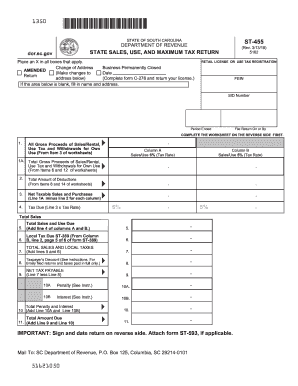
The SC ST-455 form is essential for reporting state sales, use, and maximum tax returns in South Carolina. Filling out this form online can streamline the process, making it easier for users with varying levels of experience to accurately report their tax information.
Follow the steps to fill out the SC ST-455 with ease.
- Press the ‘Get Form’ button to access the SC ST-455 online and open it in your preferred editor.
- Begin by indicating your retail license or use tax registration details, including your Federal Employer Identification Number (FEIN) and State Identification (SID) number.
- Indicate the period ended and the date by which you must file the return.
- Complete the worksheet on the reverse side first, which includes details on gross proceeds of sales, rentals, and any withdrawals for own use.
- Enter gross sales or rentals information in the appropriate columns. Ensure to differentiate between those subject to a 6% tax rate and those at a 5% tax rate.
- Calculate total gross proceeds, entering them in Line 1A and Line 1B for their respective tax rates.
- List total deductions on Line 2 for both columns, calculated from the detailed worksheet.
- Deduct the total deductions from the gross taxable sales to find your net taxable sales for each column.
- Calculate the tax due by multiplying the net taxable sales by the tax rate for each column.
- Sum the amounts from both tax columns to get total sales and use tax due.
- Calculate any applicable local taxes and add them to the total sales and use tax due.
- Enter the taxpayer's discount if eligible, and deduct it from total taxes due to find the net tax payable.
- Include any penalties or interest by following the instructions provided, then add these totals to determine the final amount due.
- Don’t forget to sign and date the return on the back, and attach Form ST-593 if required.
- Finally, save any changes, and you can download, print, or share the filled-out form as needed.
Complete your SC ST-455 online now to ensure timely and accurate filing.
Get form
Experience a faster way to fill out and sign forms on the web. Access the most extensive library of templates available.
To file an amended South Carolina tax return, complete the SC ST-455 form with the necessary details regarding your original tax return. Be sure to highlight any changes in your income or deductions. You should also keep documentation to support your amendments for potential review.
Get This Form Now!
Use professional pre-built templates to fill in and sign documents online faster. Get access to thousands of forms.
Industry-leading security and compliance
US Legal Forms protects your data by complying with industry-specific security standards.
-
In businnes since 199725+ years providing professional legal documents.
-
Accredited businessGuarantees that a business meets BBB accreditation standards in the US and Canada.
-
Secured by BraintreeValidated Level 1 PCI DSS compliant payment gateway that accepts most major credit and debit card brands from across the globe.