Loading
Form preview
  • US Legal Forms
  • Form Library
  • Tax Forms
  • Virginia Tax Forms
  • Va Va-8453 2013

Get Va Va-8453 2013

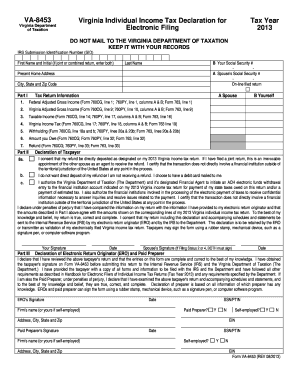
RDS IRS Submission Identification Number (SID) First Name and Initial (if joint or combined return, enter both) B Your Social Security # A Spouse s Social Security # On-line filed return Last Name Present Home Address City, State and Zip Code Part I Tax Return Information A Spouse 1. Federal Adjusted Gross Income (Form 760CG, line 1; 760PY, line 1, columns A & B; Form 763, line 1) 2. Virginia Adjusted Gross Income (Form 760CG, line 9; 760PY, line 10, columns A & B; Form 763, lin.

How it works

  1. Open form

    Open form follow the instructions

  2. Easily sign form

    Easily sign the form with your finger

  3. Share form

    Send filled & signed form or save

How to fill out the VA VA-8453 online

The VA VA-8453 is an important document used to authenticate the electronic filing of your Virginia individual income tax return. This guide provides a clear, step-by-step approach to help you complete the form with ease.

Follow the steps to efficiently complete the VA VA-8453 form online.

  1. Click ‘Get Form’ button to obtain the document and open it in your preferred editor.
  2. Begin by filling in your first name, middle initial (if applicable), and last name. If you are filing a joint return, include both names in this section as required.
  3. Enter your Social Security number and your spouse’s Social Security number if applicable. Ensure the details are accurate to avoid processing delays.
  4. Provide your present home address, including the city, state, and zip code. This information is essential for the tax records.
  5. In Part I, enter your federal adjusted gross income. Refer to the specified line from your Virginia tax return forms (760CG, 760PY, or 763) for the accurate figures.
  6. Fill in the Virginia adjusted gross income, ensuring it matches the corresponding line from your tax return.
  7. Complete the taxable income section by referring to the applicable line on your return, verifying the numbers entered.
  8. Record the Virginia income tax amount next, using the appropriate line from your tax form to ensure accuracy.
  9. Indicate the total withholding amount using the designated lines from your return forms.
  10. If you owe money, enter the amount on the specified line. This should align with the figures from your returns.
  11. Provide the refund amount expected, following the specific line from your corresponding tax return.
  12. In Part II, check the appropriate box to indicate if you consent to direct deposit of your refund or prefer an alternative method. Complete any required banking information for direct deposit.
  13. In the declaration section, confirm that all provided information is accurate and complete. This is a crucial step, as it certifies the correctness of your filing.
  14. Sign and date the form where indicated. If filing jointly, ensure both partners sign and date accordingly.
  15. Once all sections have been completed and verified, save the changes to your document. You can choose to download, print, or share the form as needed.

Start filling out your VA VA-8453 online today to ensure a smooth tax filing process.

Get form

Experience a faster way to fill out and sign forms on the web. Access the most extensive library of templates available.

Related content

Virginia Individual Income Tax Declaration for...
A paid preparer must sign Form VA-8453 in the space for Paid Preparers. EROs and Paid...
Learn more
Competency: Interpersonal and Communication Skills
MED 8453 - Competency: Interpersonal and Communication Skills ... For this longitudinal...
Learn more
Agilent 8453E UV-visible Spectroscopy System
Maximum power consumption is 220 VA. The instrument power supply has wide ranging...
Learn more

Related links form

USCIS I-693 2021 WI Youth Soccer Association Competitive Player Transfer Request Form 2021 DoL LS-210 2020 CT JD-GC-25 2017

Questions & Answers

Get answers to your most pressing questions about US Legal Forms API.

Contact support

To submit VA VA-8453, you should print the completed form after filling it out on your tax software or manually. Next, you can mail it to the appropriate IRS address indicated on the form, ensuring it's sent with any related documents. Double-check your information for accuracy before mailing to streamline IRS processing.

Form 8843 is typically filled out by nonresident aliens who are in the United States for specific purposes, such as students or teachers. If you meet the criteria set by the IRS, it is important to complete VA VA-8453 alongside form 8843 to provide a comprehensive tax submission. This process helps ensure you comply with regulations while filing.

The taxpayer, or an authorized representative, completes VA VA-8453. This ensures the form is filled out accurately and reflects the correct information for the e-filed return. It is crucial for that person to have a clear understanding of the tax data being submitted.

Form 8453 Corp is used by corporations that e-file their federal tax returns to confirm the submission. This form allows corporations to transmit any required supporting documents that are not included in the electronic submission. Utilizing VA VA-8453 Corp helps ensure accurate and complete tax filing for corporate entities.

Taxpayers who e-file a federal tax return and need to include a return that requires signatures or certain documentation need to file VA VA-8453. This form is specifically for individuals and businesses that have documents to attach to their e-filed return. If you fall into this category, it’s essential to include form 8453 with your submission.

To fill out the W4 step by step, start by entering your personal information on the top section. Next, select your filing status, and then follow the instructions to include any dependents and additional withholdings. Once completed, submit the W4 to your employer, ensuring they have your current withholding preferences. Utilizing tools from US Legal Forms can help ensure you don’t miss any crucial details.

Filling out the Virginia VA 4 form requires careful attention. Begin with your personal details, including your name and address. Indicate your filing status and any allowable deductions, similar to the W4. Resources like US Legal Forms can guide you through each section effectively, ensuring accurate completion.

After completing form 8453, you must send it to the IRS if you are filing electronically and need to provide a signature. Keep a copy for your records as well. This form supports your e-filed return, ensuring your information is verified. If you created your form through US Legal Forms, you can easily manage your documents and ensure compliance.

Filling out form W4 involves several simple steps. Start by providing personal information like your name and Social Security number. Next, indicate your filing status and claim any dependents. Always ensure that your withholding aligns with your tax obligations by referring to the IRS's withholding calculator.

Yes, you can fill out a W4 by yourself without needing assistance. The form is designed to be straightforward for employees to complete. Just gather your personal information, dependents, and income details before you start. Using the US Legal Forms platform can simplify this process by providing clear guidelines and examples.

Get This Form Now!

Use professional pre-built templates to fill in and sign documents online faster. Get access to thousands of forms.
If you believe that this page should be taken down, please follow our DMCA take down processhere.

Industry-leading security and compliance

US Legal Forms protects your data by complying with industry-specific security standards.
  • In businnes since 1997
    25+ years providing professional legal documents.
  • Accredited business
    Guarantees that a business meets BBB accreditation standards in the US and Canada.
  • Secured by Braintree
    Validated Level 1 PCI DSS compliant payment gateway that accepts most major credit and debit card brands from across the globe.
Get VA VA-8453
  • Adoption
  • Bankruptcy
  • Contractors
  • Divorce
  • Home Sales
  • Employment
  • Identity Theft
  • Incorporation
  • Landlord Tenant
  • Living Trust
  • Name Change
  • Personal Planning
  • Small Business
  • Wills & Estates
  • Packages A-Z
  • Affidavits
  • Bankruptcy
  • Bill of Sale
  • Corporate - LLC
  • Divorce
  • Employment
  • Identity Theft
  • Internet Technology
  • Landlord Tenant
  • Living Wills
  • Name Change
  • Power of Attorney
  • Real Estate
  • Small Estates
  • Wills
  • All Forms
  • Forms A-Z
  • Form Library
  • Legal Hub
  • About Us
  • Help Portal
  • Legal Resources
  • Blog
  • Affiliates
  • Contact Us
  • Delete My Account
  • Site Map
  • Industries
  • Forms in Spanish
  • Localized Forms
  • State-specific Forms
  • Forms Kit
  • Real Estate Handbook
  • All Guides
  • Notarize
  • Incorporation services
  • For Consumers
  • For Small Business
  • For Attorneys
  • USLegal
  • FormsPass
  • pdfFiller
  • signNow
  • altaFlow
  • DocHub
  • Instapage
Form Packages
  • Adoption
  • Bankruptcy
  • Contractors
  • Divorce
  • Home Sales
  • Employment
  • Identity Theft
  • Incorporation
  • Landlord Tenant
  • Living Trust
  • Name Change
  • Personal Planning
  • Small Business
  • Wills & Estates
  • Packages A-Z
Form Categories
  • Affidavits
  • Bankruptcy
  • Bill of Sale
  • Corporate - LLC
  • Divorce
  • Employment
  • Identity Theft
  • Internet Technology
  • Landlord Tenant
  • Living Wills
  • Name Change
  • Power of Attorney
  • Real Estate
  • Small Estates
  • Wills
  • All Forms
  • Forms A-Z
  • Form Library
Customer Service
  • Legal Hub
  • About Us
  • Help Portal
  • Legal Resources
  • Blog
  • Affiliates
  • Contact Us
  • Delete My Account
  • Site Map
  • Industries
  • Forms in Spanish
  • Localized Forms
  • State-specific Forms
  • Forms Kit
Legal Guides
  • Real Estate Handbook
  • All Guides
Prepared for you
  • Notarize
  • Incorporation services
Our Customers
  • For Consumers
  • For Small Business
  • For Attorneys
Our Sites
  • USLegal
  • FormsPass
  • pdfFiller
  • signNow
  • altaFlow
  • DocHub
  • Instapage
Social Media
Call us now toll free:
+1 833 426 79 33
As seen in:
© Copyright 1999-2026 airSlate Legal Forms, Inc. 3720 Flowood Dr, Flowood, Mississippi 39232
  • Your Privacy Choices
  • Terms of Service
  • Privacy Notice
  • Content Takedown Policy
  • Bug Bounty Program
VA VA-8453
This form is available in several versions.
Select the version you need from the drop-down list below.
2021 VA VA-8453
Select form
  • 2021 VA VA-8453
  • 2020 VA VA-8453
  • 2019 VA VA-8453
  • 2018 VA VA-8453
  • 2017 VA VA-8453
  • 2016 VA VA-8453
  • 2014 VA VA-8453
  • 2013 VA VA-8453
Select form