Loading
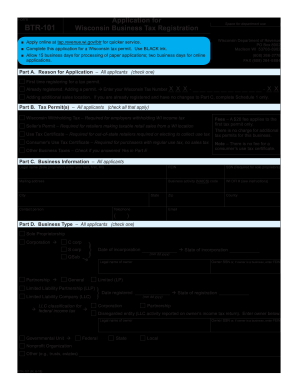
Get Wi Dor Btr-101 2018
How it works
-

Open form follow the instructions
-

Easily sign the form with your finger
-

Send filled & signed form or save
How to fill out the WI DoR BTR-101 online
The WI Department of Revenue BTR-101 form is essential for obtaining a Wisconsin tax permit. This guide will provide a clear, step-by-step process to assist you in completing the form online effortlessly.
Follow the steps to successfully complete your BTR-101 application.
- Click 'Get Form' button to download the BTR-101 application. This will allow you to access the form in your preferred online editor.
- In Part A, indicate your reason for application by checking one of the options: first-time registration, adding a permit, or adding additional sales locations. If adding a permit, enter your existing Wisconsin Tax Number.
- In Part B, check all applicable tax permits you are applying for, such as Wisconsin Withholding Tax, Seller’s Permit, Use Tax Certificate, or Consumer’s Use Tax Certificate.
- Fill out Part C with your business information, including legal name, FEIN or SSN, mailing address, business activity code, and contact details. Remember, a $20 fee applies only to the first tax permit.
- Select your business type in Part D by checking one box, identifying if you are a sole proprietorship, corporation, partnership, LLC, etc. Complete corresponding sections based on your selection.
- In Part E, provide business location information, including trade name, address, and the types of services or sales you will conduct. Be sure to check any applicable items listed.
- For sales and use tax applicants, complete Part F by entering your start date for taxable sales and estimating your monthly sales. Check the months your business will operate if not year-round.
- If applying for withholding tax, provide necessary information in Part G, including your start date for payroll and monthly withholding estimates. Confirm if your business operates all year or select applicable months.
- In Part H, list all business owners, partners, members, or corporate officers, along with their titles, addresses, and other required details.
- Complete Part I by providing details about your financial institution, including the name, address, and bank routing number.
- Finally, review your application for accuracy and completeness. Indicate your declaration, print your name, sign the form, and include the date.
- Once completed, you can save changes, download, print, or share the form as required.
Start filling out your WI DoR BTR-101 form online today for a more efficient tax application process.
Get form
Experience a faster way to fill out and sign forms on the web. Access the most extensive library of templates available.
To obtain a Wisconsin withholding tax number, visit the Wisconsin Department of Revenue's website and complete the registration process. You will need to provide your business information and may also require a Federal Employer Identification Number (FEIN). Once processed, you will receive your withholding tax number. The WI DoR BTR-101 can assist with understanding the steps involved.
Get This Form Now!
Use professional pre-built templates to fill in and sign documents online faster. Get access to thousands of forms.
Industry-leading security and compliance
US Legal Forms protects your data by complying with industry-specific security standards.
-
In businnes since 199725+ years providing professional legal documents.
-
Accredited businessGuarantees that a business meets BBB accreditation standards in the US and Canada.
-
Secured by BraintreeValidated Level 1 PCI DSS compliant payment gateway that accepts most major credit and debit card brands from across the globe.