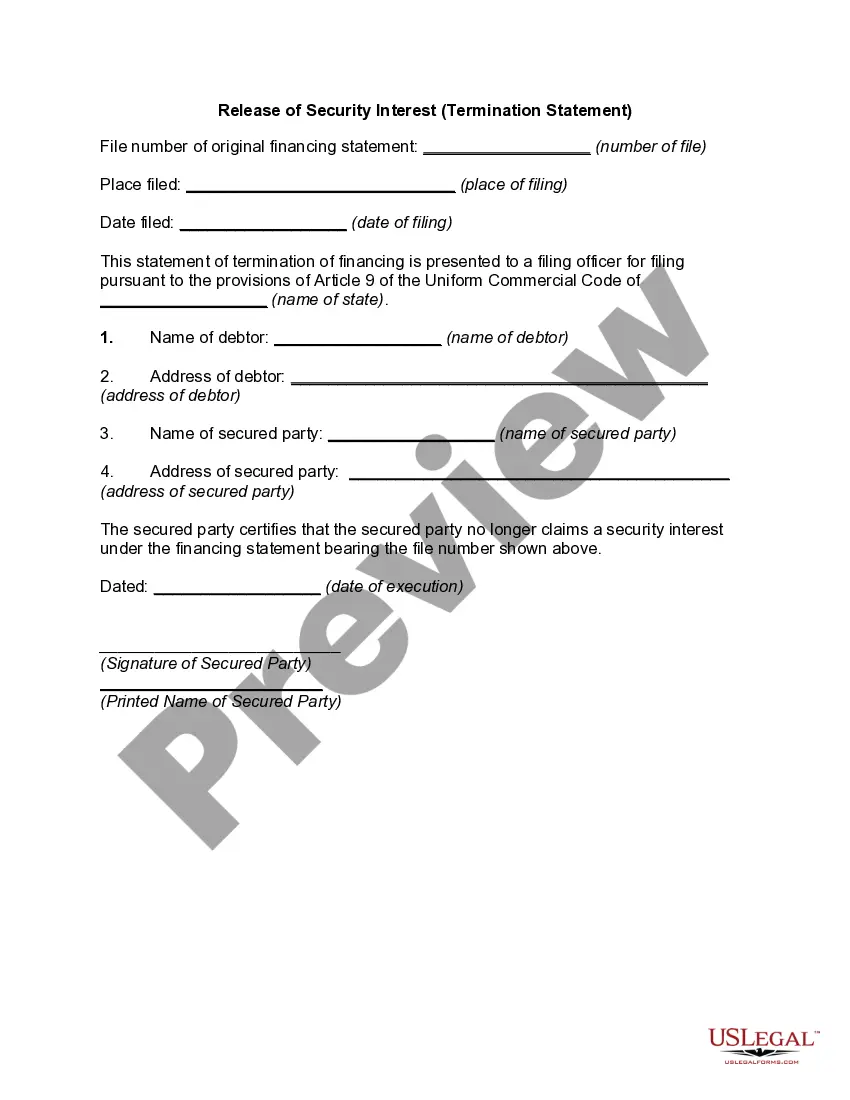
Indiana Release of Security Interest - Termination Statement
Description
Get your form ready online
Our built-in tools help you complete, sign, share, and store your documents in one place.
Make edits, fill in missing information, and update formatting in US Legal Forms—just like you would in MS Word.
Download a copy, print it, send it by email, or mail it via USPS—whatever works best for your next step.
Sign and collect signatures with our SignNow integration. Send to multiple recipients, set reminders, and more. Go Premium to unlock E-Sign.
If this form requires notarization, complete it online through a secure video call—no need to meet a notary in person or wait for an appointment.
We protect your documents and personal data by following strict security and privacy standards.

Make edits, fill in missing information, and update formatting in US Legal Forms—just like you would in MS Word.

Download a copy, print it, send it by email, or mail it via USPS—whatever works best for your next step.

Sign and collect signatures with our SignNow integration. Send to multiple recipients, set reminders, and more. Go Premium to unlock E-Sign.

If this form requires notarization, complete it online through a secure video call—no need to meet a notary in person or wait for an appointment.

We protect your documents and personal data by following strict security and privacy standards.
Looking for another form?

How to fill out Release Of Security Interest - Termination Statement?
It is possible to spend time on the Internet looking for the authorized papers design that suits the state and federal requirements you need. US Legal Forms provides a large number of authorized forms which can be reviewed by experts. It is simple to down load or print out the Indiana Release of Security Interest - Termination Statement from your assistance.
If you have a US Legal Forms bank account, you are able to log in and click on the Acquire key. Afterward, you are able to total, revise, print out, or indicator the Indiana Release of Security Interest - Termination Statement. Each authorized papers design you buy is your own eternally. To obtain another version of the obtained kind, go to the My Forms tab and click on the related key.
Should you use the US Legal Forms internet site the first time, stick to the straightforward recommendations under:
- Initial, make certain you have chosen the best papers design for your area/city of your choice. Look at the kind description to ensure you have selected the right kind. If available, take advantage of the Review key to appear throughout the papers design at the same time.
- If you would like find another variation in the kind, take advantage of the Research industry to obtain the design that suits you and requirements.
- When you have located the design you would like, just click Buy now to move forward.
- Pick the rates program you would like, type in your credentials, and register for a merchant account on US Legal Forms.
- Complete the financial transaction. You may use your charge card or PayPal bank account to cover the authorized kind.
- Pick the formatting in the papers and down load it in your gadget.
- Make modifications in your papers if necessary. It is possible to total, revise and indicator and print out Indiana Release of Security Interest - Termination Statement.
Acquire and print out a large number of papers layouts using the US Legal Forms website, which offers the greatest selection of authorized forms. Use expert and state-certain layouts to take on your organization or individual demands.
Form popularity
FAQ
3 termination statement (a ?Termination?) is a required filing that terminates a security interest that has been perfected by a UCC1 filing. 1. A Termination for personal property is accomplished by completing and filing form UCC3 with the Secretary of State's office in the appropriate state.
UCC Financing Statement Amendment (Form UCC3) Uniform Commercial Code Financing Statement Amendment is for used for the termination, continuation, and/or transfer changes to Financing Statement.
When you pay off a loan, a good rule of thumb is to immediately submit a request with the lender to file a UCC-3 form with your secretary of state. The UCC-3 will terminate the lien on your company's asset (or assets) and remove the UCC-1 filing.
What authorization is required to file a financing statement? A secured party must be authorized to file a financing statement against the assets of the debtor. If the debtor is bound by a security agreement, authorization to file a financing statement is implied.
3 is used as a way to amend that original lien filing and do things like terminate the UCC, edit any of the details of the lien, or assign your interests to another secured party for the lien.
However, it is important to note that for a UCC1 filing a termination is only an amendment and that the UCC1 filing may be amended further, even after a termination has been filed. Box 3 ? Continuation ? A UCC1 filing is good for five years.
The place to file a UCC document is listed in I.C. 26-1-9.1-501. If you are unsure of the appropriate place to file, you should seek legal counsel. To record a new UCC with our office, fill out and submit the UCC Financing Statement form.