Wyoming Owner's Information Sheet - Horse Equine Forms
Overview of this form
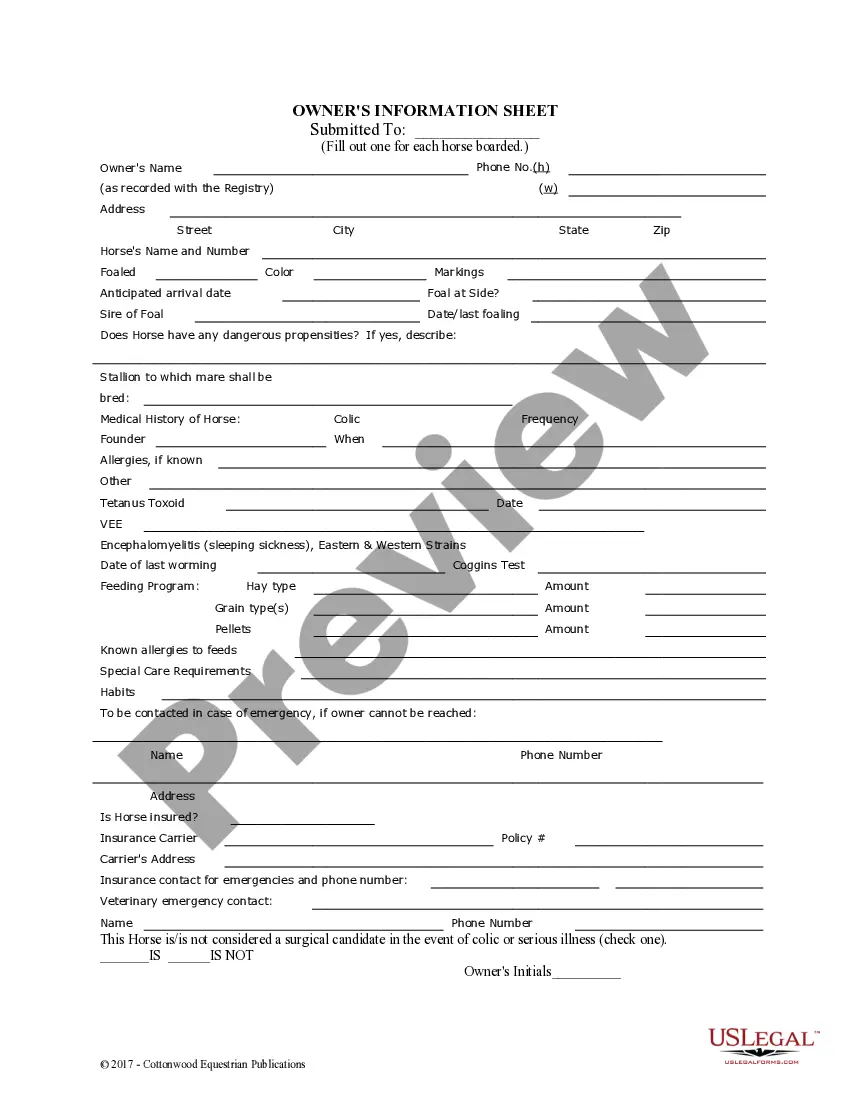
The Owner's Information Sheet for Horses is a vital document used by horse owners to provide essential details about each horse that is boarded. This form captures critical information, differentiating it from other equine documents by focusing specifically on horse care and owner responsibilities during boarding or service arrangements.
What’s included in this form
- Owner's contact information including name and phone numbers.
- Detailed horse information such as name, foaling date, and color.
- Emergency contact details for veterinary or other emergencies.
- Medical history of the horse including allergies and previous health issues.
- Feeding program details specific to the horse's dietary needs.
- Insurance information for the horse, if applicable.
When to use this form
This form should be used when you are boarding a horse or utilizing equine services. It is essential for ensuring that all pertinent information, including medical history and feeding requirements, is easily accessible to caregivers and veterinary professionals. Completing this form helps facilitate a safe and efficient boarding experience for both the horse and the owner.
Who this form is for
This form is suitable for:
- Horse owners looking to board their horses.
- Stable managers or boarding facilities requiring detailed horse information.
- Veterinarians needing medical history for treatment decisions.
- Equestrian service providers who need specific care instructions.
Completing this form step by step
- Fill in the owner's name and contact information accurately.
- Provide detailed information for each horse, including name, age, color, and any markings.
- Document any medical history, including allergies and past health issues.
- List the feeding program with types and amounts of food the horse typically receives.
- Include emergency contact names and numbers, as well as insurance details if the horse is insured.
Notarization requirements for this form
This form does not typically require notarization unless specified by local law. Ensure to check any state-specific regulations that may mandate such verification for boarding agreements.
Get your form ready online
Our built-in tools help you complete, sign, share, and store your documents in one place.
Make edits, fill in missing information, and update formatting in US Legal Forms—just like you would in MS Word.
Download a copy, print it, send it by email, or mail it via USPS—whatever works best for your next step.
Sign and collect signatures with our SignNow integration. Send to multiple recipients, set reminders, and more. Go Premium to unlock E-Sign.
If this form requires notarization, complete it online through a secure video call—no need to meet a notary in person or wait for an appointment.
We protect your documents and personal data by following strict security and privacy standards.

Make edits, fill in missing information, and update formatting in US Legal Forms—just like you would in MS Word.

Download a copy, print it, send it by email, or mail it via USPS—whatever works best for your next step.

Sign and collect signatures with our SignNow integration. Send to multiple recipients, set reminders, and more. Go Premium to unlock E-Sign.

If this form requires notarization, complete it online through a secure video call—no need to meet a notary in person or wait for an appointment.

We protect your documents and personal data by following strict security and privacy standards.
Common mistakes
- Failing to provide complete medical history, which may affect the horse's care.
- Incorrectly noting the horse's feeding requirements.
- Not updating contact information when changes occur.
- Neglecting to inform about any known allergies.
Advantages of online completion
- Easy access to download and fill out form conveniently from anywhere.
- Editable fields allow for quick updates and modifications as needed.
- Reliable templates drafted by licensed attorneys ensure legal soundness.
- Streamlined process saves time and reduces paperwork errors.
Legal use & context
- This form serves as a legal document that outlines the responsibilities of the horse owner and the boarding facility.
- Completing this form can provide essential legal protection in disputes regarding care or responsibilities.
Summary of main points
- The Owner's Information Sheet is essential for horse boarding and care.
- The form should be filled out completely for each horse to ensure proper management.
- Accurate information contributes to the well-being and safety of the horse.